
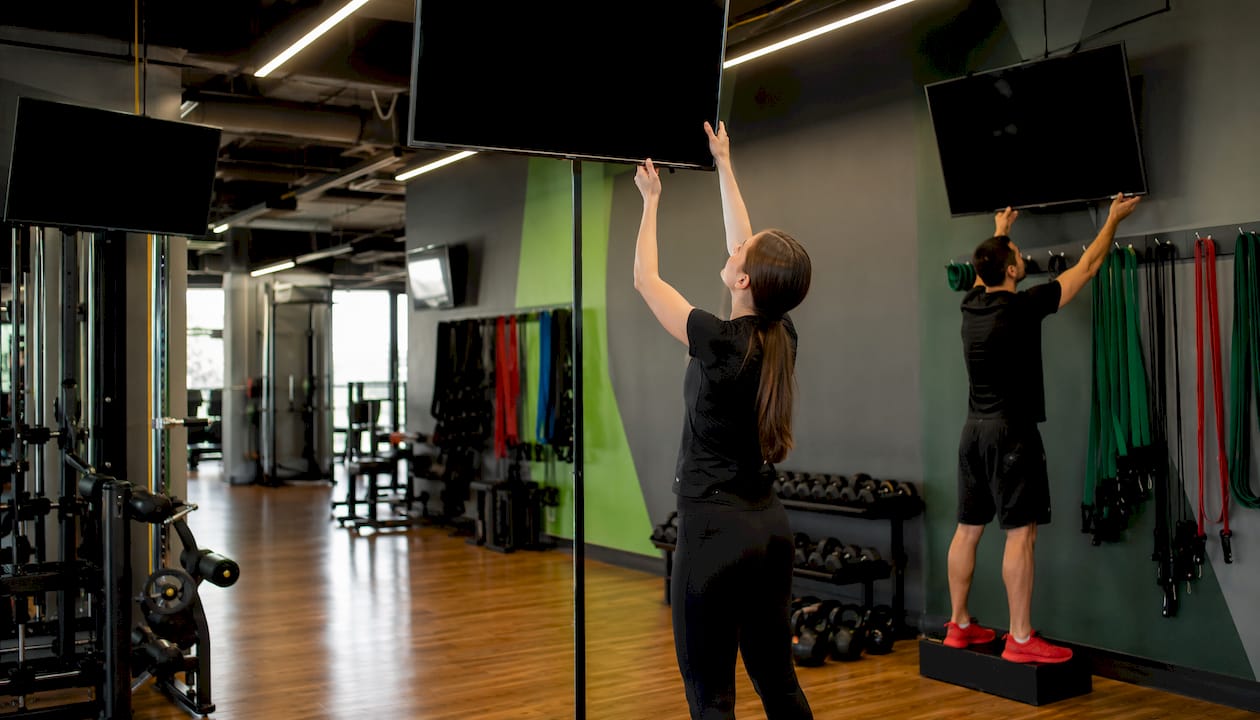
Gym networks support multiple displays by pairing a cloud-based content management system (CMS) with edge-capable media players, a zone map that defines what each screen shows, and a network designed to keep everything synchronized. The CMS pushes content from one dashboard; the players execute it locally; the zone map tells each screen what role it plays.
Every functional gym display network rests on five components:
- CMS: Centralized publishing, scheduling, and role-based permissions
- Media players or SoC TVs: Local execution and content caching at each screen
- Commercial displays: Sized and brightness-rated for the zone
- Audio distribution: Zone amplifiers or networked audio tied to visual cues
- VLAN and QoS: Dedicated network segment that isolates and prioritizes media traffic
The three performance metrics worth tracking from day one: sync latency between screens, remote-restart success rate, and overall player uptime. If any of those slips, members notice before your staff does.
Pro Tip: Set up a simple dashboard alert for player heartbeat failures before your first live day. Catching a dead player remotely beats a member pointing at a blank screen.
Table of Contents
- How do gym networks handle multiple displays at the architecture level?
- How to map zones and plan screen placement for your gym
- What hardware and software does a gym display system actually need?
- What network setup do gym displays actually require?
- How do you keep gym display content fresh and automated?
- How do you monitor and recover gym displays remotely?
- What does a gym display rollout actually cost and how long does it take?
- Pre-launch checklist: what to test before screens go live
- What does audio and visual sync look like across three gym zones?
- Key Takeaways
- Why unified control is the right call for multi-location gyms
- Kingdomsignage: unified gym display control, ready to pilot
- Useful sources
How do gym networks handle multiple displays at the architecture level?
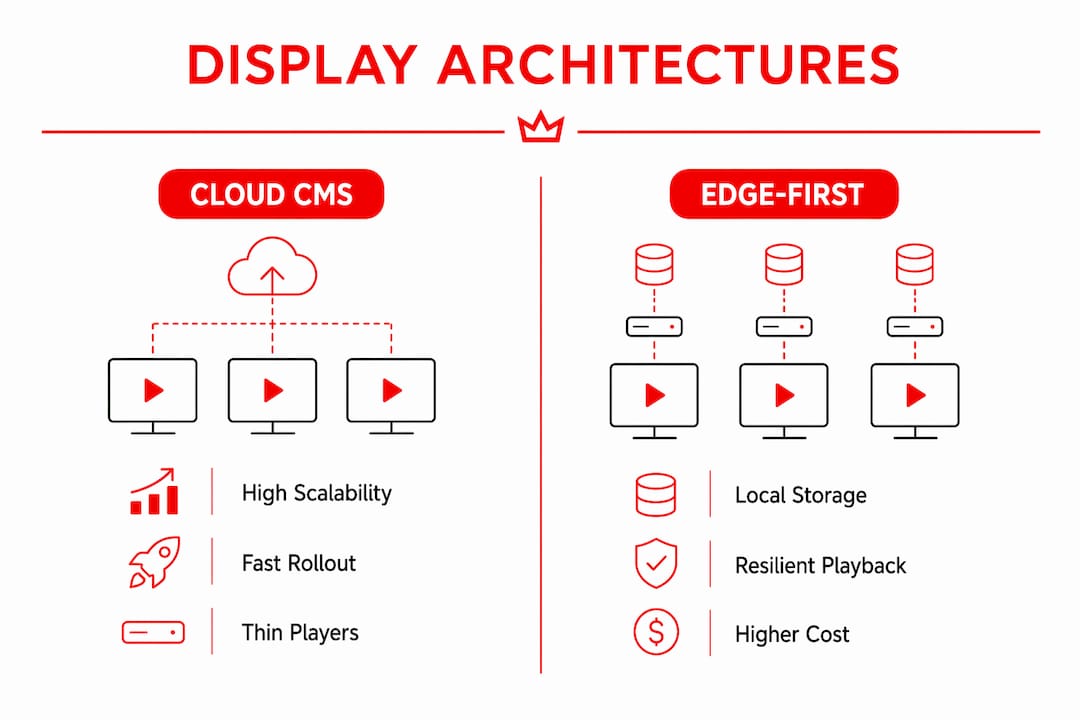
Two architectures dominate gym deployments, and choosing the wrong one for your footprint creates headaches that compound as you scale.
Centralized cloud CMS with lightweight players is the standard for multi-location operators. One administrator publishes a campaign once and it reaches every club, avoiding the USB-stick workflow that causes content drift across locations. Players are thin clients: they pull content from the cloud, cache it locally, and render it without depending on a constant high-bandwidth pipe. This model scales well because adding a new location means provisioning a player and assigning it to the right playlist group, not reconfiguring a server.
Edge-first or local-player architecture keeps a more capable device on-site, often a small-form PC, that stores the full content library locally. Latency to the display is near zero, which matters for real-time class timers and audio-visual sync in group studios. The trade-off is management overhead: firmware updates, local storage limits, and on-site troubleshooting all require more attention.
| Factor | Cloud CMS + Thin Players | Edge-First / Local Players |
|---|---|---|
| Scalability | High — add locations without on-site servers | Moderate — each site needs capable hardware |
| Offline resilience | Good with local caching | Excellent — full library stored locally |
| Sync latency | Low (under 100 ms typical) | Very low (under 100 ms) |
| Management overhead | Low — remote updates | Higher — firmware and storage per site |
| Best fit | Multi-location chains | Single studio, high-performance sync needs |
For most U.S. gym chains with reliable broadband, the cloud CMS model wins on total cost and rollout speed. A boutique studio running tight interval classes may prefer edge-first for the latency advantage.
Pro Tip: Whatever architecture you choose, standardize on one player model across all locations. Mixed hardware means mixed recovery behavior, and that inconsistency shows up at the worst moments.
How to map zones and plan screen placement for your gym
Zone-first planning ensures the physical install supports the fitness formats you actually run, not a generic layout someone copied from a trade show floor. Do this before purchasing a single mount.
The core zones to plan for:
- Entry and check-in: Membership offers, class schedules, and welcome messaging
- Front desk: Staff-facing operational data, waitlist status
- Cardio deck: Entertainment feeds, class timer mirrors, motivational content
- Free-weights area: Exercise demos, rep counters, interval timers
- Group studios: Central timer, instructor-controlled workout display, zone displays per station
- Locker-area touchpoints: Upcoming class reminders, promotional content
Match the zone role to the training format. Circuit stations need individual station screens showing the exercise and rep count. Bootcamp rooms need one large central timer visible from every corner. Cardio rows benefit from mirrored zone displays so members on any treadmill see the same content. A gym screen layout workflow that documents sightlines and mounting heights before install prevents expensive rework.
Pro Tip: Pilot your highest-traffic zone first, typically the cardio deck or main studio, and run it for two weeks before installing anywhere else. You will catch template clarity issues and sightline problems that no floor plan reveals.
What hardware and software does a gym display system actually need?
Commercial-grade displays paired with reliable media players handle the majority of gym use cases. The intelligence lives in the software; over-specifying hardware is one of the most common mistakes operators make.
Display selection: Commercial panels rated for 16–18 hours of daily operation are the baseline. Consumer TVs lack the brightness, duty-cycle rating, and remote management APIs that a gym environment demands. SoC (smart TV) displays with a built-in player app are acceptable for lower-traffic zones; dedicated media players are worth the extra cost in studios where recovery behavior after a power cut matters.
Media player options:
- HDMI stick players: Low cost, limited recovery behavior, acceptable for lobby content
- Small-form PCs: Best for edge-first setups, full local caching, reliable watchdog restart
- SoC apps on commercial displays: Reduces cable runs, works well with cloud CMS platforms
Audio distribution: Zone amplifiers handle most gym environments. For facilities running synchronized audio across multiple rooms, Dante or AES67 networked audio keeps timing tight. Simpler line-level distribution works fine when audio zones don't need frame-accurate sync with video cues.
CMS feature checklist:
| Feature | Why It Matters |
|---|---|
| Template library | Consistent brand across locations without per-site design work |
| Scheduling and overrides | Automate content changes; handle exceptions without manual edits |
| Live-data integrations | Pull class schedules and timers in real time |
| Role-based permissions | Corporate controls brand; local managers control local content |
| Remote restart | Recover a frozen player without dispatching staff |
Pro Tip: Prioritize vendor support and long-term firmware commitment over panel specs. A player that gets security updates for five years beats a flashier device abandoned after eighteen months.
What network setup do gym displays actually require?
Segment your displays and media players onto a dedicated VLAN. Guest Wi-Fi, member app traffic, and point-of-sale systems should never share bandwidth with your media network. This single step eliminates the majority of sync and buffering complaints.
Bandwidth and QoS guidance:
| Stream Type | Estimated Bandwidth per Display | Notes |
|---|---|---|
| Standard-definition video loop | 4–8 Mbps | Cache locally to reduce live pull |
| 4K video loop | — | Pre-download during off-peak hours |
| Live schedule feed | Under 1 Mbps | API polling, minimal overhead |
| Audio stream | — | Depends on codec and quality |
Apply QoS rules that prioritize real-time media traffic over general browsing. For live timer and class-sync scenarios, target under 100 ms end-to-end latency. Use multicast distribution when pushing the same stream to many displays simultaneously; switch to unicast for individually managed content zones.
Local caching ensures players continue rendering sessions if internet connectivity drops. Schedule large asset downloads during overnight hours to keep daytime bandwidth clean.
Pro Tip: Put a UPS on every media player in a group studio. A power blip that kills a class timer mid-session is the kind of thing members remember and instructors complain about for weeks.
How do you keep gym display content fresh and automated?
Stale content is the silent killer of gym signage programs. The fix is treating displays as dynamic communication tools with three content layers running simultaneously.
- Brand layer: Corporate-controlled templates, promotional campaigns, and brand standards pushed from the central CMS
- Location layer: Local promos, staff spotlights, and club-specific announcements managed by local staff within scoped permissions
- Session layer: Live class timers, interval structures, and real-time waitlist data pulled from integrations
Fitness CMS platforms commonly integrate with scheduling systems like Mindbody, Zenoti, Glofox, and ClassPass to pull live class schedules into displays. That API connection means the schedule on your lobby screen reflects actual bookings, not a manually updated slide someone forgot to change.
Workout display platforms let one coach control several screens simultaneously, showing timers, exercise videos, and interval structures without touching each display individually. That directly reduces instructor burden: the screen becomes the authoritative source for workout instructions, so coaches lead the class instead of managing tech.
For content scheduling best practices that prevent signage rot, build a content calendar with scheduled overrides for seasonal promotions and set expiration dates on every time-sensitive asset.
Pro Tip: Set every promotional asset with an expiration date at creation. An expired offer still running on lobby screens costs you credibility with members who try to redeem it.
How do you monitor and recover gym displays remotely?
Essential signals to track for every player in your network:
- Player heartbeat: Confirms the device is online and responsive
- Remote-restart success rate: Tracks whether watchdog commands execute correctly
- Content rendering errors: Flags template or asset failures before they become visible
- Sync latency: Monitors drift between displays in the same zone
Set alerting so corporate operations gets notified for any player offline more than five minutes, and local managers get a daily health summary. That split keeps noise low at the club level while giving corporate visibility across the portfolio.
Failover sequence when a player goes dark:
- Automated watchdog triggers a remote restart
- If restart fails, local cache continues playback on the display
- Alert fires to the operations team with player ID and location
- Remote firmware check and manual restart attempted via CMS
- On-site dispatch only if remote recovery fails after two attempts
Run a scheduled monthly test: take one player offline intentionally, confirm the watchdog fires, confirm local cache holds, and confirm the alert reaches the right inbox. That drill catches configuration drift before a real failure does.
Pro Tip: Document your triage flow in a one-page reference card posted in each equipment closet. When a local manager is troubleshooting at 6 AM before a class, they need steps, not a support ticket.
What does a gym display rollout actually cost and how long does it take?
Phased timeline:
- Weeks 1–2: Site survey, zone mapping, network assessment, hardware procurement
- Weeks 3–6: Pilot installation at one location, template build, integration testing
- Week 7–8: Pilot review, template refinement, staff training
- Waves 2+: Clone templates, provision players, install in batches of 3–5 locations
Ballpark cost ranges:
These ranges cover commercial displays, mounts, players, cabling, and labor. Music licensing and premium CMS features add to the SaaS line. ROI justification typically points to eliminated print costs, improved class attendance from better schedule visibility, and reduced staff time spent on manual content updates. A gym signage upgrade checklist can help you build the business case before presenting to ownership.
Pre-launch checklist: what to test before screens go live
Before flipping any screen live, run through this sequence:
- Zone sightline verification: Stand at every member position in the zone and confirm the display is readable at the intended viewing distance
- Content template test: Push a test playlist to every player and confirm templates render correctly on each display size and orientation
- Schedule API end-to-end test: Trigger a class schedule update in your gym management system and confirm it appears on the lobby display within your target latency
- Audio-video sync test: Start a class timer in the studio and confirm cardio-deck mirrors update within your sync budget
- UPS and power-fail recovery test: Cut power to one player, restore it, and confirm the watchdog restarts and content resumes without manual intervention
Corporate signs off on template standards, brand compliance, and integration accuracy. Local managers sign off on sightlines, audio levels, and staff familiarity with the override controls. Hand local managers a one-page quick-reference for the three most common tasks: updating a local promo, restarting a player, and escalating a fault.
Pro Tip: Run the full checklist at the pilot location with your integrator present. Every item you catch there is one you won't have to fix remotely across ten locations later.
What does audio and visual sync look like across three gym zones?
A realistic three-zone topology: central CMS, one media player per room, a zone amplifier per room tied to the player's audio output, and all devices on a dedicated VLAN segmented from member Wi-Fi.
Topology at a glance:
- Lobby: Player A pulls class schedule from Mindbody API, displays upcoming classes and membership promotions on a 65" commercial display
- Group studio: Player B runs the workout display platform; instructor triggers a 45-second EMOM timer from a mobile controller; the display shows the timer, exercise demo video, and interval structure
- Cardio deck: Player C mirrors the studio timer on four 43" displays mounted above the treadmill row; members see the same countdown without leaving their machine
When the instructor starts the timer in the studio, the CMS sends a sync command to the cardio-deck player. Both players pre-load the timer asset during the class setup period, so the sync command triggers playback of an already-cached file rather than a live stream. That pre-load strategy keeps drift under 100 ms even on a congested network.
When sessions switch quickly between formats, the biggest risk is a blank screen during the asset handoff. Pre-loading the next session's assets 60 seconds before the transition and keeping a 5-second buffer loop as a fallback eliminates that gap entirely.
Pro Tip: For multi-room audio and visual sync, pre-load assets for the next session while the current one is still running. The handoff becomes invisible to members.
Key Takeaways
A cloud CMS paired with edge-capable players, a zone map, and a dedicated VLAN is the architecture that makes gym multi-display networks reliable, scalable, and manageable from a single dashboard.
| Point | Details |
|---|---|
| Architecture choice matters early | Cloud CMS fits multi-location chains; edge-first suits single studios needing sub-50ms sync. |
| Zone mapping before hardware | Plan screen roles by fitness format before purchasing mounts or players to avoid rework. |
| Network segmentation is non-negotiable | A dedicated VLAN with QoS rules prevents buffering and sync failures during peak hours. |
| Monitor three metrics post-launch | Track player heartbeat, remote-restart success rate, and sync latency from day one. |
| Kingdomsignage for unified control | Kingdomsignage unifies class schedules, timers, room music, and signage in one dashboard, reducing instructor burden and signage rot across locations. |
Why unified control is the right call for multi-location gyms
The operators who struggle most with multi-display networks are not the ones who chose the wrong hardware. They are the ones who stitched together three separate tools: one for signage, one for music, one for class timers. Each tool works fine in isolation. Together, they create a coordination problem that lands on the instructor every single class.
A unified platform changes that dynamic. When the class timer, the music zone, and the lobby schedule all live in one dashboard, the instructor's job is to teach. The screen handles the rest. That is not a convenience feature; it is the difference between a system your staff actually uses and one they work around.
The pilot-first approach matters here too. Locking in templates and zone maps at one location before rolling out to ten means corporate can push brand updates confidently, knowing the structure underneath is consistent. Local managers get scoped permissions to handle their own promos without touching anything they shouldn't. That division of control is what keeps brand standards intact at scale.
Kingdomsignage: unified gym display control, ready to pilot
Kingdomsignage gives U.S. gym operators one dashboard for everything that touches a screen or a speaker: class schedules pulled live from your gym management system, interval timers your instructors control from their phone, room-based music that transitions with the class, and promotional signage that updates without anyone touching a USB drive.

The platform is built for the pilot-first rollout model. Start with one location, lock in your zone templates and integrations, then clone the setup across your portfolio. Onboarding support is included, and the team is U.S.-based. Most operators are running live content within two weeks of their first install.
Book a demo at Kingdomsignage to see multi-room sync, schedule integrations, and the instructor control interface in a live walkthrough. If you want to map your zones before the call, the gym digital signage setup guide is a practical starting point.
Useful sources
- Gym Digital Signage: A Multi-Location Scaling Playbook — truDigital: Covers centralized CMS publishing, pilot strategy, and hardware standardization for multi-location fitness brands.
- Gym Digital Signage for Multi-Location Fitness Brands — truDigital: Details pilot-to-wave rollout sequencing, template cloning, and commercial display selection guidance.
- Workout Display Software for Multi-Screen Rooms — Vxchnge: Explains workout display features including interval timers, multi-screen orchestration, and local session caching.
- Gym Digital Signage for Fitness Chains — CrownTV: Covers zone-first planning methodology and scheduling platform integrations (Mindbody, Zenoti, Glofox, ClassPass).
- KingdomSignage — Gym Control + Digital Signage: Product detail on multi-room sync, class schedule integrations, room-based music, and demo availability.