
Secure gym digital signage with a defense-in-depth approach that layers protection across devices, networks, software, content, and daily operations. No single control stops every threat, but the combination closes the gaps attackers actually use.
Start with three actions this week:
- Isolate every screen on its own VLAN or subnet, separate from member Wi-Fi and back-office systems.
- Kill default passwords and turn on MFA for every CMS account with publishing access.
- Lock down your content approval workflow so nothing reaches a screen without a named reviewer.
These three matter because they block the highest-impact failure modes: a hijacked screen broadcasting something offensive to a room full of members, an intruder pivoting from a signage player into your point-of-sale or member database, and an employee accidentally pushing the wrong file to fifteen screens at once.
Key Takeaways
Securing gym digital signage requires layering network isolation, device hardening, CMS access controls, and a documented content-approval workflow, since no single control stops every threat.
| Point | Details |
|---|---|
| Isolate the network first | Put signage on its own VLAN before adding any other control, since network access is the highest-impact gap. |
| Fix credentials immediately | Replace default passwords and enforce MFA on every CMS account this week, not next quarter. |
| Govern content, not just devices | Require a named reviewer for every upload, especially safety messaging and after-hours changes. |
| Log everything, review monthly | Track CMS logins, playlist changes, and firmware versions, and audit them on a fixed schedule. |
| Centralize with the right platform | Kingdom Signage maps role-based access, kiosk mode, and centralized updates directly onto these security layers across multiple gym locations. |
Table of Contents
- Why Digital Signage Security Matters in Fitness Centers
- Defense-in-Depth: Five Layers That Protect Gym Signage
- Implementation Checklist: This Week, This Month, This Quarter
- Technical Settings to Apply on Players, CMS, and Networks
- Content Approval and Governance for Gym Screens
- Monitoring, Detection, and Incident Response
- Costs, Licensing, and a Realistic Timeline
- How Kingdom Signage Maps to These Security Controls
- Benefits and Uses of Digital Signage in Gyms
- Where to Place Screens for Maximum Impact and Minimum Risk
- Safety and Security Risks That Make Signage Protection Non-Negotiable
- Steps to Implement Security Measures With Timelines and Roles
- Regular Security Audit Checklist for Gym Signage
- What One Deployment Taught Us About Locker Room Screens
- How Kingdom Signage Helps You Secure Every Screen
- Frequently Asked Questions
- Sources
Why Digital Signage Security Matters in Fitness Centers
Every screen bolted to your gym wall is a networked computer sitting in public view, and any device connected to a network is a potential target. That distinction gets missed constantly. Gym operators think of signage as marketing hardware. Attackers think of it as an open port with a captive audience standing in front of it.
The business fallout from a compromised screen splits three ways:
- Member trust erosion — a manipulated or offensive screen in a locker room hallway spreads on social media faster than any complaint form.
- Operational disruption — class schedules and safety instructions go dark exactly when reliable safety messaging matters most.
- Lateral network access — an unsecured player becomes a foothold into billing systems, door access controls, or member data.
The reputational math is brutal. Visual content draws roughly 94% more views than text-only marketing, which means a hijacked screen doesn't just embarrass you quietly. It gets seen, photographed, and shared at a scale a bad email or a typo on your website never would.
Defense-in-Depth: Five Layers That Protect Gym Signage
Security professionals treat digital signage as a layered problem, not a single lock to install. One weak endpoint can compromise the whole system, so each layer needs its own controls rather than relying on one firewall rule to carry the load.
Picture the stack as five bands wrapped around your content, from the outside in: network perimeter, physical device, operating system and firmware, CMS and software, and content and operations governance. A gap in any band exposes everything inside it.
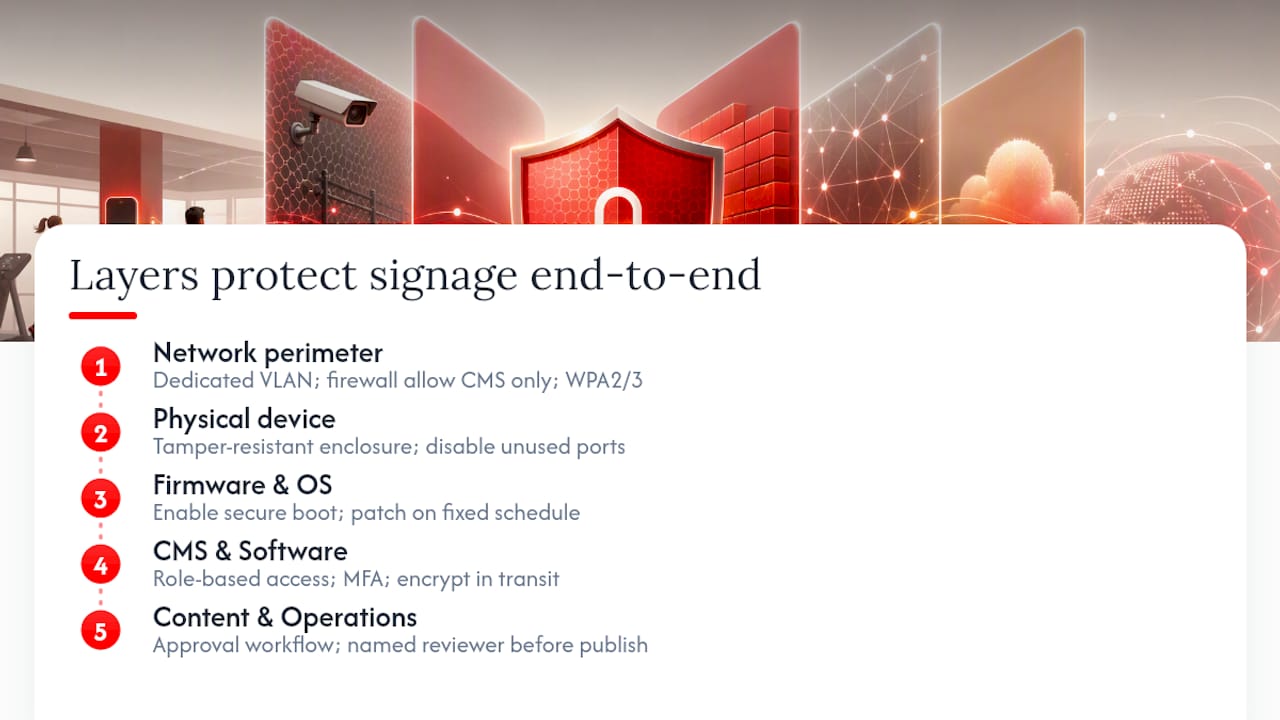
Network layer. Put signage on a dedicated VLAN, harden firewall rules to allow only CMS traffic, and secure Wi-Fi with WPA2 or WPA3 rather than an open guest network.
Device layer. Choose commercial-grade players in tamper-resistant enclosures, and disable ports nobody uses.
Firmware and OS layer. Enable secure boot where the hardware supports it, and patch on a fixed schedule instead of "when someone remembers."
CMS and software layer. Enforce role-based access control, require MFA, and encrypt content in transit.
Content and operations layer. Standardize an approval workflow so uploads pass through a named reviewer before they publish.
Known threats hitting gym signage include physical tampering, weak or default credentials, outdated software, social engineering, and insecure content delivery. Notice that most of these are not exotic. They're the same lapses that compromise any small-business network, just with a screen attached.
Most signage breaches don't start with a sophisticated hack. They start with a media player still running its factory password because nobody assigned ownership of updating it.
Pro Tip: The weakest point in most gym deployments isn't the network, it's the physical enclosure. A player with an exposed USB port behind an unlocked panel gives anyone with five minutes and a flash drive full access, regardless of how good your firewall rules are.
Don't skip the nontechnical controls. A locked cabinet and a documented approval chain stop more incidents than another layer of encryption ever will.
Implementation Checklist: This Week, This Month, This Quarter
Turn the five layers into a schedule with named owners, or the plan dies in a shared drive.
This week (facility manager + IT):
- Change every default password on players, routers, and CMS accounts.
- Move signage devices to an isolated VLAN.
- Enforce MFA on all CMS logins with publishing rights.
This month (IT + operations):
- Install tamper-resistant enclosures on floor-level and locker-room units.
- Disable unused USB and HDMI ports on every player.
- Set role-based permissions so front-desk staff can schedule content but not alter network settings.
- Establish a fixed patch window, monthly at minimum.
This quarter (security coordinator + operations lead):
- Audit the content-approval workflow for gaps, especially around after-hours or emergency-message publishing.
- Run a third-party review or basic penetration test on the signage network segment.
- Train front-of-house staff on phishing recognition, since CMS credentials are often stolen through email, not brute force.
Assign each task to a role, not a person. Staff turnover in gyms runs high, and a checklist tied to "Dave" instead of "operations manager" falls apart the day Dave leaves. A documented setup process that outlives any one employee is worth the extra hour it takes to write.
Technical Settings to Apply on Players, CMS, and Networks
Hand this section directly to your IT contractor or vendor. It's the specific configuration work, not the strategy.
Network configuration:
- Assign signage to its own subnet (for example, 10.10.20.0/24) walled off from the subnet running point-of-sale and member management systems.
- Write firewall rules that deny all inbound traffic except from the CMS's known IP range and the specific ports it needs for push updates.
- Run signage Wi-Fi on a dedicated SSID with WPA2 or WPA3 encryption, never the same network guests use.
Device configuration:
- Enable secure boot and disk encryption on any player that supports it.
- Physically disable or tape over unused USB and HDMI ports.
- Add tamper sensors on units in high-traffic or low-supervision areas like locker rooms.
CMS and software configuration:
- Require MFA for every account, no exceptions for "just the front desk login."
- Set role-based access so class-schedule updates and promotional content follow separate permission tiers.
- Force TLS/HTTPS on all content delivery, and confirm your player app updates automatically through its official channel. App-based players distributed through major app stores typically handle this well if you keep auto-update enabled rather than disabling it to avoid interruptions.
A firewall rule that allows "any" traffic on port 443 because someone couldn't get the CMS to connect otherwise is the single most common misconfiguration we see in signage deployments.
Content Approval and Governance for Gym Screens
Technical controls stop outsiders. Governance stops insiders and honest mistakes, which cause more embarrassing screen incidents than hackers do.
Build a three-step chain: creator drafts content, a reviewer approves it, and the system publishes on a schedule with a logged audit trail. No single person should be able to draft and publish without a second set of eyes, especially for anything touching safety messaging or member data.
Classify your content types before you set approval rules:
- Safety and emergency messaging — highest approval priority, reviewed by operations leadership.
- Class schedules and studio updates — reviewed by the studio manager.
- Promotions and motivational content — reviewed by marketing or the general manager.
Motivational and promotional content gets refreshed often, which is exactly why it needs a rule, not a habit. Keep brand-consistent templates for this category so nobody improvises a graphic at 11 p.m. before opening.
Pro Tip: Review your scheduled playlists monthly, not just when you upload new content. Old promotions for expired deals or outdated class times sit live longer than anyone realizes.
Monitoring, Detection, and Incident Response
You can't respond to what you don't log. At minimum, collect CMS login attempts, content-change timestamps, device heartbeat status, and firmware version per player.
Watch for these signals:
- A playlist change outside normal business hours.
- Multiple failed login attempts on one CMS account in a short window.
- A player suddenly making outbound connections to an unfamiliar address.
When something trips, work through this sequence:
- Isolate the affected player from the network immediately.
- Preserve logs before restarting anything.
- Switch the screen to safe fallback content, a static logo or schedule slide.
- Escalate to IT or your vendor's support line.
- If members saw the incident, prepare a short, honest front-desk statement before rumors fill the gap.
Costs, Licensing, and a Realistic Timeline
Budget shapes vary by gym size, but the components stay consistent: commercial-grade displays, media players, tamper-resistant enclosures, CMS licensing, installation labor, and ongoing support.
For timeline planning:
- Single-location minimum-viable secure deployment: 2 to 4 weeks, covering network segmentation, credential hardening, and basic content governance.
- Multi-location rollout: 6 to 12 weeks, accounting for staggered installation, staff training across sites, and centralized policy rollout.
Recurring costs typically include CMS subscription licensing, support SLAs, and ongoing patch management. Hardware and installation usually fall under the operations or facilities budget, while licensing and security patching often sit with whoever owns IT, sometimes an outsourced contractor for smaller gyms. Multi-location operators should expect the CMS subscription and support contract to be the largest recurring line item once initial hardware is paid off.
How Kingdom Signage Maps to These Security Controls
A gym-focused platform earns its keep when its features map directly onto the layers above rather than adding a sixth thing to manage. Kingdom Signage centralizes control of TVs, class content, and room-based audio from one dashboard, which supports several of the controls already covered.
Role-based access control lets a facility manager restrict who can publish content versus who can only view schedules, directly supporting the CMS/software layer. Kiosk mode locks each player into its designated app, reducing the tampering risk covered in the device layer. Centralized updates handle patch cadence across every screen at every location without a technician visiting each unit, and multi-site management gives an operations lead one place to audit playlist changes across a franchise footprint.
Picture a three-location gym chain onboarding this way: IT sets up the VLAN and firewall rules in week one, the operations manager configures RBAC and approval workflows in week two, and by week four all three sites are running centrally managed, audit-logged signage with a documented fallback plan.
The platforms that hold up under scrutiny are the ones where security features aren't bolted on as an afterthought, but built into how daily scheduling and content actually get published.
Benefits and Uses of Digital Signage in Gyms
Digital signage earns its wall space by solving five distinct jobs at once, something a printed poster never could. Class schedules update in real time without a staff member reprinting a sheet every time a spin session shifts ten minutes. Promotions rotate automatically, testing membership offers without new signage orders each month.
Safety messaging benefits most from the format. A static poster about proper equipment use gets ignored after week one. A screen that rotates safety reminders alongside class content gets seen repeatedly, which matters given how facility safety guidance treats consistent messaging as part of injury prevention, not just compliance paperwork.
Entertainment and motivation round out the use case. Screens on the gym floor running fitness content or leaderboard-style progress trackers keep members engaged during longer sessions, and displays shape the overall atmosphere of a facility in ways that affect how long members stay and how often they return.
The throughline across all five uses: none of it works if the screen goes dark or shows the wrong thing, which is exactly why the security layer underneath matters as much as the content on top of it.
Where to Place Screens for Maximum Impact and Minimum Risk
Placement determines both value and vulnerability, so treat it as a security decision, not just a design one.
Front desk: High-traffic, high-visibility, ideal for promotions and welcome messaging, but also the first thing a visitor or reporter photographs if something goes wrong. Keep this screen on the tightest content-approval rules.
Locker rooms: Useful for schedule reminders and safety notices, but typically unsupervised for long stretches, which makes physical tamper resistance non-negotiable here specifically.
Gym floor: Best for class schedules, motivational content, and entertainment. High member visibility means content errors get noticed fast, so this is a good candidate for automated, pre-approved playlists rather than ad hoc updates.
Studios: Class-specific content and instructor-led visual cues. These screens often need the fastest content turnaround, since class rosters shift daily, which makes role-based scheduling permissions especially valuable here.
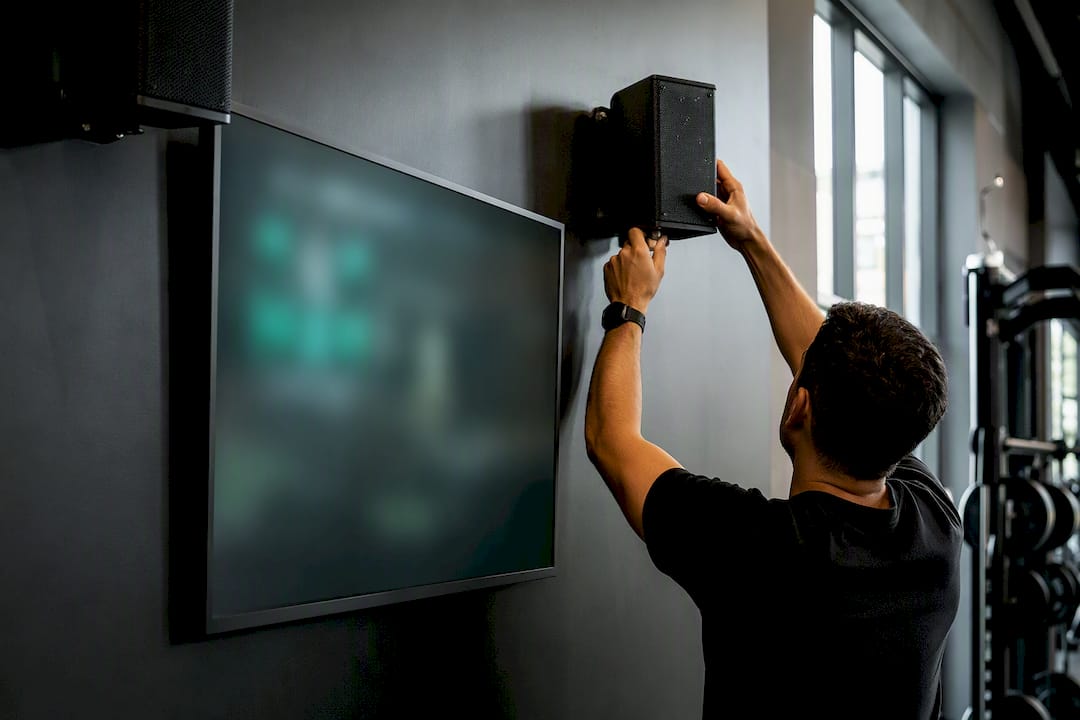
Every location trades visibility for exposure. The busier the spot, the more damage a compromised screen does, and the more attention a broken one draws before anyone thinks to check the network settings.
Safety and Security Risks That Make Signage Protection Non-Negotiable
The risks aren't hypothetical, and they cluster around a short list of failure points that show up across threat assessments for public-facing displays.
Physical tampering tops the list in low-supervision areas like locker rooms, where someone can access a port undisturbed for minutes at a time. Network vulnerabilities follow closely, particularly when signage shares a subnet with billing or member-management systems instead of sitting isolated. Weak or default credentials remain the most common entry point industry-wide, not because attackers are clever but because nobody changed the password the installer left behind.
Outdated software creates a widening gap over time. A player that hasn't been patched in eight months has eight months of accumulated vulnerabilities that a patched device doesn't. Social engineering targets the people managing the CMS rather than the hardware itself, tricking staff into handing over login credentials through a convincing phishing email. Insecure content delivery, meaning unencrypted uploads or unauthenticated publishing endpoints, lets an attacker intercept or replace content in transit.
None of these risks requires a sophisticated adversary. Most gym signage incidents trace back to a gap that a fifteen-minute configuration change would have closed.
Steps to Implement Security Measures With Timelines and Roles
Sequencing matters more than most managers expect. Skip network isolation to rush content governance, and you've secured the wrong layer first.
Week 1, owned by IT: Segment signage onto its own VLAN and change every default credential across players, routers, and CMS accounts.
Week 2 to 3, owned by IT and operations jointly: Configure role-based access control, enforce MFA, and install tamper-resistant enclosures in unsupervised areas.
Week 4, owned by operations: Stand up the content-approval workflow with named reviewers for each content category, and document the escalation path for incidents.
Month 2, owned by the security coordinator: Run a basic vulnerability check on the signage network segment, ideally with outside help if budget allows.
Ongoing, owned by whoever manages the vendor relationship: Confirm patch cadence, review access logs monthly, and reassess permissions whenever staff turn over.
Multi-location operators should run this sequence per site rather than trying to standardize everything simultaneously across a franchise. A manager's guide to multi-room deployment works best when one location proves the process before it scales.
Regular Security Audit Checklist for Gym Signage
Set a recurring calendar reminder, because "we'll get to it" is how most audit schedules quietly disappear.
Monthly:
- Review CMS access logs for unusual login times or locations.
- Confirm firmware and app versions are current across all players.
- Spot-check scheduled playlists for expired or incorrect content.
Quarterly:
- Reassess role-based permissions against current staff.
- Test the incident-response playbook with a tabletop walkthrough.
- Verify tamper enclosures and physical security in unsupervised zones haven't degraded.
Annually:
- Bring in a third-party review of the network segment.
- Renegotiate or reassess vendor support SLAs.
- Retrain all staff with CMS access on phishing recognition and password hygiene.
Skipping the annual outside review is the most common shortcut gyms take, and it's usually the one that catches the gap nobody on staff thought to check.
What One Deployment Taught Us About Locker Room Screens
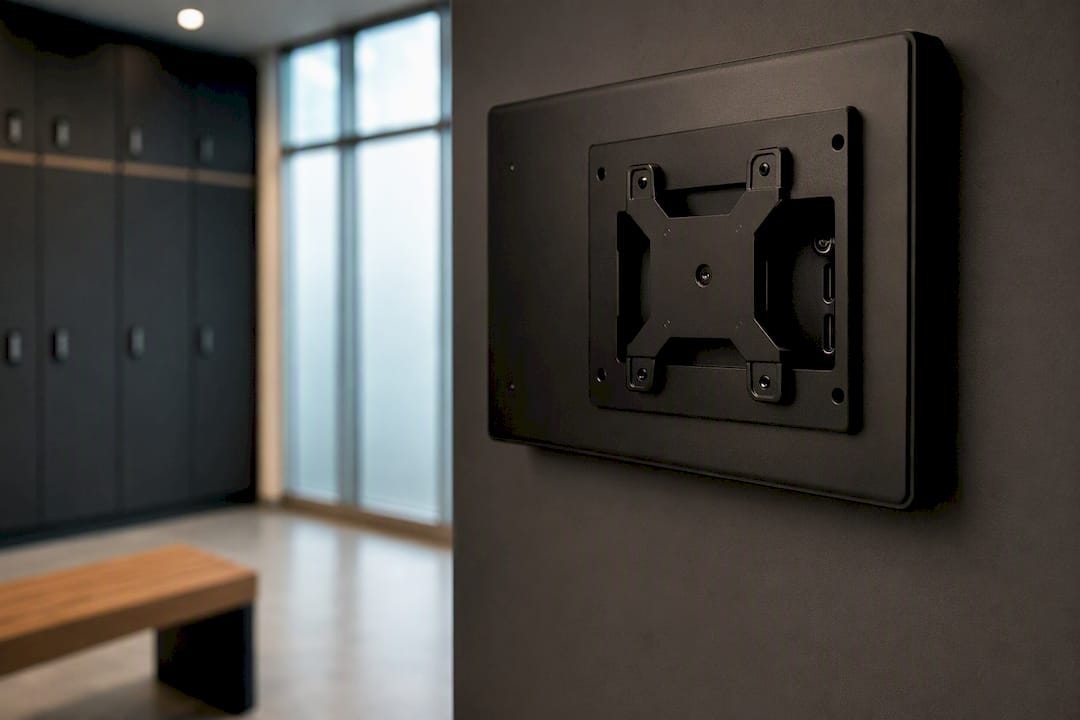
The screen nobody watches is the one that gets hit first. On one rollout, a locker-room player with an exposed HDMI port got unplugged and swapped within a week, unnoticed until a member reported it. The fix was simple: enclosed mounts everywhere, no exceptions for "low-traffic" spots. Add physical tamper checks to your monthly audit, not just your network logs.
How Kingdom Signage Helps You Secure Every Screen
Kingdom Signage gives you one dashboard to control every screen, schedule, and audio zone across your gym, so security settings like role permissions and content approval aren't scattered across five different tools you'd otherwise need to stitch together.

That centralization is the practical advantage here: instead of managing separate logins for your CMS, your music system, and your class-schedule display, one platform handles all of it with a single set of access controls to audit. Fewer systems means fewer places for a weak password or a forgotten permission to slip through. If you're planning a rollout using the checklist above, start with a demo of Kingdom Signage to see how centralized dashboard control fits into your specific network and staffing setup.
Frequently Asked Questions
What's the fastest way to reduce digital signage security gyms risk this week? Change every default password on your media players and CMS accounts, then move signage devices onto an isolated VLAN separate from your billing and member-management network.
Do small, single-location gyms really need network segmentation? Yes. A single unsecured screen sharing a network with your point-of-sale system gives an attacker a path into financial data, regardless of how many locations you operate.
How often should gym signage software be patched? Monthly at minimum, with critical security patches applied as soon as your vendor releases them rather than waiting for the scheduled window.
Who should own signage security at a gym, facilities or IT? Both, with clearly split responsibility: facilities typically owns physical hardware and tamper resistance, while IT owns network configuration, credentials, and patch management.
Can content approval workflows slow down time-sensitive updates like class cancellations? Not if designed correctly. Give a small group of trusted staff fast-track publishing rights for urgent updates while keeping full review for promotional and safety content.
Sources
- Securing Your Screens: Guide to Digital Signage Security | AVIXA
- Visual content receives 94% more views than text-only marketing | PR Daily
- Gym safety & cleanliness | Memorial Hermann
- Rise Vision Inc. developer listing | Apple App Store