
Wired and wireless AV differ because a wired path carries an analog or uncompressed digital signal straight to its destination, while wireless has to encode, compress, transmit over radio, and decode it, adding delay and points of failure along the way. That difference shows up as latency measured in single-digit milliseconds for wired gear versus anywhere from a few milliseconds to several hundred for wireless, depending on the codec, and it's why a recording studio wires everything while a backyard party speaker doesn't need to.
The technical axes that drive this apart are consistent no matter what gear you're shopping for:
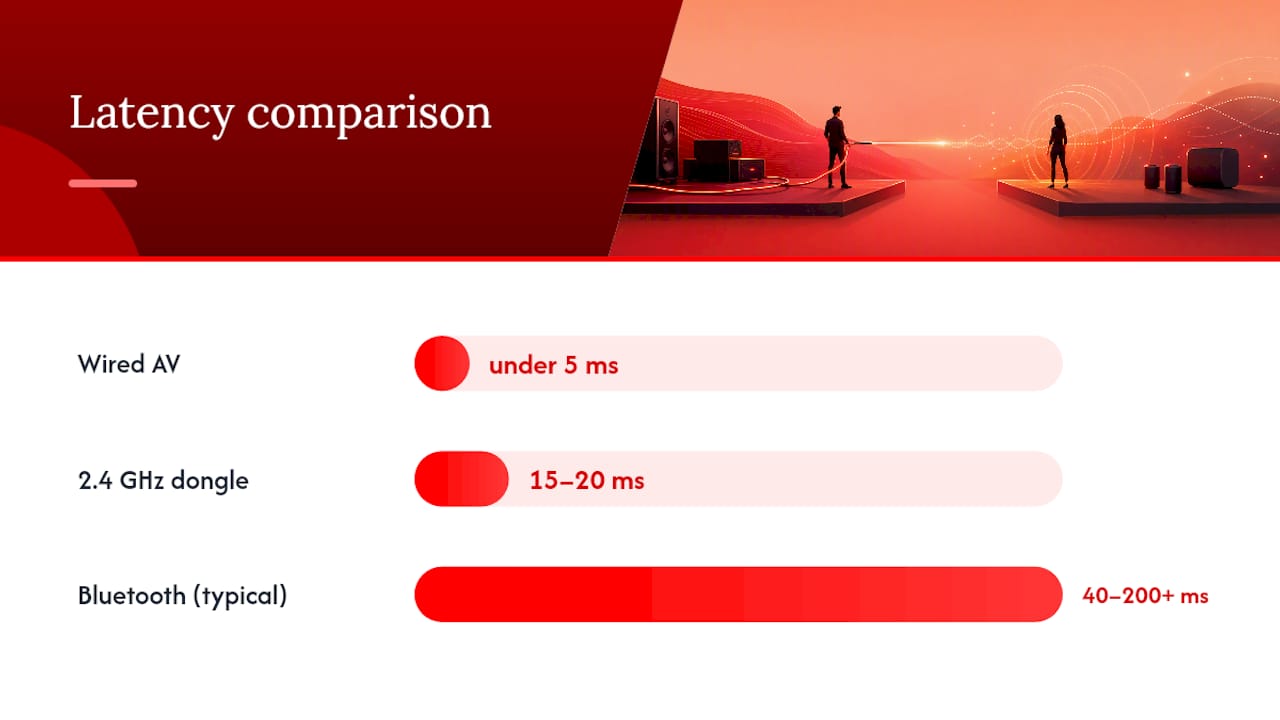
- Latency and sync: wired connections typically run under 5 milliseconds; Bluetooth and 2.4GHz wireless links vary widely by codec and hardware.
- Bandwidth and codecs: wired media has no compression ceiling, while wireless throughput is capped by whatever codec (SBC, aptX, LDAC, WiSA) is negotiating the connection.
Here's the practical shortcut: choose wired for anything mission-critical or permanent, like a home theater or a recording booth. Choose wireless for flexibility, like moving speakers between rooms. And for anything that needs both, like a gym or multi-zone facility, a hybrid setup, a wired backbone with wireless endpoints, usually wins. Platforms like Dante handle professional audio networking this way, WiSA does it for wireless speaker arrays, and Wi-Fi 7 is pushing what wireless can handle next. Kingdom Signage builds its gym control platform around that same hybrid logic.
Key Takeaways
Wired AV generally has advantages in latency, fidelity, and reliability because it avoids encoding and radio transport steps that can cause variability in wireless, while wireless wins on installation speed and flexibility.
| Point | Details |
|---|---|
| Latency gap is real | Wired stays under 5ms; Bluetooth ranges from roughly 40ms to over 200ms depending on codec. |
| Codec ceiling matters for lossless sources | LDAC reaches up to 990kbps, closer to wired quality, but still short of true lossless. |
| Interference is environmental, not just technical | RF congestion and physical obstructions degrade wireless in ways cable never experiences. |
| Hybrid wins for multi-zone facilities | A wired backbone with wireless endpoints balances reliability and flexibility for gyms and multi-room setups. |
| Kingdom Signage manages the control layer | Its dashboard unifies screens, scheduling, and music across zones once the wired-plus-wireless infrastructure is in place. |
Table of Contents
- Why Wired Vs Wireless AV Differs at a Glance
- How Wired AV Systems Actually Move Signal
- How Wireless AV Systems Trade Fidelity for Flexibility
- What Actually Causes the Quality Gap
- Comparing Install Time, Cost, and Long-Term Upkeep
- Which Setup Fits Your Actual Use Case
- How to Fix Wireless AV's Biggest Weaknesses
- What Gyms Need to Know About Multi-Zone AV
- Why the "Wireless Is Just as Good Now" Take Misses Something
- A Multi-Room AV Platform Built for This Exact Trade-Off
- Frequently Asked Questions
- Sources
Why Wired Vs Wireless AV Differs at a Glance
The table below isn't a replacement for reading the rest of this guide, but if you just need a gut check before a purchase or install decision, it'll get you most of the way there.
| Dimension | Wired AV | Wireless AV |
|---|---|---|
| Reliability/uptime | Extremely high; failure usually means a bad cable or connector | Vulnerable to interference, dropped packets, dead batteries |
| Audio/video quality | No compression ceiling; limited only by source and hardware | Capped by codec bitrate (SBC ~328kbps, LDAC up to 990kbps) |
| Latency/sync | Typically under 5ms | 40ms to 200+ms on Bluetooth depending on codec; ~15 to 20ms on 2.4GHz gaming dongles |
| Installation complexity/time | Higher upfront labor; cable runs, wall fishing, termination | Faster initial setup; pairing and app configuration |
| Cost (equipment + labor) | Higher labor cost, lower per-unit hardware cost | Lower labor cost, higher per-unit hardware cost |
| Range & interference | Immune to RF interference; limited by cable length and signal boosting | Susceptible to Wi-Fi congestion, walls, microwaves, other 2.4GHz devices |
| Scalability/multi-room sync | Excellent with proper backbone (Dante, AV-over-IP, PTP timing) | Improving, but sync drift is a known issue without dedicated protocols |
| Security | Physically isolated; harder to intercept | Requires encryption, VLAN segmentation, or dedicated SSIDs |
If your setup is small, permanent, and quality-sensitive, the table alone tells you what to do: wire it. If you need flexibility across a bigger footprint, keep reading, because the interesting decisions happen in the nuance the table can't capture.
How Wired AV Systems Actually Move Signal
A wired AV path guarantees something wireless can't: the signal that leaves the source is, in most cases, the same signal that arrives at the destination, whether that's analog voltage riding a speaker cable or a deterministic digital packet stream over Cat6a.
That guarantee comes from a fairly short list of standards doing most of the heavy lifting:
- HDMI for consumer video and audio, carrying uncompressed digital signal between source and display.
- SDI for professional broadcast video, still dominant in live production trucks.
- Dante and AES/EBU for professional digital audio networking over standard Ethernet infrastructure.
- Speaker cable (copper, gauge-rated for distance) for straightforward analog amplifier-to-speaker runs.
- Cat6a or fiber for AV-over-IP deployments, where audio and video are packetized but travel a closed, managed network instead of open airwaves.
The physics behind why wired resists noise is straightforward. Shielded copper and fiber optic cable reject radio frequency interference that would otherwise degrade a signal, which keeps the signal-to-noise ratio high and consistent regardless of what else is happening in the building. Wired audio also skips the encoding and decoding steps wireless requires, which is part of why it's made a comeback among people who've gotten tired of compression artifacts and dead batteries killing a listening session.
| Connection type | Typical latency | Notes |
|---|---|---|
| Analog speaker cable | Near-zero | Limited only by cable length and electrical resistance |
| HDMI | Under 5 milliseconds | Signal processing on the display can add more |
| Dante over Ethernet | Under 5ms | Deterministic, managed network, not shared with other traffic |
| AV-over-IP (Cat6a/fiber) | Sub-5ms typical | Depends on switch configuration and network load |
How Wireless AV Systems Trade Fidelity for Flexibility
Wireless AV adds four steps a wired connection never needs: encoding, packetization, radio transport, and decoding. Each one is a place where quality or timing can slip, and that's the entire reason wireless behaves differently than wired even when the source material is identical.
The wireless landscape isn't one technology, it's a stack of competing approaches, each with its own ceiling:
- Bluetooth codecs: SBC (the baseline, lossy and limited), AAC, aptX, aptX Adaptive, LDAC (up to 990kbps, the closest Bluetooth gets to lossless), and the newer LE Audio standard aimed at lower power draw.
- Wi-Fi streaming protocols: used by whole-home audio systems and smart speakers, generally capable of higher fidelity than Bluetooth because they aren't as bandwidth-constrained.
- Proprietary 2.4GHz links: common in gaming headsets and wireless mic systems, prioritizing low latency over audio fidelity.
- WiSA: a dedicated wireless standard for surround speaker arrays, built specifically to solve the multi-speaker sync problem that plagues generic wireless audio.
- Thread/Matter and AV-over-Wi-Fi: emerging smart-home protocols that are starting to blur the line between AV control and general IoT networking.
Wi-Fi-based systems can sound close to wired for most casual listening, but Bluetooth remains audibly lossy on a lot of common streams, especially on the lower end of the codec spectrum. The other issue nobody markets on the box: packet loss and jitter. When a wireless packet doesn't arrive cleanly, the receiving device either drops it (a glitch) or waits for a retransmission (added latency). Neither is available on wired. And every wireless device runs on a battery, which means eventual power failure is baked into the design in a way copper cable simply doesn't have to worry about.
| Wireless type | Typical latency | Bitrate ceiling |
|---|---|---|
| Bluetooth SBC | over 200 milliseconds | ~328kbps |
| Bluetooth aptX Adaptive | around 40 milliseconds | around 328kbps |
| Bluetooth LDAC | ~100 to 200ms | Up to 990kbps |
| 2.4GHz proprietary (gaming) | ~15 to 20ms | Varies by chipset |
| WiSA | Sub-5ms claimed | Uncompressed, multi-channel |
What Actually Causes the Quality Gap
Almost every practical difference between wired and wireless AV traces back to five things: latency, bandwidth and codecs, interference and range, and synchronization across multiple devices. Understand these five and you understand the entire debate.
Latency is the most quoted, least understood axis. Wired connections deliver under 5ms in nearly every scenario. Bluetooth varies enormously by codec, anywhere from 40ms on the good end to over 200ms on the bad end. A 2.4GHz gaming dongle usually targets 15 to 20ms, which is why competitive gamers use those instead of Bluetooth. The consequence that actually matters to most people isn't the number itself, it's lip-sync: once audio drifts more than about 45ms from video, most viewers notice something's off, even if they can't say what.
Bandwidth and codecs set a hard ceiling on quality that no amount of good engineering elsewhere can fix. SBC tops out around 328kbps. LDAC can hit 990kbps, closer to CD quality but still not equivalent to an uncompressed source. This only matters when your source material actually exceeds the codec's ceiling; streaming a heavily compressed Spotify track over SBC isn't losing much, but playing a lossless FLAC file over the same connection absolutely is. Modern codecs like LDAC and aptX Adaptive have narrowed this gap significantly, but narrowed isn't closed.
Interference and range are where environment does the damage. A 2.4GHz band is crowded with microwaves, other Wi-Fi networks, Bluetooth devices, and baby monitors, all fighting for the same limited spectrum. 5GHz and 6GHz bands have less congestion but shorter effective range and worse penetration through walls. Wired media doesn't care about any of this; a shielded cable is immune to RF noise by design, which is a big part of why wired remains the standard for mission-critical installations.
Scalability and multi-room sync separate the amateur setups from the professional ones. Wired systems sync using hardware-level timing, word clock in pro audio, PTP (Precision Time Protocol) in AV-over-IP networks, both of which keep every device locked to the same clock down to microseconds. Wireless systems have to fake this with software timing and buffer management. WiSA claims tight synchronization across its speaker arrays specifically because it built a dedicated protocol to solve this problem rather than relying on generic Wi-Fi.
Pro Tip: If you're planning a multi-speaker install where sync actually matters, home theater surrounds, a gym with several zones playing the same class audio, don't trust generic Wi-Fi to keep everything locked together. Run a wired backbone and use PTP or a purpose-built sync protocol like WiSA for the endpoints that need to stay tight.
Comparing Install Time, Cost, and Long-Term Upkeep
Wired systems cost more upfront in labor and materials; wireless systems cost more over time in hardware, batteries, and maintenance. That's the one-line version. The longer version has a lot more nuance worth understanding before you commit budget either way.
- Upfront labor: wired installs require fishing cable through walls, terminating connectors, and testing runs, all of which take skilled hands and billable hours.
- Material costs: cable, conduit, wall plates, and patch panels add up fast on a wired job, especially in a large facility.
- Hidden costs: wall repair after fishing cable, cable management hardware, and sometimes rerouting due to code requirements or building obstructions.
- Recurring wireless expenses: battery replacement across dozens of endpoints, firmware updates, and vendor support contracts that never really end.
A typical wired install for a single room might run one to three days depending on wall access and cable runs. A wireless retrofit for the same room could be done in an afternoon, sometimes less. That speed is wireless's real selling point, not audio quality.
The lifecycle math flips the script, though. Passive wired speakers with no active electronics can run for decades with zero maintenance. Active wireless hardware has batteries that degrade, firmware that goes unsupported, and radios that age out of relevance as new standards arrive. Running conduit and cable during initial construction pays off specifically because it avoids retrofitting later, when walls are finished and access is expensive.
Which Setup Fits Your Actual Use Case
The deciding factor changes by scenario: quality-sensitive rooms want wired, mobile or rapidly changing environments want wireless, and anything spanning multiple zones usually wants both. There's no universal right answer, only the right answer for what you're actually building.
- Dedicated home theater: go wired. You control the room, you're not moving speakers, and lip-sync and fidelity matter more than convenience.
- Gym or fitness studio with multiple zones: hybrid. A wired backbone connecting main equipment with wireless endpoints for flexible speaker placement gives you reliable multi-zone audio without rewiring every time a layout changes.
- Conference room: wired for the core AV chain (display, main audio), wireless acceptable for presenter mic and screen sharing.
- Live touring or events: wired wherever physically possible, engineered RF planning for wireless mics where cable simply isn't an option.
- Gaming or pro audio recording: wired, or at minimum a dedicated low-latency 2.4GHz link, never generic Bluetooth.
- Small home gym or DIY setup: wireless is fine here, the stakes are lower and the flexibility usually outweighs the quality trade-off.
Each scenario carries its own caveat. Live events need real RF spectrum planning to avoid mic interference from other broadcasters on site. Gyms need power planning for wireless endpoints that run all day. Conference rooms need to think about security if presenter devices are joining an open network.
How to Fix Wireless AV's Biggest Weaknesses
Most wireless problems are fixable with planning, not by throwing more hardware at the problem. The failures people blame on "unreliable wireless" are usually a network that was never configured for AV traffic in the first place.
- Run a wired backbone to every zone or room, even if the endpoints themselves are wireless.
- Reserve a dedicated SSID or VLAN for AV traffic, separate from general guest or office Wi-Fi.
- Enable QoS (Quality of Service) and traffic shaping so AV packets get priority over background downloads or video calls.
- Prefer 5GHz or 6GHz bands where range allows; they're less congested than 2.4GHz.
- Avoid overlapping channels between access points; a proper site survey will show you where conflicts exist.
- Use PoE (Power over Ethernet) for access points so you're not dependent on separate power runs.
- Place transmitters and receivers with line of sight in mind; walls, metal studs, and mirrors all degrade signal.
Pro Tip: Before blaming a wireless dropout on "bad luck," walk the space with a spectrum analyzer. Most interference problems have a physical source, a microwave, a neighboring network, a cordless phone base station, and you'll find it faster than you'd think.
For low-latency speaker arrays specifically, a dedicated 2.4GHz link or a purpose-built protocol like WiSA will outperform generic Wi-Fi every time. And schedule firmware updates and power maintenance windows the same way you'd schedule any other preventive maintenance, not as a reaction to something breaking.
What Gyms Need to Know About Multi-Zone AV
Gyms consistently do better with a wired backbone feeding managed wireless endpoints, because a facility running five classes simultaneously across different rooms can't afford the kind of dropout that a home theater owner might shrug off. Concurrent audio streams, scheduled zone control, and screen signage all depend on timing staying locked, and that's a wired-first problem even when the last few feet to a speaker are wireless.
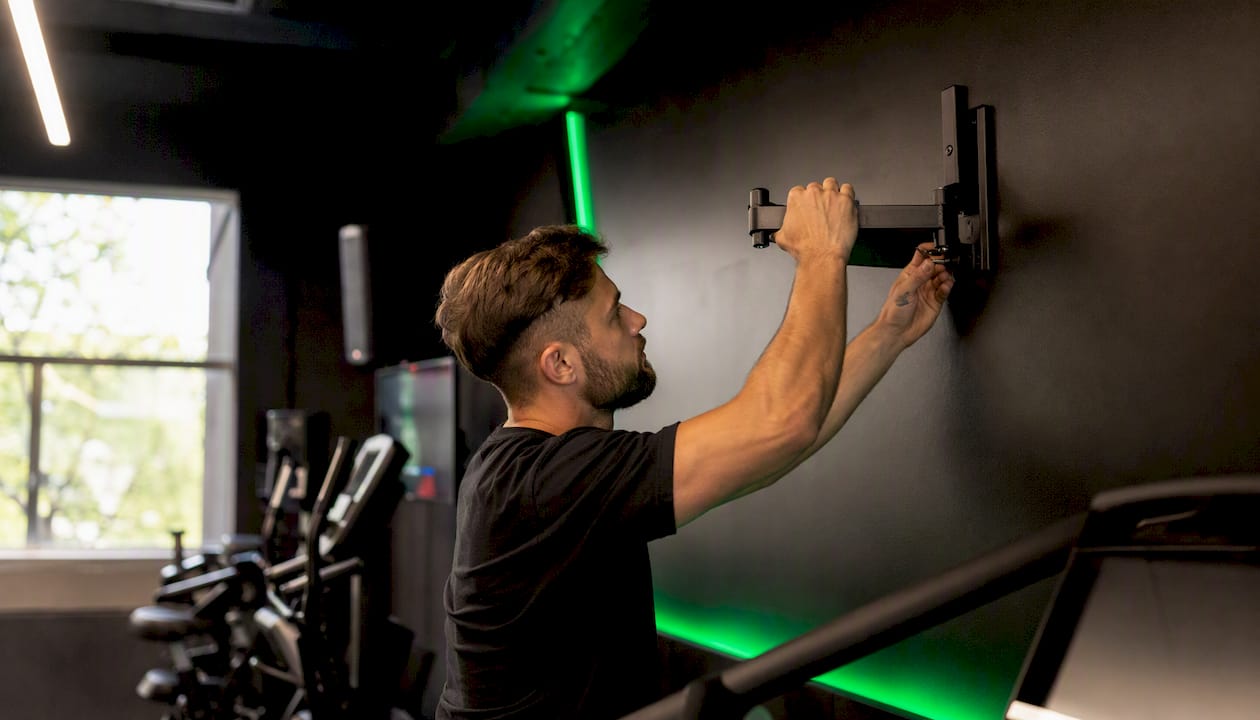
Picture a mid-size facility running a spin class, a yoga session, and open-floor cardio at the same time, each with its own audio feed and none of them allowed to bleed into each other. That only works reliably when the core network is wired and each zone's wireless endpoint is just the last hop, not the whole chain. Redundancy planning matters here too: if one zone's wireless link drops mid-class, the fallback shouldn't be silence, it should be an automatic handoff that members never notice.
Power planning deserves more attention than it usually gets. Active wireless speakers and screens need consistent power, and in a gym running for 16 or more hours a day, that adds up fast in both electricity cost and hardware wear. Centralized monitoring, watching for a dropped zone or a screen that's gone dark before a member complains, is the difference between catching a problem in minutes versus hearing about it from an annoyed member an hour later.
- Class transitions need audio and visual cues switching cleanly between zones without a lag that throws off instructor timing.
- Concurrent streams across rooms need enough bandwidth headroom that one zone's traffic never starves another.
- Scheduled zone control lets a facility push different content, promotional screens, class schedules, music, without touching hardware in each room individually.
Pro Tip: A centralized dashboard that shows the health of every zone at a glance, screens, audio, and scheduling, catches most problems before members ever notice them. That kind of visibility is worth more than any single piece of hardware in the rack.
Why the "Wireless Is Just as Good Now" Take Misses Something
The narrative that wireless has fully caught up to wired isn't wrong exactly, it's incomplete. For a lot of casual listening, a good Wi-Fi speaker genuinely sounds close enough to wired that most people can't tell the difference in a blind test. But "close enough for casual listening" and "reliable enough for a business that depends on uninterrupted audio and video" are two very different bars.
What gets underestimated is how much of the wired versus wireless decision is really a decision about failure tolerance, not fidelity. A home listener who loses a wireless connection for three seconds shrugs it off. A gym running a live class, a conference room mid-presentation, or a touring show mid-set doesn't have that luxury. That's the real argument for hybrid design: wired where failure is expensive, wireless where flexibility is worth more than perfection. Standards like WiSA and the rollout of Wi-Fi 7 will keep narrowing the gap, and AV-over-IP is quietly becoming the backbone that makes both worlds work together instead of competing. The smart move isn't picking a side permanently, it's building infrastructure flexible enough to lean either way as the technology keeps shifting under your feet.
A Multi-Room AV Platform Built for This Exact Trade-Off
Kingdom Signage is a multi-platform SaaS built specifically for gyms and fitness studios, giving operators one dashboard to control screens, class schedules, workout timers, and room-based music across every zone in a facility. A wired backbone gives you the reliability; Kingdom Signage's dashboard gives you the control layer that turns that reliable infrastructure into something a manager can actually operate without juggling five different apps or remotes.

Picture a facility running a wired network to each zone, with Kingdom Signage managing what plays where, when classes transition, and which screens show promotional content versus class schedules, all from a single login instead of walking room to room adjusting settings by hand. That's the practical payoff of getting the wired versus wireless decision right: the infrastructure stops being something you fight and starts being something you manage. If you're evaluating platforms for a multi-zone deployment, a platform evaluation checklist is a useful starting point before you commit. Request a demo through Kingdom Signage to see how the dashboard handles concurrent zones, and ask about deployment examples from facilities running a similar wired-plus-wireless setup.
Frequently Asked Questions
Does wired audio actually sound better than wireless? For lossless or high-resolution sources, yes, wired avoids the codec compression that limits even the best wireless connections. For casual streaming from services that already compress the audio, the difference narrows considerably.
Is wireless AV less reliable than wired? Generally, yes, because wireless depends on RF conditions that can change room to room and hour to hour, while wired is only vulnerable to a physical cable fault. Proper network planning, dedicated VLANs, QoS, and 5GHz or 6GHz bands closes much of that gap.
Can wireless AV cause health concerns? No credible evidence links standard wireless AV equipment, Wi-Fi, Bluetooth, WiSA, to health risks at consumer power levels. The technical trade-offs are about signal quality and reliability, not safety.
What's the main difference between wired and wireless AV for a small business? Installation speed versus long-term reliability. Wireless gets you running faster with less labor cost; wired costs more upfront but rarely fails once it's in the wall.
Should I choose a hybrid setup if I'm not sure which I need? If your space has more than one zone or room that needs synchronized audio or video, a hybrid approach, wired backbone with wireless endpoints, gives you room to adjust without committing fully to either extreme.
Sources
- Wired headphones are making a comeback, and I totally get why
- Wired vs Wireless Home AV: Which is Best in 2026?
- Wireless vs Wired Audio Systems | AV Experience