
Gym TV content approvals are the review steps a facility uses to check, authorize, and schedule every video, promo, or class graphic before it plays on a screen members can see. The best starting setup is not complicated: define four roles (creator, reviewer, publisher, admin), lock your templates so brand elements can't shift, require scheduling metadata on every submission, and turn on audit logging with proof-of-play. That combination works because gym content lives or dies in the first three seconds someone glances at it between sets, and class schedules change too fast for a slow, ad hoc review chain to keep up.
- Four roles minimum: creator, reviewer/approver, publisher, admin
- Locked templates for logos, fonts, and layout zones
- Scheduling metadata required at submission (screens, dates, recurring rules)
- Audit log and proof-of-play turned on from day one
Pro Tip: Start with fewer approval steps than you think you need. You can always add a review layer once you see where mistakes actually happen.
Key Takeaways
The most reliable gym TV content approval setup pairs locked templates and role-based access with mandatory scheduling metadata and full audit logging.
| Point | Details |
|---|---|
| Lock templates first | Restrict logos, fonts, and layout before building approval chains to cut review volume. |
| Match approval depth to risk | Give high-visibility or regulated screens multi-step review; let low-risk local screens use lighter checks. |
| Require scheduling at submission | Ask for target screens and dates in the approval request to catch timing errors early. |
| Log everything | Record who approved what, when, and where it played, with rollback available. |
| Kingdom Signage as the setup | Kingdom Signage bundles role-based controls, template locking, scheduling metadata, and proof-of-play in one dashboard built for gyms. |
Table of Contents
- Governance Blueprint: Content Classes, Screen Risk, and Lifecycle Rules
- Roles and Permissions: The Minimum Set You Actually Need
- Which Approval Workflow Fits Which Type of Content?
- Templates, Locked Zones, and Approved Asset Libraries
- Why Scheduling Belongs Inside the Approval Request
- How Do You Get a New Approval Process to Stick?
- How Kingdom Signage Puts This Checklist Into Practice
- Why Most Gyms Get Approval Workflows Backward
- Get Your Approval Workflow Running This Month
- Sources
Governance Blueprint: Content Classes, Screen Risk, and Lifecycle Rules
Before touching your content management system, put a one-page policy in writing. Content governance exists to make sure everything reaching a screen meets brand, legal, and operational standards before it airs, and that starts with sorting content into classes.
- Core content: brand-approved promos, national campaigns, franchise-mandated messaging. Locked down, rarely edited locally.
- Local content: class schedules, instructor spotlights, in-house challenges. Editable within guardrails.
- Restricted or prohibited: anything touching pricing claims, health outcomes, or third-party trademarks. Requires legal or compliance sign-off.
Screen risk should map directly to approval depth. A lobby screen visible to prospective members and passersby carries more brand risk than a locker room monitor showing class timers, so it earns a stricter review path. Set expiry and auto-unpublish rules for every asset, and assign clear ownership: brand marketing owns core content, IT owns the platform and access, local ops owns day-to-day scheduling, and compliance signs off on anything restricted.
Roles and Permissions: The Minimum Set You Actually Need
Every gym signage deployment needs the same skeleton of roles, scoped tightly so nobody has more access than their job requires. Role-based workflows and approval chains work by mapping exactly who can create, approve, and publish, then scoping that by screen group or location rather than granting blanket access.
- Creator — builds drafts, uploads media, cannot publish.
- Reviewer/approver — checks brand and compliance fit, approves or rejects with comments.
- Publisher — pushes approved content live and manages scheduling.
- Admin — controls user access, template locks, and platform settings.
- Viewer — read-only access for franchise auditors or regional managers.
Scope each role by screen group, location, and specific action, not just a blanket "editor" tag. A studio manager in one location shouldn't be able to touch screens at a sister club across town. If you run more than a handful of locations, SSO and SCIM provisioning save real time on onboarding and offboarding staff, since access disappears automatically the moment someone leaves.
Pro Tip: Set a reasonable service level agreement for reviews with faster response times for urgent items, including automatic escalation to backup approvers if needed. A single unstaffed reviewer role is the most common reason approval queues stall.
Which Approval Workflow Fits Which Type of Content?
Not every piece of content needs the same scrutiny, and treating a class-cancellation notice like a national ad campaign is how approval queues become bottlenecks. Match the workflow to the risk.
- Single-step approval: one reviewer signs off, fast turnaround. Fits local class announcements, room schedule changes, birthday shoutouts.
- Multi-step approval: creator, brand reviewer, then compliance. Fits franchise-wide promos, pricing offers, anything mentioning results or testimonials.
- Conditional routing: the system routes automatically based on tags, screen risk, or media type. A video tagged "nutrition claim" routes to compliance regardless of who submitted it; a tagged "internal schedule update" skips straight to publisher.
Urgent operational content needs its own lane. A facility closure notice or an equipment safety warning cannot sit in a queue behind three marketing promos waiting on brand sign-off.
A fast-track path with a single named approver, checked once daily even outside business hours, is the difference between a same-day fix and a screen showing wrong information all weekend.
Capture every review comment and decision inline, tied to the specific asset version, learning from the role of customer reviews in hospitality to improve feedback loops and monitor outcomes effectively. When a rejected promo comes back for round two, the reviewer needs to see exactly what changed, not guess based on a Slack thread from three days ago.
Templates, Locked Zones, and Approved Asset Libraries
Locking the right fields is what keeps local teams moving fast without creating brand or legal exposure. Lock logos, fonts, color palettes, and layout structure. Leave text fields, class times, instructor names, and swap-in photos open for local editing.
- Build an approved image and video library so local staff pull pre-cleared assets instead of sourcing their own stock photos with murky licensing.
- Require metadata on every submission: target screens, start and end dates, playback windows, and a campaign tag.
- Run every design against a glance-based readability check. Screen communication research confirms that gym signage gets viewed in passing, not read closely, so text size, slide timing, and visual density all need to account for someone walking by mid-set, not sitting and reading.
Facilities that skip locked templates and approved libraries tend to see the same problem repeat: stale promos that missed their expiration date, or a rogue font choice that slipped past a distracted reviewer. Our own template type guide breaks down which zones to lock by content type.
Why Scheduling Belongs Inside the Approval Request
Scheduling is not a step that happens after approval. It has to be part of the request itself, because a piece of content can be perfectly on-brand and still air on the wrong screen at the wrong time. Screen communication approval processes that work require target screens, dates, and recurring rules to be submitted alongside the creative, so a reviewer can catch a Tuesday class promo mistakenly scheduled to run every day of the week before it ever goes live.
- Require target screens and a start/end window on every submission, not just the asset file.
- Keep version history so a reviewer or publisher can roll back to the last approved version in seconds.
- Log who submitted, who approved, what changed, and where it played.
- Run proof-of-play checks, especially for any sponsored or paid content, to confirm it actually aired as scheduled.
| Audit Field | Why It Matters |
|---|---|
| Submitter and approver identity | Traces accountability for every published asset |
| Timestamp of each action | Shows how long content sat in each review stage |
| Screen and location target | Confirms content played where it was meant to |
| Version number | Enables rollback without rebuilding from scratch |
| Proof-of-play confirmation | Verifies paid or sponsored content actually ran |
Version control and rollback capability turn a bad publish from a crisis into a two-minute fix, and a clear audit trail is what you hand a franchise auditor without scrambling.
How Do You Get a New Approval Process to Stick?
Documentation alone doesn't change behavior. Train creators, reviewers, and publishers separately, since each role needs different judgment calls, not the same generic onboarding deck.
- Track draft-to-publish time, rejection rate, and post-publish issues as your core KPIs.
- Watch proof-of-play failure rate closely if you run any sponsored content.
- Review templates and asset libraries quarterly, not annually. Gym promos age fast.
- Launch with one location as a pilot before rolling the workflow chainwide.
A pilot with defined KPIs and a scheduled audit cadence surfaces friction points early, before they multiply across twenty locations.
Pro Tip: Track rejection reasons for the first 60 days, not just the rejection count. If half your rejections cite the same missing metadata field, fix the submission form instead of retraining every creator.
How Kingdom Signage Puts This Checklist Into Practice
Kingdom Signage builds this governance model directly into its dashboard rather than leaving gym operators to bolt it on with spreadsheets and email chains.
- Role-based controls that scope creator, reviewer, and publisher access by screen group or location.
- Template locking so brand elements stay fixed while local staff edit class times, names, and photos.
- Scheduling metadata built into every content submission, tied to target screens and playback windows.
- A multi-location dashboard for franchise technology managers overseeing several clubs at once.
- Proof-of-play tracking to confirm sponsored or promotional content actually aired.
The practical payoff shows up in class transitions that run without a staff member manually swapping a screen, and in audio and video that stay synced across rooms during back-to-back sessions. Our multi-location dashboard guide and security checklist cover implementation details for teams managing more than one facility.
Why Most Gyms Get Approval Workflows Backward
The instinct in most gyms is to build the approval chain first and worry about templates later. That's backward. A locked template with an approved asset library eliminates most of the judgment calls a reviewer would otherwise have to make, which means fewer things ever need escalation in the first place. The gyms that struggle most with content approvals aren't the ones with too few reviewers. They're the ones asking one overworked reviewer to catch brand violations that better guardrails should have prevented before submission.
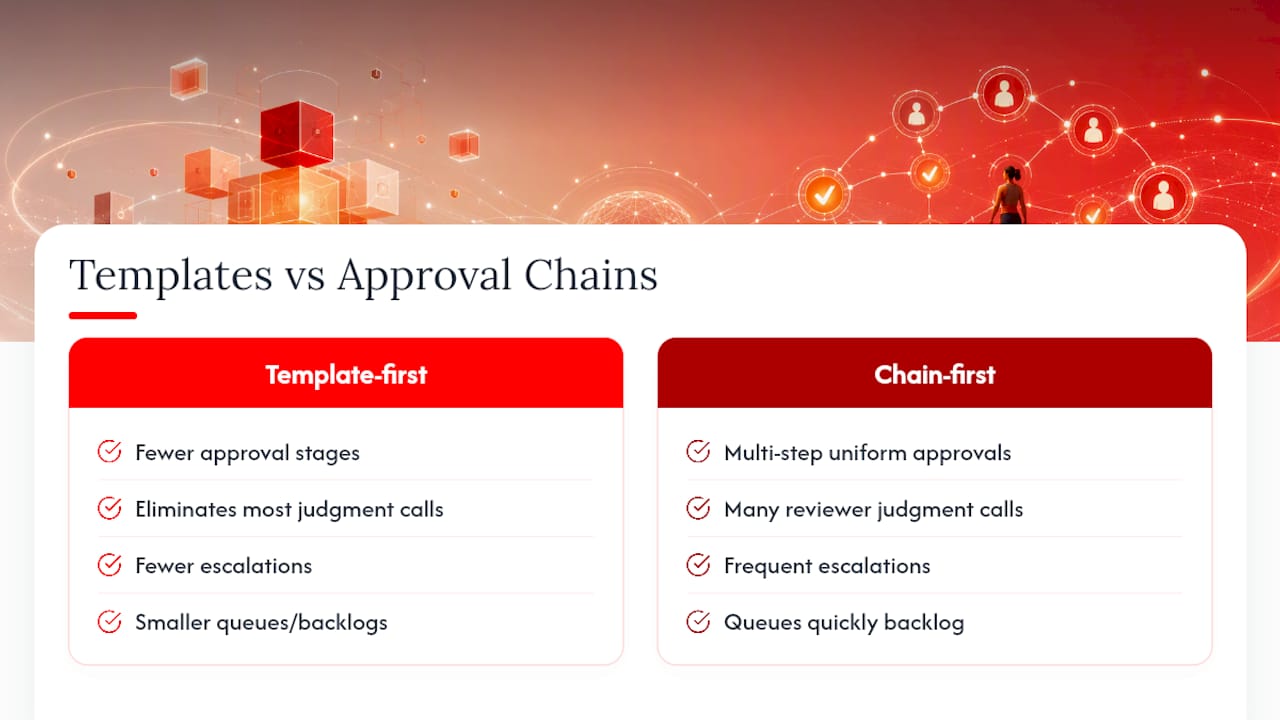
The other overrated idea is uniform approval depth. Treating a class-cancellation notice with the same multi-step scrutiny as a paid sponsorship spot is why queues back up and staff start bypassing the process entirely, which is worse than having no process at all. Map your review depth to actual screen risk, not to a single one-size-fits-all policy that feels safer on paper.
If you take one thing from this, prioritize the guardrails over the approval chain. Get templates locked and metadata mandatory first. The workflow layer matters, but it's the second decision, not the first.
— Kingdom
Get Your Approval Workflow Running This Month
Kingdom Signage is built for gyms that need approval governance without hiring a full-time content administrator. It's the practical alternative to stitching together a generic CMS, a shared drive, and an email chain for sign-offs. Role-based access, locked templates, scheduling metadata, and proof-of-play all live in one dashboard, so a studio manager and a franchise technology manager see exactly the controls their role needs and nothing more.

That means fewer late-night calls about a screen showing last month's promo, and class transitions that switch automatically instead of relying on someone remembering to hit a button. If you're running multiple locations, the gym TV network setup guide walks through configuration before you even touch a screen. Start a trial with Kingdom Signage and get your first location's approval workflow live within a week.
Sources
- Comprehensive Guide to Content Governance for Digital Signage: Templates, Approvals, and Multi-Site Workflows
- Role-Based Workflows and Approval Chains for Digital Signage
- Screen Communication Approval Process That Works | SignageTube