
The right approach to gym playlist management is a cloud-based, hardware-agnostic platform that runs music, announcements, and on-screen content from one dashboard, across every room and every location. Not a phone plugged into an aux cord. Not five different apps for five different screens. One system, multiple zones, built-in licensing.
That single sentence resolves most of the operational headaches gym operators bring up: instructors overriding the lobby speakers, corporate promos that never make it to the treadmill row, and the constant fear that a consumer streaming account is one audit away from a licensing problem. Kingdom Signage was built around this exact framing, and this guide walks through what to look for and how to roll it out.
Here's what actually matters when you're evaluating or configuring a system:
- Centralized scheduling that handles day-parts, class triggers, and promos without manual re-uploads
- Multi-zone audio and display grouping, so the studio doesn't hear what the lobby sees
- Commercial licensing baked in, not bolted on
- Role-based permissions for franchise and multi-location teams
- Hardware flexibility so you're not locked into one screen or player brand
Key Takeaways
Centralized, hardware-agnostic platforms with built-in licensing and multi-zone scheduling solve the core operational problems in gym playlist management better than fragmented, room-by-room tools.
| Point | Details |
|---|---|
| Choose centralized control | One dashboard for music, signage, and announcements reduces instructor friction and scheduling errors. |
| Design zones deliberately | Separate the studio, cardio floor, and lobby with independent bandwidth and sync tolerances. |
| Verify licensing before launch | Confirm PRO coverage or use a bundled commercial provider to avoid compliance gaps. |
| Pilot before full rollout | Test one location for four to eight weeks before expanding across a franchise. |
| Kingdom Signage fits this model | Its unified dashboard covers multi-zone scheduling, announcements, and hardware flexibility in one platform. |
Table of Contents
- What Does Gym Playlist Management Actually Require?
- How Should You Design Zones and Network Layout?
- Building Scheduling Workflows That Don't Create Extra Work
- Is Your Gym's Music Actually Licensed for Public Play?
- Rolling Out Gym Playlist Management Across Multiple Locations
- Does Kingdom Signage Cover These Requirements?
- Three Mistakes I See Operators Make Repeatedly
- Kingdom Signage: One Dashboard for Music, Signage, and Class Control
- Where to Go Deeper on Gym Playlist Management
- Sources
What Does Gym Playlist Management Actually Require?
Before you sign anything, run the system against this checklist. It separates tools built for personal music organization from platforms built for commercial, multi-room deployment.
- Multi-zone audio and per-screen grouping. The weight room, group studios, lobby, and locker rooms each need independent content control, not a single feed piped everywhere.
- Centralized scheduling with day-part rotations. Morning HIIT classes shouldn't inherit the same tempo as a 9 p.m. recovery session, and the system should switch automatically.
- Commercial music licensing coverage. This is non-negotiable for any space where members and staff hear music you don't personally own the rights to broadcast.
- Role-based permissions across locations. Corporate sets the template; local managers get limited override rights, not full access to every screen in the franchise.
- Announcements with push and overlay capability. A live "class starting in 5 minutes" message or a scheduled promo overlay needs to work without interrupting playback.
- Hardware flexibility with caching and monitoring. The platform should run on whatever screens and players you already own, and alert you when a zone drops offline.
Pro Tip: Test the failover behavior before you commit. Pull the network cable on one zone during a demo and watch what happens to playback. If it just stops, that's a problem you'll discover during a real outage, not a demo.
How Should You Design Zones and Network Layout?
Zone design is where most rollouts either succeed quietly or fail loudly. A "zone" is any space with its own audio or visual identity: the studio door screen showing the next class, the cardio floor running a looped playlist, the lobby signage cycling promotions and check-in prompts.
Each zone needs its own bandwidth allocation, not a shared pipe fighting for priority. That means VLANs to segment traffic, QoS rules that prioritize streaming media over general Wi-Fi guest traffic, and enough redundancy that one router hiccup doesn't take down three rooms at once.
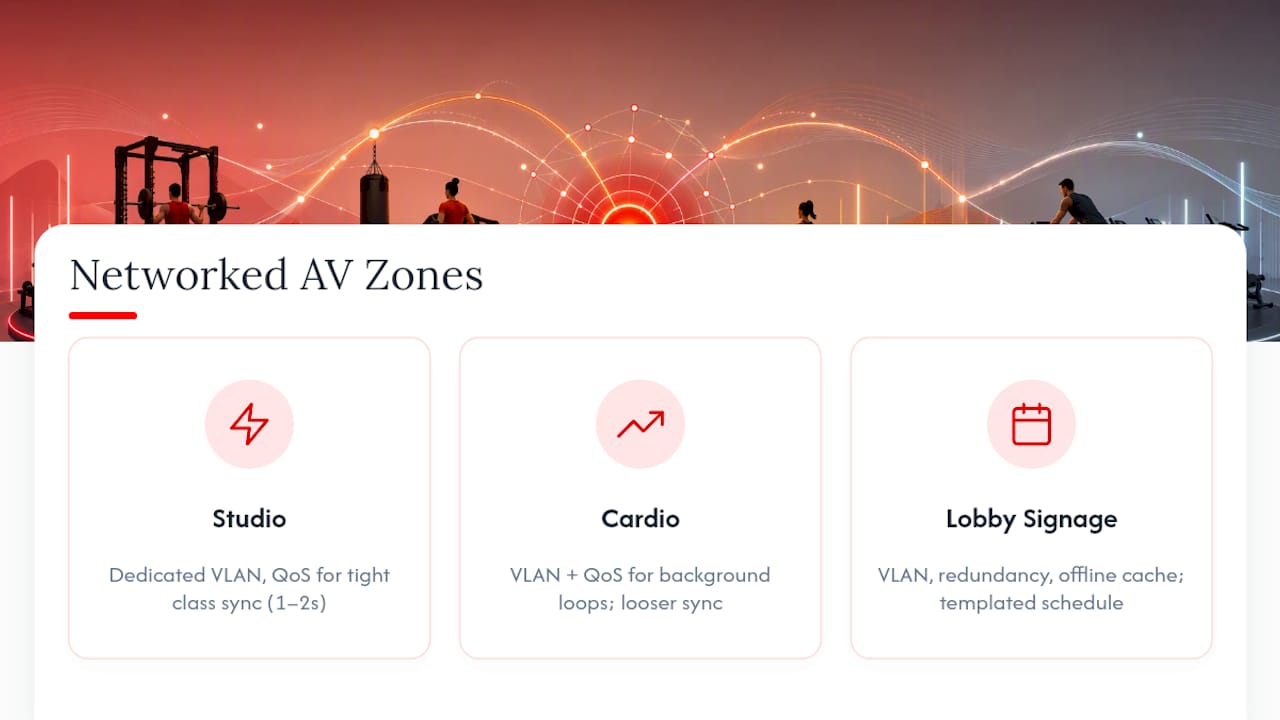
Pick media players that aren't locked to a single vendor's ecosystem. Fitness-focused AV platforms increasingly emphasize centralized control precisely because gyms run mixed hardware fleets bought over several years, and a hardware-agnostic approach avoids ripping out working screens just to add software.
Sync expectations matter too. A class-start trigger needs tight timing, ideally within a second or two, so music hits right as the instructor starts. Background loops in the cardio area tolerate looser sync, since nobody's counting beats against a screen. Vendor analysis of multi-location signage rollouts consistently points to templated scheduling and day-part rotation as the features delivering the most operational return, which lines up with what actually breaks when zones aren't properly separated.
Build in offline caching so a zone with a flaky connection keeps playing its last-known playlist instead of going silent, and monitor for dropped zones the same way you'd monitor a point-of-sale terminal.
Building Scheduling Workflows That Don't Create Extra Work
Templates are what keep this manageable week over week. Build five or six reusable content blocks, morning rush, midday lull, peak evening classes, weekend programming, and let staff swap content into those slots instead of building schedules from scratch.
- Set day-part defaults first. Higher-tempo tracks for peak hours, calmer programming for early morning and late evening, applied automatically rather than manually reset each day.
- Link class schedules to triggers. When a spin class starts at 6:00 p.m., the studio's screen and audio should shift automatically, no instructor fumbling with a remote.
- Separate corporate templates from local overrides. Headquarters sets the baseline playlist and promo rotation; local managers get narrow, approved room to adjust without breaking brand consistency.
- Route consumer playlist imports through a compliance check. If an instructor wants a personal playlist played publicly, it needs to be converted and cleared through your licensed system first, never streamed directly from a personal account.
Kingdom Signage's scheduling guides map these templates directly to day-part rotations, which cuts the manual scheduling load that eats into a manager's week. Pair that with instructor-level ambiance tips and you get consistency without micromanaging every room.
Is Your Gym's Music Actually Licensed for Public Play?
A personal Spotify or Apple Music account is licensed for private, individual listening, not for broadcast in a commercial space with paying members. That distinction is the single most common compliance gap in gyms, and it's usually not intentional. Someone just plugged in their phone.
Performing rights organizations like ASCAP, BMI, SESAC, and GMR collect royalties on behalf of songwriters and publishers, and commercial venues need coverage from these organizations (directly or through a licensed provider) to legally play copyrighted music publicly. Bundled commercial music services fold PRO licensing into the subscription, which removes the administrative burden of negotiating separate agreements with each organization.
Two practical paths exist: subscribe to a commercial provider that already carries PRO coverage, or license directly and route playback through a delivery layer built for commercial use. Either way, keep documentation, playlogs, access records, and signed licensing agreements, on file for at least a few years in case of an audit.
| Point | Details |
|---|---|
| Licensing gap risk | Consumer streaming accounts don't cover commercial or public playback in gyms. |
| PRO coverage | ASCAP, BMI, SESAC, and GMR each represent different catalogs; commercial providers often bundle coverage. |
| Audit documentation | Retain playlogs, access logs, and signed agreements to show compliance if questioned. |
Rolling Out Gym Playlist Management Across Multiple Locations
A few weeks to a couple of months is a realistic window to move from audit to full deployment, if you keep the sequence tight.
- Weeks 1 to 2: Audit existing zones, network capacity, and hardware. Know what screens, speakers, and players you already have before buying anything new.
- Weeks 3 to 4: Run a pilot at one site. Test scheduling accuracy, announcement delivery, and failover behavior under real gym conditions, not a quiet office demo.
- Weeks 5 to 6: Standardize five core templates. These should carry most of your weekly content load across all rooms and locations.
- Weeks 7 to 8: Roll out permissions, train local staff, and confirm support response times. Franchise teams need clear escalation paths when something breaks at 6 a.m.
- Ongoing: Track KPIs before expanding further. Uptime, schedule accuracy, and instructor complaints are the signals that tell you whether to add the next site.
Pro Tip: Treat your pilot site's acceptance criteria as non-negotiable. If failover doesn't work cleanly at one location, it won't magically work better across ten.
Kingdom's technical guidance on multi-room displays covers the concurrent audio and sync considerations that come up repeatedly during this phase, and framing the rollout as part of a broader guest experience strategy tends to make cross-department buy-in easier to secure.
Does Kingdom Signage Cover These Requirements?
Every capability on the checklist above maps directly to what Kingdom Signage's platform was built to do: one dashboard controlling music, digital signage, class schedules, and workout timers across as many rooms and locations as a franchise operates.
- Multi-zone scheduling that separates studio, cardio floor, and lobby content without manual re-uploads
- Push and scheduled announcements that layer over existing playback instead of interrupting it
- A hardware-agnostic approach that works with screens and players already installed
- Role-based permissions built for franchise teams managing several sites at once
For a pilot, scope it to one location, track schedule accuracy and instructor override frequency for four weeks, and compare member feedback before and after. That gives you a real signal on whether centralized control moves the needle on engagement, not just a guess based on a sales demo.
Three Mistakes I See Operators Make Repeatedly
The first is hardware lock-in: buying screens tied to one vendor's software, then discovering they can't switch platforms without replacing hardware. Prioritize players that work with multiple systems.
The second is skipping licensing checks entirely, assuming a streaming subscription covers public playback. It doesn't. Verify PRO coverage or use a provider that already carries it.
The third is having no failover plan. A dropped connection shouldn't mean silence in a packed studio. Local caching and active monitoring catch that before members notice.
— Kingdom
Kingdom Signage: One Dashboard for Music, Signage, and Class Control
If you're tired of juggling a music app, a separate signage tool, and a class-schedule spreadsheet that never quite line up, that's the exact gap Kingdom Signage was built to close. It replaces the patchwork with one dashboard: music, TV screens, announcements, and workout timers, synced across every room and every location you run.

It suits operators managing more than one room, studio owners tired of instructors manually swapping playlists between classes, and franchise technology managers who need consistent branding and licensed music without babysitting every site individually. If you've read this far, you already know the checklist a real solution needs to clear, multi-zone control, centralized scheduling, licensing, permissions, and hardware flexibility, and that's the exact list Kingdom Signage was designed against.
Start with a demo of the platform and scope a single-location pilot before committing across your full portfolio.
Where to Go Deeper on Gym Playlist Management
Start with Kingdom's scheduling guide for template-building specifics, then read how multi-room displays actually work for the technical side of zone sync.
For the compliance angle, review music licensing basics for gym owners, and for connecting this work to broader operational strategy, Wild Foodz's guest experience guide frames playlist and signage decisions as part of the full member experience.