
For multi-room, multi-site AV estates managed by IT teams, a unified dashboard is the right call. Manufacturer tools work fine for a single room with a single vendor. The moment you cross into multi-vendor, multi-location territory, they become a liability: fragmented logins, siloed alerts, and no estate-level view of what is actually working.
TL;DR: Unified AV dashboards give enterprise IT centralized visibility, remote remediation, and business-level analytics across every device and location. The main tradeoff is upfront normalization work. The fastest next step is a device inventory followed by a 30–60 day pilot at one to three sites. Gyms and fitness operators with vertical-specific needs (scheduling, music, class timers) should evaluate Kingdomsignage as a purpose-built alternative to general platforms.
Table of Contents
- Why do manufacturer monitoring tools stop scaling in enterprise AV?
- How do manufacturer tools compare with unified AV dashboard platforms?
- What features matter most in the best unified dashboard AV solutions?
- How does pricing work for unified AV dashboard platforms?
- How should you evaluate AV dashboard vendors before buying?
- When does a vertical specialist beat a general unified platform?
- What does a realistic implementation timeline look like?
- What is the final verdict and what should you do next?
- Large-scale deployment examples
- Key Takeaways
- The part of AV consolidation most buyers underestimate
- Kingdomsignage: unified signage and audio for gyms, from one dashboard
- Useful sources and further reading
Why do manufacturer monitoring tools stop scaling in enterprise AV?
Siloed manufacturer tools prevent estate-level visibility and create operational friction that compounds as estates grow. Each vendor ships its own portal, its own alert schema, and its own naming conventions. A 50-room estate with three AV vendors means three dashboards, three login sets, and three incident queues that never talk to each other.
The failure modes are predictable:
- Fragmented logins and context switching. Support staff toggle between portals to diagnose a single incident, losing time and correlation.
- Siloed alerts with no cross-vendor context. A display going offline and a switcher losing signal may be the same root cause, but two separate tools will never surface that connection.
- No estate-level analytics. Manufacturer portals report device health, not utilization rates, uptime trends, or ROI metrics that a CFO can act on.
- Maintenance overhead that scales with vendor count. Every new vendor added to the estate adds another tool to maintain, another training cycle, and another integration gap.
The operational impact lands hardest on support desks. Technicians spend time on manual correlation that a unified platform handles automatically. Uptime reporting becomes a manual spreadsheet exercise. And when leadership asks for ROI data on the AV estate, the answer is usually "we don't have it."
Pro Tip: Before your next vendor renewal, count how many separate AV portals your support team logs into daily. If the answer is more than two, you are already paying a hidden productivity tax.
How do manufacturer tools compare with unified AV dashboard platforms?
The practical differences show up fast in a side-by-side evaluation.

| Capability | Manufacturer tool | Unified AV dashboard |
|---|---|---|
| Device visibility | Single-vendor only | Multi-vendor, multi-protocol |
| Remote remediation | Limited or none | Remote reboot, power-cycle, self-healing |
| Estate-level analytics | Not available | Uptime, utilization, lifecycle, ROI |
| Network-layer visibility | Proprietary only | Port-level, PoE, and live diagnostics |
| ITSM / API integrations | Rare | Standard (REST, webhooks, CMDB connectors) |
| Multi-location management | Single-site focus | Multi-site maps, tenant separation |
| Support model | Vendor-specific | Platform-wide, IT-managed |
| Scalability | Single room / single vendor | Thousands of endpoints |
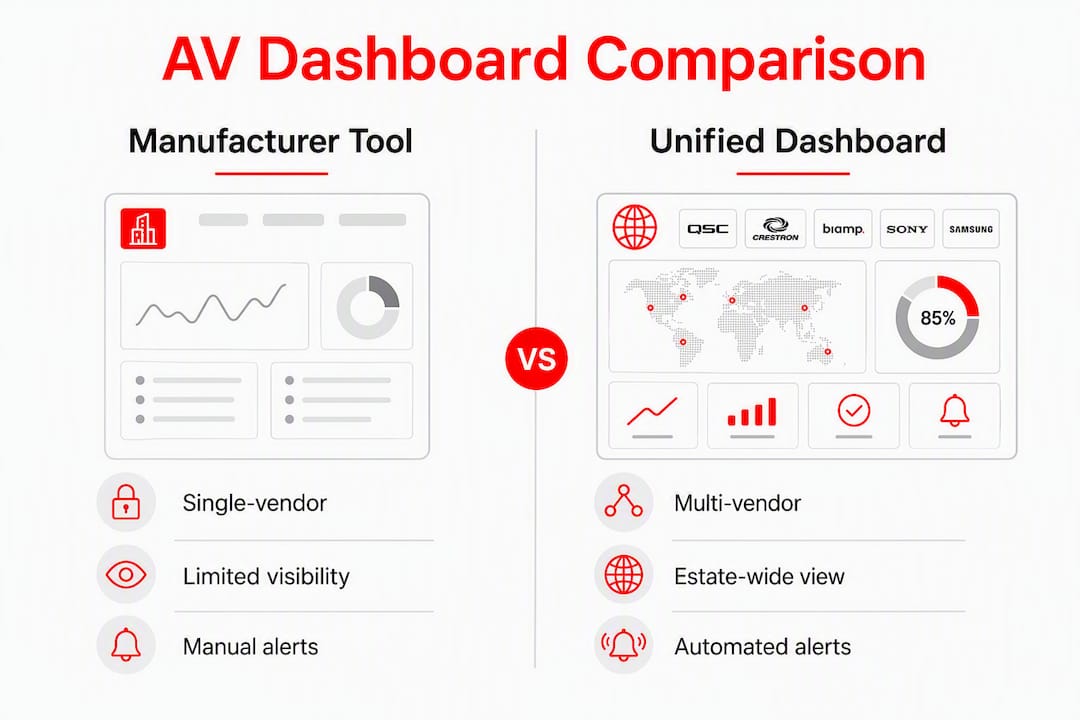
Manufacturer tools still make sense in one scenario: a single-vendor, single-room installation where the integrator controls every device and no IT team is involved. A small conference room running entirely on one brand's ecosystem does not need a unified platform. The moment a second vendor enters, or a second location, the calculus shifts.
For enterprise IT, the ROI case for a unified platform is clearest when remote remediation is factored in. Automated power-cycling and remote reboots materially reduce on-site dispatches, saving hours per incident and cutting truck-roll costs across a distributed estate.
What features matter most in the best unified dashboard AV solutions?
Evaluation criteria fall into three tiers. Getting the must-haves wrong disqualifies a platform; the should-haves separate good from great; the nice-to-haves are worth asking about but should not drive the decision.
Must-have features
- Vendor and device agnosticism. The platform must monitor and manage hardware from multiple manufacturers without requiring proprietary agents or custom integrations for each one.
- Network-friendly architecture. Platforms built on standard IT protocols let IT teams use existing security infrastructure rather than managing proprietary AV stacks. Look for SNMP, REST APIs, and standard network discovery.
- Role-based access control (RBAC). Local facility managers should see only their site. Central IT retains estate-wide telemetry. Mixing those views creates alert fatigue and security exposure.
- Remote remediation including self-healing. Automated reboot, power-cycle, and input-switching actions are the fastest path to measurable operational savings.
- Contextual alerting. Alerts must carry enough metadata (device, room, site, severity, recent history) to act on without opening a second tool.
- APIs and ITSM integrations. The platform must connect to your ticketing system (ServiceNow, Jira, Zendesk) and CMDB so AV incidents flow into existing workflows.
- Multi-location management. A single pane of glass across all sites, with geographic mapping and per-site drill-down.
- Business-level analytics. Platforms with business-level reporting translate uptime and incident data into utilization rates and lifecycle metrics that justify budget requests.
Should-have features
- Firmware and version management across device types
- Asset tracking with warranty status and end-of-life dates for refresh planning and ROI calculations
- Room and floor-plan visualization
- Multi-tenant support with tagging for departments or cost centers
- Automated scheduled reporting for stakeholders
Nice-to-have features
- AI-assisted diagnostics and predictive maintenance
- Pre-built connectors for popular ITSM and CMDB systems
- Customizable KPI dashboards by business unit
Pro Tip: Ask every vendor to show you a live alert that fired in the last 24 hours and walk you through the remediation steps. If they cannot do it in the demo, they cannot do it in production.
On security: require encryption in transit and at rest, SSO/SAML support, granular RBAC, full audit logging, and a clear vendor security disclosure process. These are not negotiable for any platform touching enterprise infrastructure.
How does pricing work for unified AV dashboard platforms?
Pricing models vary, and the one that looks cheapest at contract signing often is not the cheapest at year two.
- Per-location pricing suits multi-site operators with consistent room counts per site. Costs are predictable and scale linearly with estate growth.
- Per-device pricing favors smaller estates with high device density per site. It becomes expensive quickly as endpoint counts grow.
- Per-seat (named user) licensing is less common in AV management but appears in platforms that blend AV with broader IT asset management.
- Tiered SaaS subscriptions bundle feature sets at price tiers. Entry tiers often exclude remote remediation or advanced analytics, which are the features that deliver the most operational value.
- Managed-service add-ons cover onboarding, normalization, and ongoing support. These are worth budgeting for separately.
The primary cost drivers beyond the license fee are endpoint count, geographic distribution, support SLA tier, premium modules (music integration, signage, class scheduling), and the onboarding and normalization work required before the platform delivers value.
On total cost of ownership: practitioners estimate that approximately 70% of initial platform value depends on standardizing device names and network settings before connecting devices. Budget for that work explicitly. The savings from remote remediation (fewer truck rolls, faster mean time to repair) and from automated reporting (hours reclaimed from manual spreadsheet work) are the two clearest lines to draw when building a business case for finance.
How should you evaluate AV dashboard vendors before buying?
A structured evaluation process prevents the most common procurement mistake: buying on demo polish rather than operational fit.
- Run a multi-site map demo. Ask the vendor to show a live view of at least three locations with real or simulated device health data. If the map is static or requires manual refresh, that is a red flag.
- Trigger a remote remediation action. Watch a reboot or power-cycle execute and confirm the device status updates in real time.
- Review the API documentation before the demo. If it is not publicly available or requires an NDA to access, integration will be painful.
- Ask for a sample report translated to business metrics. Uptime percentage is a technical metric. Utilization rate by room, cost per incident, and device lifecycle status are business metrics. You need both.
- Probe the onboarding process. Ask specifically: who owns device naming normalization, how long it takes, and what happens when a device does not conform to the naming schema.
- Test RBAC in the demo environment. Log in as a facility manager and confirm you cannot see another site's data. Then log in as central IT and confirm you can see everything.
Questions to ask every vendor:
- What is your SLA for platform uptime and for support response?
- How do you handle a device type we add after go-live that you have not seen before?
- What does your security disclosure process look like?
- Are integrations with our ITSM included in the base license or priced separately?
Red flags to watch for: pricing that hides integration costs in a separate SKU, no publicly documented security posture, RBAC that is role-based in name only (all users see all data), and onboarding timelines that assume your device naming is already standardized.
A simple scorecard weighted across technical fit (25%), integration depth (20%), security (20%), TCO (15%), support quality (10%), and vertical fit (10%) gives procurement a defensible basis for the final decision.
When does a vertical specialist beat a general unified platform?
General unified platforms are built for breadth. They handle hundreds of device types across dozens of verticals, which means their vertical-specific features are usually thin. For enterprise IT managing a mixed estate of conference rooms, lobbies, and training spaces, that breadth is exactly what you need.

For operators running a single vertical with specific workflow requirements, the calculus is different.
A gym operator, for example, does not primarily need port-level PoE diagnostics or CMDB connectors. They need class schedules to sync with the right screens, workout timers to display in the right rooms, music to switch automatically between zones, and promotional content to rotate without requiring a technician. Kingdomsignage is built for exactly that workflow: a unified dashboard that consolidates digital signage, class scheduling, workout timers, and music integration across locations, with multi-room management from a single interface.
The vertical-fit checklist by environment:
- Fitness / gym: class scheduling integration, zone-based audio control, workout timer display, multi-room sync, promotional content scheduling
- Hospitality: wayfinding, event scheduling, lobby displays, room booking integration
- Education: classroom display management, bell schedule integration, emergency alert broadcasting
- Corporate: meeting room booking, occupancy display, executive dashboard feeds
If more than half the features on your required list are vertical-specific, a specialist platform will deliver faster time to value and lower configuration overhead than a general platform customized to fit.
What does a realistic implementation timeline look like?
Most enterprise deployments follow a sequential five-phase pattern that varies in duration depending on estate size and normalization needs.
Pilot checklist before expanding to full estate:
- Device coverage confirmed (all target device types monitored)
- Network readiness verified (firewall rules, VLAN access, DNS resolution)
- SLA tests passed (alert latency, remediation response time)
- Remote remediation verified on at least two device types
- Reports validated against manual counts
- Staff trained on their role-specific dashboard view
The normalization phase is where most deployments stall. Most of the initial platform value depends on standardizing names and network settings before devices connect. Skipping or rushing this phase produces a noisy, unreliable dashboard that erodes stakeholder confidence before the platform has a chance to prove itself.
What is the final verdict and what should you do next?
Run a proof of concept if your estate spans more than five locations or three AV vendors. Run a pilot deployment if you have already validated the platform category and are choosing between shortlisted vendors.
Immediate next steps:
- Complete a device inventory: count endpoints by vendor, device type, and location
- Shortlist two to three platforms based on the evaluation criteria above
- Schedule a multi-site demo with each vendor using the demo checklist from the evaluation section
- Define pilot success metrics before the pilot starts: alert accuracy rate, remote remediation success rate, and time saved per incident
- Run a 30–60 day pilot at one to three representative sites before committing to a full rollout
Pilot request template (adapt for vendor outreach):
Large-scale deployment examples
Enterprise AV teams that have moved from manufacturer tools to unified platforms consistently report the same pattern: the first 90 days are spent on normalization, and the operational savings become visible in months three through six.
A corporate real estate team managing a large number of meeting rooms across a distributed campus network typically sees the clearest wins in remote remediation. Before consolidation, a display going offline required a facilities ticket, a site visit, and often a 24-hour resolution window. With automated power-cycling and remote reboot, the same incident resolves in minutes without a truck roll.
Fitness franchise operators face a different version of the same problem. Managing multiple gym locations with separate signage tools, audio systems, and scheduling software requires coordination across multiple platforms and staff members. A unified platform that handles multi-room display management alongside scheduling and audio cuts that coordination overhead significantly, and it makes promotional content updates something a single operator can execute across all locations in minutes.
Education deployments benefit most from the alerting and RBAC capabilities. A district IT team managing displays across dozens of classrooms needs local staff to see only their building's health status, while central IT retains visibility across the full estate. That separation, enforced through role-based access control, reduces alert noise for local staff and keeps the central dashboard actionable rather than overwhelming.
Key Takeaways
Unified AV dashboards deliver measurable operational value for multi-vendor, multi-location estates, but only when device normalization is completed before go-live and RBAC is configured to match actual operational roles.
| Point | Details |
|---|---|
| Manufacturer tools have a hard ceiling | Siloed alerts and no estate-level analytics make them unworkable beyond single-vendor, single-room deployments. |
| Normalization drives platform value | Approximately 70% of initial value depends on standardizing device names and network settings before connecting devices. |
| Remote remediation is the fastest ROI | Automated reboot and power-cycling reduce truck rolls and cut mean time to repair across distributed estates. |
| RBAC is not optional | Local managers see their site; central IT sees everything. Mixing those views creates alert fatigue and security risk. |
| Kingdomsignage fits gym and fitness verticals | For operators needing unified signage, class scheduling, timers, and music from one dashboard, Kingdomsignage is the purpose-built option. |
The part of AV consolidation most buyers underestimate
The technology decision is actually the easy part. Pick a platform with solid device agnosticism, real RBAC, and an API that connects to your ITSM. That narrows the field quickly. What most procurement processes underestimate is the organizational work that determines whether the platform succeeds.
Naming conventions sound trivial until you are six weeks into a deployment and half your devices are named "Display 1" in three different rooms across four sites. Establish a naming schema before you connect a single device. Room taxonomy, site codes, device type prefixes: get these agreed upon in writing before the pilot starts, and enforce them as a condition of go-live.
Role separation is the other thing that gets skipped. Practitioners who have run large deployments consistently report that dashboards become noisy and unused when every user sees every alert. Map roles to actual jobs: helpdesk sees actionable alerts for their queue, facilities sees site health for their building, central IT sees the full estate. That mapping is a configuration decision, but it is really an organizational decision that needs sign-off from operations leadership, not just IT.
On procurement: budget for onboarding explicitly, not as a line item that gets cut when the license fee comes in higher than expected. Insist that API and ITSM integrations are included in the base contract, not priced as professional services after signing. And negotiate onboarding SLAs with teeth: if the vendor misses the normalization milestone, the go-live date moves, not your budget.
The buyers who get the most from unified AV platforms are the ones who treat the first 90 days as an organizational change project, not a technology deployment.
Kingdomsignage: unified signage and audio for gyms, from one dashboard
Gym operators running separate tools for screens, music, class schedules, and timers are paying a coordination tax every single day. Kingdomsignage eliminates that by putting digital signage, class scheduling, workout timers, and zone-based audio under one dashboard, built specifically for how gyms actually operate.

The platform handles multi-room sync, real-time announcements, and promotional content rotation across every location, whether you run one studio or a franchise network. Content updates that used to require logging into three separate tools happen in a single action. Class transitions, music zone changes, and promotional displays stay coordinated without staff intervention.
When you evaluate Kingdomsignage, ask to see multi-room audio and video sync in the demo, role-based access for front-desk versus management views, onboarding support and timeline for your location count, and per-location pricing against your current tool stack. The free trial gives you a working environment to validate those capabilities before committing. Start your trial or request a demo at Kingdomsignage.com and bring your current screen and audio setup details so the onboarding team can scope your configuration accurately.
Useful sources and further reading
- BSS OMNI: The Unified Audio, Video & Control Platform — Technical overview of a purpose-built unified AV and control platform; useful for understanding hardware-software integration standards and what "unified" means at the infrastructure level.
- PepperDash Portal: AV Operations Platform — SaaS-based AV device management platform documentation; covers unified device management workflows and deployment models relevant to enterprise IT teams.
- Innomate Innomesh: Cloud-Based AV Monitoring — Covers cloud, native, and hybrid deployment models for AV and UC monitoring; useful for teams evaluating tiered alerting systems and proactive remote management.
- AVNetwork: 15 Hardware and Software Solutions for AV Control — Industry roundup of AV control hardware and software; useful for understanding the range of control approaches available and how unified platforms fit within the broader AV control market.
- Utelogy AV Monitoring and Management Features — Detailed feature documentation covering cloud scaling, RBAC, and device normalization requirements; directly relevant to pilot planning and onboarding scope.
- Ross Video Dashboard — Reference for role-based access control implementation and tenant separation in AV dashboards; useful for IT teams defining access policies before go-live.
- Kingdomsignage: Gym AV Infrastructure Design — Technical overview of AV architecture decisions for gym environments; relevant for fitness operators planning a unified dashboard deployment.