
Audio ducking for announcements works by automatically pulling background music down the moment a voice signal fires, then bringing it back up once the announcement ends, so speech stays intelligible without ever cutting the music entirely. The main implementation approaches covered here are hardware DSP or mixer ducking, plugin/DAW sidechain compression, FFmpeg and automation-platform scripting, and unified dashboards that let operators manage presets across rooms.
TL;DR:
- Proper routing ensures the announcement signal triggers ducking of the music, not the other way around; reversing inputs causes ineffective operation.
- Using a consistent preset tailored to the announcement type and fine-tuning parameters like release time prevents unnatural sounds and abrupt volume changes.
- Hardware DSP units handle multi-room ducking reliably but lack real-time adjustability, while software plugins and scripts offer more control but need careful setup.
- Regular validation with live voices and real content is crucial to avoid issues like clipping, missed cues, or music pumping during announcements.
- Centralized preset management across rooms helps maintain uniform sound quality and prevents configuration drift that degrades listener experience.
Table of Contents
- How Audio Ducking Works: Sidechain Compression, Triggers, and Signal Flow
- Parameter Ranges and Starter Presets for Announcements
- Choosing an Implementation Path: DSP, Plugins, or Scripted Automation
- Tuning and Troubleshooting Checklist
- Operational Best Practices for Venues: A Kingdom Signage Perspective
- FFmpeg Command and Plugin Routing Reference
- Why Unified Control Changes the Announcement Experience
- Get Multi-Room Ducking Right Without Touching Five Different Mixers
- Sources
How Audio Ducking Works: Sidechain Compression, Triggers, and Signal Flow
Ducking is sidechain compression applied with intent. You route two signals into a compressor: the main path (background music) and the sidechain path (the announcement, whether that's a live mic, a paging system, or a text-to-speech engine). The compressor listens to the sidechain, and when that signal crosses a threshold, it turns down the main path's gain. No manual fader work, no operator standing by the mixer during class transitions.
The routing matters more than most people expect. In a typical setup, background music runs through a bus insert holding the ducker plugin or DSP block, while the announcement mic or TTS output feeds that same ducker's sidechain input, not the main signal chain. Get that reversed, and you'll duck the announcement instead of the music, which is a surprisingly common wiring mistake in mixers with unlabeled sidechain sends.
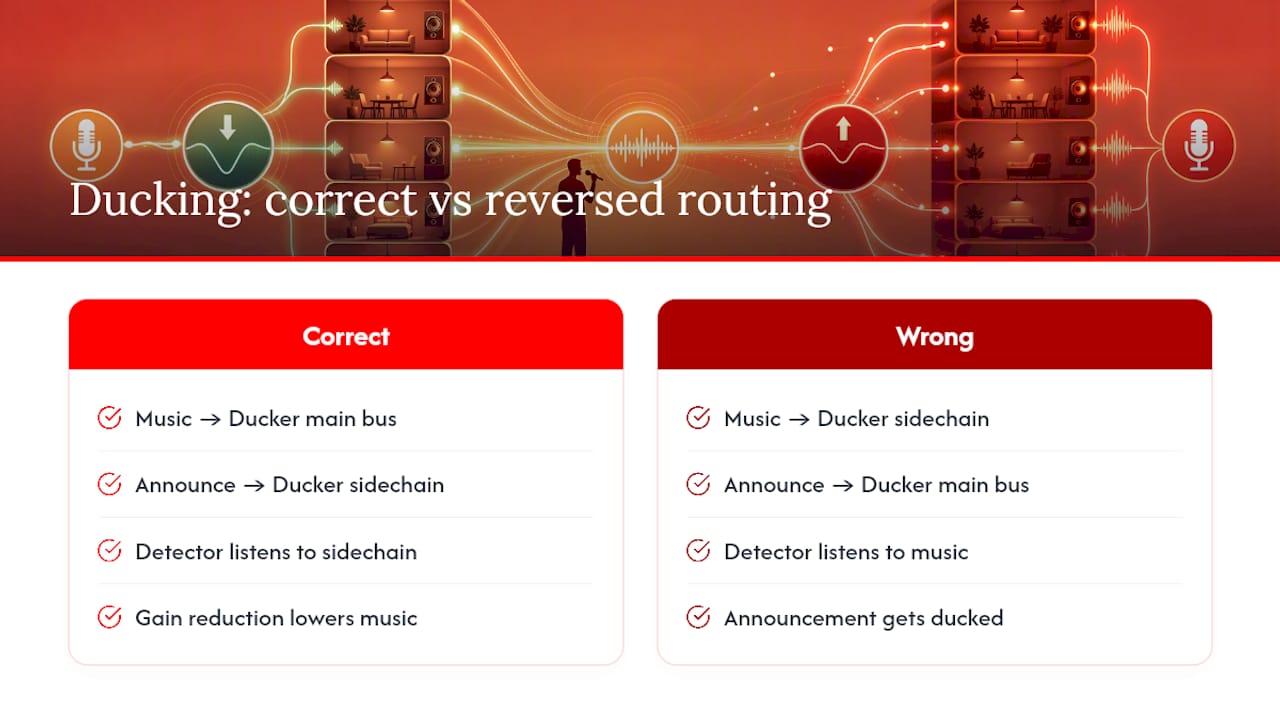
Trigger source choice changes your entire tuning strategy. A live mic has natural noise floor variance and breath sounds that can false-trigger a poorly set threshold, whereas a TTS or prerecorded announcement file has a clean, consistent level, which means you can set a tighter threshold and faster attack without worrying about ambient room noise tripping the ducker mid-song. Paging systems that route through a dedicated priority input, as commercial PA systems do, often skip level-detection logic entirely and instead use a hard priority flag: mic active equals duck now, no threshold math required.
That priority-flag approach is really a cousin of ducking, not ducking itself. True ducking layers the announcement over reduced music. Interruptive muting kills the music outright, which is what you want for emergency evacuation messages but is jarring and unnecessary for a "last call for the 6pm spin class" announcement. Pick layering for routine, informational, or promotional messages, and reserve full mute for anything safety-critical.
Parameter Ranges and Starter Presets for Announcements
Six parameters control how a ducker behaves, and getting them wrong is the single biggest reason ducking sounds either sluggish or seasick.
- Threshold sets the level the sidechain signal must cross to trigger ducking. Somewhere around -25 dB is a reasonable starting point for speech, per FFmpeg's sidechaincompress documentation, though a noisy room may need it lower.
- Ratio controls how hard the compressor pulls the music down once triggered. Typical settings provide noticeable ducking without sounding choppy, adjusted according to the desired effect.
- Attack is how fast the duck engages. A fast attack avoids audible clicks and ensures the speech cuts through smoothly.
- Release is how fast the music returns after speech stops. A moderate release time helps avoid audible pumping between sentences, while longer announcements may need longer release times to avoid abrupt volume changes.
- Lookahead gives the ducker a few milliseconds of advance warning before the trigger, which prevents the first syllable of an announcement from getting clipped. This is the trade for adding a small, fixed amount of latency, per atkDucker's documentation.
- Hold keeps the duck engaged briefly after the trigger drops, useful for speech with natural pauses.
Here's how those settings map onto real announcement types:
| Preset | Notes |
|---|---|
| Short TTS page | Clean signal tolerates a tight, fast response |
| Long PA announcement | Long release rides through mid-sentence pauses |
| Live emcee/host | Gentler ratio compensates for inconsistent mic gain |
| Fitness class cue | Fast, aggressive duck for short instructor calls over loud music |
Start with the preset closest to your use case, then adjust release first. It's the parameter most tied to how natural the transition feels.
Choosing an Implementation Path: DSP, Plugins, or Scripted Automation
Hardware DSP and mixers handle ducking at the signal-processing layer, often with a dedicated priority input specifically for paging mics. Networked DSP units (Biamp, QSC, and similar platforms) let you configure ducking once and push it across multiple zones, which matters if you're running five rooms off one rack. The tradeoff is setup complexity: DSP programming isn't something you tweak on the fly from a phone.
Plugin and DAW-based ducking gives you the most granular control. atkDucker, for instance, supports mid/side mode and filter-mode ducking, meaning you can duck only the frequency range where vocal masking happens rather than pulling the entire mix down, which keeps some stereo ambience intact in music-heavy rooms. Setup generally follows this order:
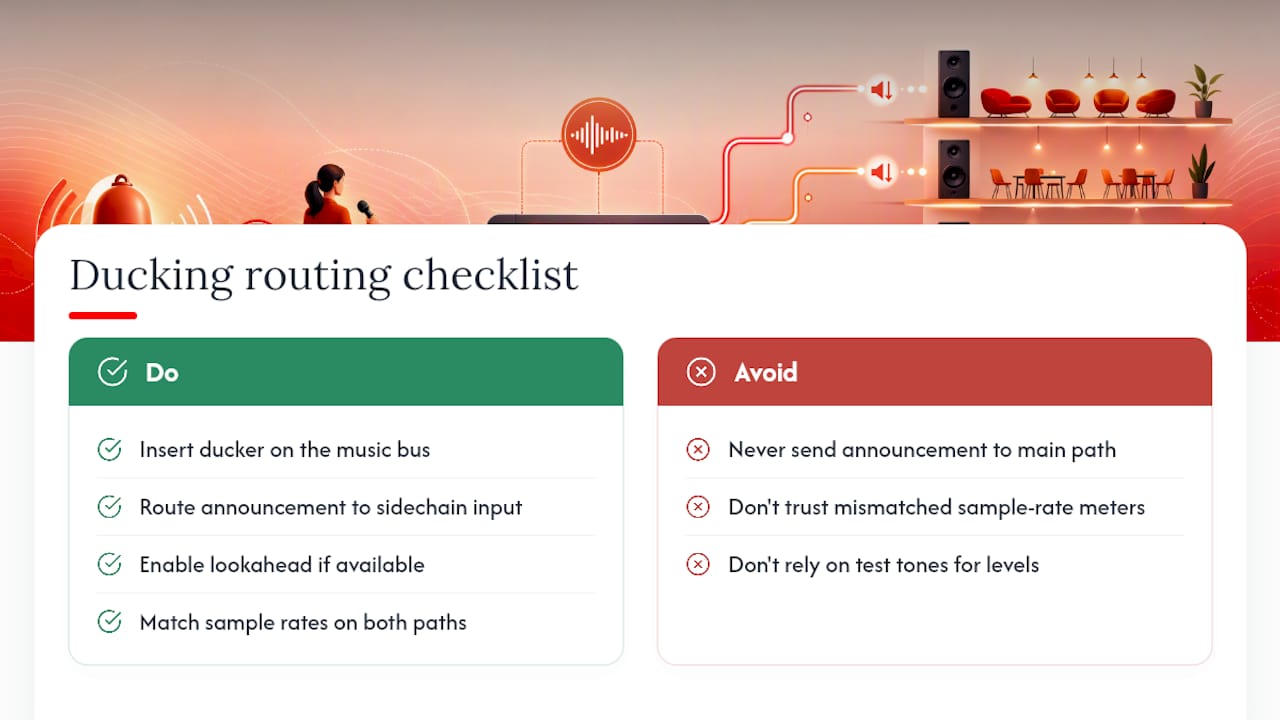
- Insert the ducker on the background music bus, not the announcement track.
- Route the announcement or mic signal to the ducker's sidechain input.
- Set lookahead if your plugin supports it, to protect the first syllable.
- Confirm sample rates match between sidechain source and main path. Mismatched rates cause detection lag that's maddening to diagnose later.
FFmpeg and automation-platform scripting wins when you need batch processing or event-driven triggering without a human at a fader. The sidechaincompress filter does exactly what a hardware ducker does, just in software, which makes it ideal for prerecorded content pipelines or scheduled announcement systems. The catch: FFmpeg ducking is static per render, not truly live and reactive, so it fits pre-produced announcement tracks better than real-time paging.
For live systems, Home Assistant's community discussion on native ducking support illustrates what automation platforms still lack: proper parameters for ducking level, background media ID, and pre- / post-announcement delay, built into the announcement API itself rather than bolted on with custom scripts. Multi-zone deployments amplify every latency issue, since a duck that lands a half-second late in one room but on time in another creates an audible mismatch guests notice even if they can't name it.
Tuning and Troubleshooting Checklist
Most ducking complaints trace back to one of three symptoms: pumping, missed triggers, or an abrupt, unnatural return to full volume.
Pumping (the music audibly breathing up and down between words) usually means release is too fast or ratio is too aggressive. Slow the release toward 800 to 1,200 ms and drop the ratio to 4:1. If your ducker supports linear-in-dB gain ramps instead of linear-in-amplitude, switch to that mode. It smooths the transition curve noticeably.
Missed triggers point to a threshold set too high for the actual announcement level. Lower the threshold in small steps, and if your background music runs hot, consider pre-attenuating the BGM bus by 2 to 3 dB so the sidechain has an easier job distinguishing voice from music. Increasing sidechain sensitivity helps too, but do it before touching threshold, since sensitivity changes affect detection speed independent of level.
Abrupt returns almost always mean release is too short for content with natural speech pauses. This is the exact failure mode long PA announcements hit when tuned like short TTS pages.
Multi-room sync issues need a different fix entirely: check that every zone's DSP or player is running the same firmware version and confirm network audio distribution isn't introducing variable latency between rooms.
Before calling any setup finished, run this quick validation pass:
- Play music at real venue volume, not studio-quiet monitoring levels.
- Trigger the announcement source at the actual mic gain staff will use, not a bench-test level.
- Listen for the first syllable. If it's clipped, add lookahead.
- Let a full announcement with pauses play through. If music surges mid-sentence, release is too short.
Pro Tip: Test with a real staff member's voice, not your own. Gain staging and proximity habits vary enough between people that a duck tuned to your voice can under-trigger for someone who talks softer into the mic.
Operational Best Practices for Venues: A Kingdom Signage Perspective
Getting the DSP math right is only half the job. The other half is making sure the same preset behaves consistently whether it's triggered by a front-desk staffer, a scheduled TTS message, or a class instructor's headset mic, across every room in the building.
We recommend mapping presets to room function, not to a single global setting. A cardio floor running high-energy music needs the fitness-cue preset (fast attack, aggressive ratio) to cut through during a coach's countdown. A lobby or reception area, playing quieter ambient music, does better with the long PA preset since announcements there are informational, not urgent.
Ducking timing should also respect whatever's happening on-screen. If a class-transition announcement fires while a promotional video is mid-play on the lobby display, an abrupt audio cut feels disconnected from the visual timeline even when the ducking itself is well tuned, which is why pairing signage transitions with audio cues matters as much as the compressor settings.
A few habits keep configurations from drifting room to room:
- Standardize mic gain staging across all announcement stations so one preset actually works everywhere.
- Run the validation checklist above after any hardware swap, not just at initial install.
- Set a documented fallback behavior (full mute, not partial duck) for emergency announcements specifically.
- Centralize presets in one dashboard so a change in one room doesn't silently diverge from the others over months of manual tweaks.
That last point is the one operators underestimate. Configuration drift, where Room A's release time quietly diverges from Room B's after six months of "quick fixes," is a bigger source of inconsistent announcement quality than any single bad parameter choice.
FFmpeg Command and Plugin Routing Reference
A working FFmpeg ducking command looks like this:
ffmpeg -i bgm.wav -i announcement.wav -filter_complex "[0:a][1:a]sidechaincompress=threshold=0.03:ratio=6:attack=20:release=400[ducked]" -map "[ducked]" -map 1:a output.wav
Breaking it down: threshold=0.03 sits around -25 dB, ratio=6 gives a firm but not harsh duck, attack=20 (milliseconds) catches the announcement onset cleanly, and release=400 handles short TTS pages well. For longer PA-style content with pauses, push release to 1200 and drop ratio to 4 so the music doesn't chase every breath.
For plugin or DSP setups, the routing checklist is short: insert the ducker on the music bus, route the announcement to its sidechain input (never the main path), enable lookahead if available, and confirm both signal paths run at matching sample rates before you trust any level reading.
Ducking multiple background channels at once works best when each BGM path runs through its own sidechaincompress instance, all keyed off the same voice sidechain, then remixed afterward, which avoids cross-triggering and keeps the stereo field intact.
Check levels with real content, not test tones, before locking any preset into production.
Why Unified Control Changes the Announcement Experience
Poor ducking isn't a subtle problem. Members hear it as the music cutting out awkwardly, or they miss the announcement entirely because it got buried under a loud chorus. Either failure erodes trust in the announcement system itself, and staff stop using it, which defeats the entire point of having one.
Consistent ducking across every room, tuned once and applied everywhere, is what turns announcements from an occasional interruption into a background feature nobody resents. That consistency is exactly what breaks down when presets live in five different mixers instead of one dashboard.
If you're running multiple rooms and want to test presets like the ones above without touching a rack of DSP units individually, KingdomSignage's room-specific playlist tools are worth trying against your own announcement content.
— Kingdom
Get Multi-Room Ducking Right Without Touching Five Different Mixers
Kingdomsignage gives gym and studio operators one dashboard to set announcement ducking once and push it across every room, instead of hand-tuning a separate DSP or mixer in each zone.

The presets and parameter ranges covered above only pay off if they stay consistent room to room, and that's the exact configuration-drift problem a unified AV dashboard is built to prevent. With Kingdomsignage, you get:
- Central preset management so a fitness-cue duck setting applies identically across every room running it.
- Multi-room scheduling that ties announcement timing to class transitions and signage content.
- Synchronized audio and visual cues, so a lobby screen and its speaker feed change together.
- Remote testing, so you can validate a preset without walking to every rack in the building.
Clear, non-interruptive announcements also matter for guest communication in shared spaces, where a jarring audio cut can undercut an otherwise good experience. If your rooms are still running on separately tuned mixers, request a KingdomSignage demo and test your own presets across a real multi-room setup.
Sources
- Automatically Duck BGM Under Narration with sidechaincompress
- atkDucker | atkAudio
- What is commercial automatic priority audio ducking or muting and how to use it for paging and emergency announcements
- Proposal: Native support for background audio "ducking" in media player announcements · home-assistant architecture · Discussion #1383 · GitHub