
Yoga studio signage is a single dashboard that keeps class schedules, in-room music, and displays in sync so studios run with less admin and fuller classes. The one feature to prioritize above all others is real-time schedule sync paired with multi-zone audio and visual coordination, backed by local caching so a shaky gym Wi-Fi connection never freezes a screen mid-class. Get that right and you'll see fewer no-shows, faster transitions between sessions, and clearer communication with members who no longer have to ask the front desk what's happening next.
TL;DR:
- Real-time schedule sync and multi-zone audio-visual coordination are essential for smooth class transitions and reducing member confusion.
- Offline caching is crucial to prevent display freezing during Wi-Fi outages, and live testing of this feature in demos is highly recommended.
- Integration with booking, POS, and scheduling systems ensures instant updates and reduces front-desk questions about class availability.
- A phased rollout, starting with one lobby screen and expanding gradually, minimizes disruption and allows for troubleshooting network or hardware issues.
- Prioritizing synchronization capabilities over screen size or design details prevents long-term manual management and operational chaos.
Table of Contents
- What Core Capabilities Does Yoga Studio Signage Need?
- How Do You Choose the Right System? A Prioritized Checklist
- How Do You Roll Out Signage Without Disrupting Classes?
- Which Integrations Actually Matter for Studios?
- What Does Signage Actually Cost, and Does It Pay Back?
- What Kingdom Signage Prioritizes for Studio Operators
- Do Studio Screens Work for Members with Disabilities?
- Is Networked Signage Software Actually Secure?
- Can You Keep Branding Consistent Across Multiple Locations?
- How Do You Keep Signage Running Without Constant IT Calls?
- The Real Priority: Sync, Not Screens
- Ready to See Multi-Zone Sync in Action?
- Sources
What Core Capabilities Does Yoga Studio Signage Need?
The phrase "digital signage" undersells what a good system actually does in a working studio. Think of it less as a bulletin board and more as an operations layer that touches booking, audio, and member communication at once. A handful of capabilities separate a system that quietly runs the building from one that just displays a static class list.
- Real-time schedule sync: Lobby and studio screens pull directly from your booking calendar, so a canceled 6 p.m. flow class disappears instantly instead of confusing walk-ins an hour later.
- Automated waitlists and reminders: When someone cancels, the system should notify the next person in line automatically, converting empty mats into filled ones without a staffer making calls.
- Multi-zone audio and visual sync: Music and screen content change together across rooms, so a Vinyasa room transitioning to Restorative doesn't blast the wrong playlist over calm imagery.
- Local caching: Media players store content locally so a dropped internet connection doesn't blank out mid-class.
- Content zoning and day-parting: Morning screens can push class start times while evening screens rotate in retail promotions or workshop signups.
- Simple, template-driven content management: Front-desk staff should be able to update a promo or swap a schedule without calling IT.
Pro Tip: Test the offline behavior before you sign anything. Unplug the router during a demo and watch whether the screen freezes, goes black, or keeps playing from local cache. That thirty-second test tells you more than any sales deck.
How Do You Choose the Right System? A Prioritized Checklist
Comparing signage platforms gets easier once you stop evaluating features in isolation and start scoring vendors against a fixed list. Six criteria matter more than the rest: integration depth with your booking software, true multi-room audio capability (not just multiple screens showing the same feed), local caching for outages, transparent music licensing, clear per-screen pricing, and visible uptime monitoring.
Ask any vendor to run three tasks live during the demo, not in a slide deck:
- Change a class time in your booking system and watch how fast it propagates to the lobby screen and the studio screen inside that room.
- Cancel a spot and confirm the waitlist cascade actually fires, notifying the next person automatically rather than flagging it for staff to handle manually.
- Trigger a class transition and check whether music, on-screen timer, and visual content shift together, not one after another with an awkward gap.
A few warning signs should end the conversation fast. If music and signage run on separate systems that require manual syncing, you're buying two products pretending to be one. No offline caching means a Wi-Fi hiccup turns your lobby screen into a black rectangle. Hidden per-screen fees that appear after the sales call are a pricing-transparency problem, not a technicality. And if the platform can't integrate with your primary booking and scheduling software, you're back to manual updates within a month.
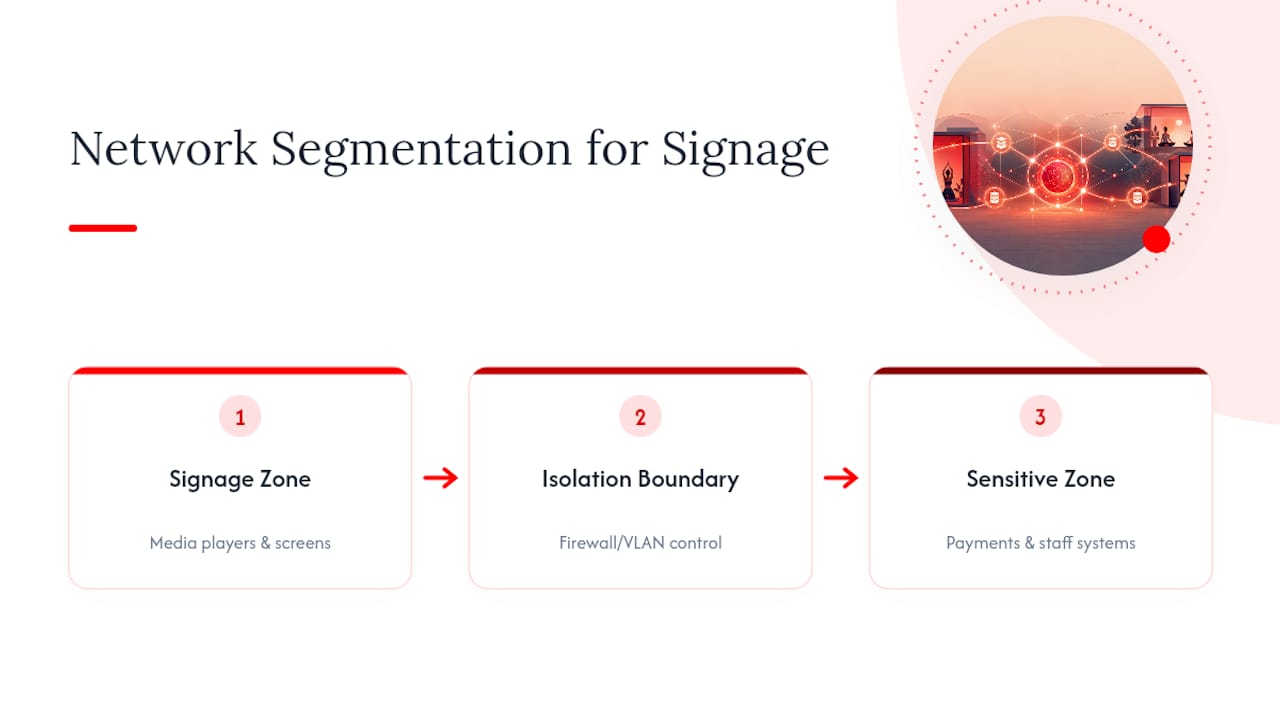
Before rollout, confirm network segmentation for media players (keep them off the same network as member Wi-Fi), get the vendor's recommended media player specs in writing, and verify mobile admin access so a manager can push a change from their phone.
How Do You Roll Out Signage Without Disrupting Classes?
A rollout succeeds or fails based on sequencing, not ambition. Studios that try to wire every room on day one tend to create more confusion than the old whiteboard ever did. A phased plan keeps risk low and gives you real data before you commit budget to a full build-out.
- Map your zones first. Walk the building and list every screen location: lobby, each studio room, the cardio or floor area if you have one. Note which zones need audio sync and which are visual-only.
- Pick one pilot screen. The lobby is almost always the right starting point since it touches every visitor and doesn't interrupt an active class if something glitches.
- Confirm your network and caching approach. Decide whether media players sit on a dedicated network segment and confirm the platform caches content locally before you mount a single screen.
- Choose hardware. Commercial-grade displays handle continuous run-time better than consumer TVs, though many studios start with existing TVs paired with a recommended media player to control upfront cost.
- Expand to one studio feed. Once the lobby pilot runs clean for a week or two, add the schedule and music feed inside your busiest studio room.
- Layer in multi-zone audio sync. This is where transitions between classes start feeling automatic rather than staff-managed.
- Roll out to remaining rooms and locations. By this stage you've already caught the network quirks and staff-training gaps, so full rollout moves faster.
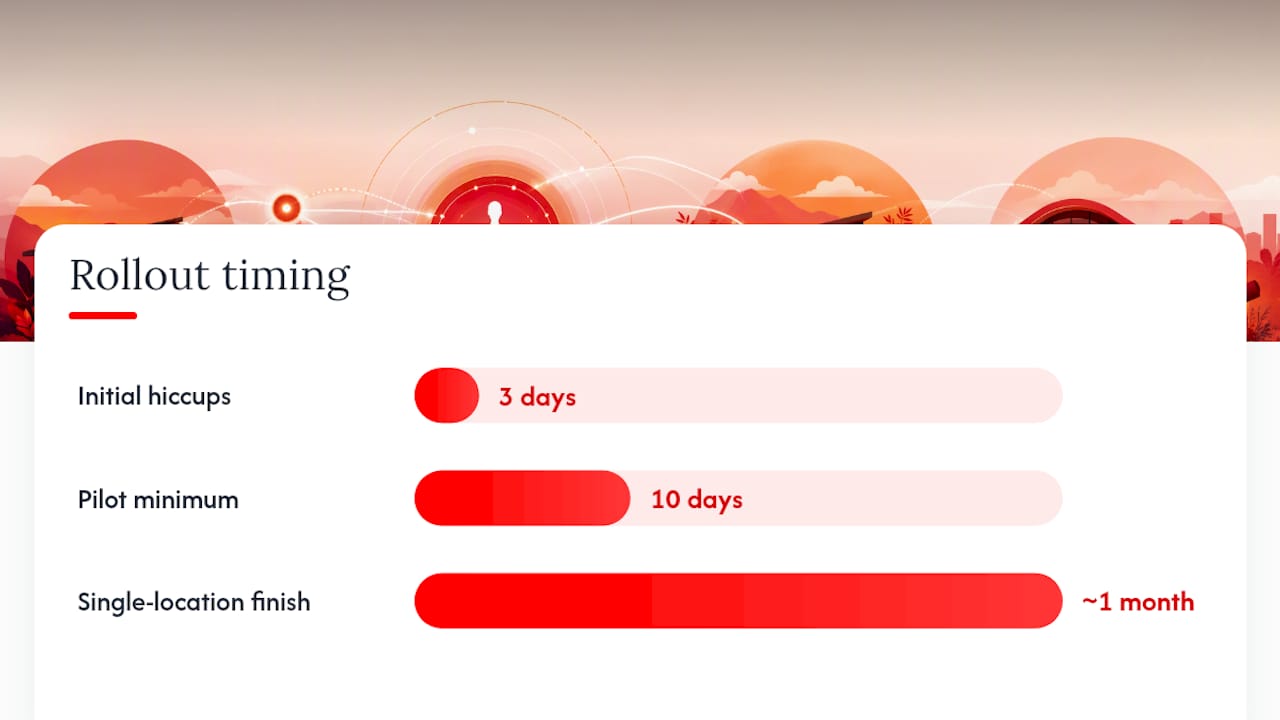
Realistic timing: pilot for a few weeks, then studio feed expansion, followed by multi-zone sync testing, and finally full rollout. A single-location studio can typically be fully live within about a month or so; multi-location operators should plan accordingly to allow sufficient time for staggered installations.
Train front-desk staff on a simple script for the pilot period ("the schedule board updates automatically, but flag anything that looks off"), give instructors a cue for manual override if a transition glitches, and keep a printed backup schedule taped behind the desk for the first two weeks. That fallback costs nothing and saves you from a bad first impression if hardware ships late.
Pro Tip: Run the pilot for at least ten business days before judging it. Most hiccups show up in the first three days and get fixed fast, but you need real class-transition data across a full week's schedule to know if multi-zone sync is actually working.
Which Integrations Actually Matter for Studios?
Signage software is only as useful as what it connects to. A screen that shows a class schedule is nice; a screen that updates the instant someone books or cancels through your booking platform is what actually reduces front-desk questions.
- Direct API sync with your booking system should be the default ask. It pushes availability changes to screens in real time, with a calendar or CSV import as a fallback for smaller studios not ready for a full integration.
- POS linkage lets you target in-lobby promotions based on what members actually buy, showing a retail push to someone who just bought a mat instead of blasting the same generic offer to everyone.
- Unified music and visual scheduling avoids the legal and operational mess of running separate licensing and content systems. Handling both from the same scheduler ensures audio and visuals switch together instead of drifting out of sync mid-class.
- Growing studios that stick with spreadsheets eventually hit a wall. Most move to dedicated scheduling software within their first year once manual updates start breaking down under member volume.
The payoff shows up in daily friction: check-in flows get clearer, instructors transition between rooms without hunting for the right playlist, and walk-ins convert at a higher rate when they can see real-time class availability the moment they walk in.
What Does Signage Actually Cost, and Does It Pay Back?
Pricing typically breaks into a few predictable shapes, with variations depending on the number of screens and locations. None of that is exotic, but it adds up differently depending on how many rooms you're wiring.
A small pilot keeps the number manageable. Industry estimates put a three-screen setup around $573 and a five-screen setup around $955 for the first year, covering both hardware and software costs. That's a reasonable test budget for a single-location studio before committing to a full build-out.
The clearest ROI case comes from waitlists, not screens. A CorePower Yoga pilot using automated cascade notifications filled 91% of cancellations and recovered roughly $1,600 a month that had previously gone unfilled. That number reflects one documented pilot, not a guarantee, but it shows what automated fill-rate recovery is worth chasing.
Start with your highest-traffic screen, usually the lobby, and measure two things over thirty days: occupancy rate changes and staff hours no longer spent manually calling waitlisted members.
What Kingdom Signage Prioritizes for Studio Operators
Kingdom Signage was built around a specific frustration: gyms and studios juggling separate tools for TVs, class schedules, and music, none of which talk to each other. The platform's core bet is that unifying all three under one dashboard removes the manual syncing that eats staff time and causes mismatched transitions between classes.
That shows up in a few concrete ways for daily operations:
- Schedule edits made from any device propagate to every screen in the building without a separate content push.
- Multi-room audio and visual sync means a class transition in Studio B doesn't require someone physically walking over to change the music.
- Promotional campaigns can run consistently across multiple locations from a single control point, rather than being updated location by location.
If you're evaluating a demo, ask to see a live schedule change propagate to both a lobby screen and a studio screen at the same time, and look at real schedule display examples before deciding on your own layout. A reasonable trial goal: run one lobby screen and one studio feed for two weeks and track how many front-desk interruptions drop off.
Do Studio Screens Work for Members with Disabilities?
Signage that only works for members with perfect vision and hearing isn't finished signage. Accessibility isn't a nice extra here. It's the difference between a system that serves your whole membership and one that quietly excludes part of it.
Font size and contrast matter more in a yoga studio than most settings, since members often glance at a schedule screen from across a dim, low-light room mid-transition. High-contrast text (dark text on light backgrounds or vice versa, never low-contrast pastel-on-pastel combinations) and a minimum font size that reads clearly from fifteen feet away should be non-negotiable in your template choices.
Audio announcements need a visual counterpart. If your system pushes a spoken reminder about a schedule change or fire drill, a text version should appear on screen simultaneously for members who are deaf or hard of hearing. The reverse matters too: a system that relies entirely on visual alerts leaves out anyone who can't see the screen clearly, so pairing a chime or audio cue with visual changes covers both directions.
Motion sensitivity is an underdiscussed issue in fitness spaces. Aggressive scrolling text, flashing promotional banners, or fast slide transitions can genuinely bother members prone to migraines or vestibular issues, which matters in a room full of people doing inversions and balance poses. Favor static holds with gentle fades over hard cuts and constant motion.
Finally, keep language simple and avoid dense jargon on class-schedule screens. Not every member is fluent in studio shorthand, and a clear, plain-language schedule serves newcomers and regulars alike.
Is Networked Signage Software Actually Secure?
Every screen connected to your network is a device that can be compromised if it's set up carelessly, and gyms handle enough member data (names, contact info, payment references tied to booking systems) that a sloppy signage install becomes a real liability, not just an IT inconvenience.
Network segmentation is the single most effective safeguard. Media players and signage devices should sit on a separate network segment from the one carrying member payment data or staff systems, so a compromised display can't become a path into more sensitive parts of your infrastructure. This is a basic ask in any vendor conversation, not an advanced feature.
Look for role-based admin access, so a front-desk staffer can update a promo banner without having credentials that could touch billing integrations or member records. Vendors should also support forced password rotation and the ability to instantly revoke access for a departed employee.
Ask directly how the vendor handles data in transit and at rest, particularly if your signage integrates with your POS or booking platform. A vendor unwilling to answer basic questions about encryption or data retention policies is a signal to keep looking.
Physical security matters too. Media players mounted behind screens are an easy target for a curious member to unplug or tamper with, so mounting hardware out of reach and disabling unused USB ports on the player itself closes an obvious gap.
Can You Keep Branding Consistent Across Multiple Locations?
Multi-location studios face a specific tension: every location needs to feel like part of the same brand while still reflecting its own room layout, local promotions, and instructor lineup. Signage software has to support both at once.
Template-based branding solves most of this. Set a master template with your studio's fonts, colors, and logo placement, then let individual locations swap in local class photos, instructor names, or neighborhood-specific promotions without breaking the overall look. This keeps a Tuesday morning flow class in one city visually consistent with the same class type across town, even if the room and instructor differ.
Centralized campaign management matters just as much. A promotional push for a new class format or a seasonal membership offer should be schedulable from one dashboard and deployed to every location simultaneously, rather than requiring a manager at each site to manually build and upload the same content.
Local override permissions still need to exist. A location running a workshop unique to that studio should be able to add that content without waiting on corporate approval for every small update, while the core brand template stays locked to prevent drift.
How Do You Keep Signage Running Without Constant IT Calls?
Most signage problems fall into a small set of repeatable categories, and knowing the usual suspects saves hours of frustrated troubleshooting.
Screen goes black or frozen: Check the media player's power and network connection first. If local caching is working properly, a Wi-Fi drop shouldn't cause this, so a frozen screen despite a stable connection usually points to a player that needs a reboot or firmware update.
Schedule doesn't match booking system: This is almost always a sync delay or a broken integration, not a display problem. Confirm the API connection to your booking software is still authenticated, since expired credentials are the most common silent failure.
Audio and visual fall out of sync: Usually a sign that a room's media player and audio system are running on separate schedules instead of a unified scheduler. If this keeps happening, it's worth revisiting whether your platform truly unifies music and visuals or just runs them in parallel.
Content looks stretched or cropped wrong: Almost always a resolution mismatch between the template and the actual screen. Confirm your content templates match each screen's native resolution during setup, not after installation.
Basic maintenance habits prevent most of this: reboot media players on a weekly schedule, keep firmware updated, and do a monthly walk-through checking every screen in the building rather than waiting for a member to mention a problem.
The Real Priority: Sync, Not Screens
Most advice on studio signage focuses on the wrong layer. It's easy to get pulled into debating screen size, mounting angles, or which font looks best on a lobby display, and none of that moves the needle if the schedule feed is delayed or the music drifts out of sync during a transition. The conventional wisdom treats signage as a display problem. It's actually a synchronization problem, and studios that grasp that distinction early save themselves a rebuild eighteen months in.
The instinct to buy the cheapest screen and worry about integration later is backwards. Hardware is replaceable in an afternoon. A platform that can't sync schedules, music, and multi-zone audio in real time is a structural problem you'll be working around for years, not a setting you fix later.
If there's one thing to prioritize before anything else, it's local caching combined with true multi-zone sync, tested live and not taken on faith from a slide deck. Everything else, branding templates, promotional zoning, accessibility polish, builds cleanly on top of that foundation. Skip it, and you're just running a nicer-looking version of the same manual chaos.
— Kingdom
Ready to See Multi-Zone Sync in Action?
Kingdom Signage exists specifically because gyms and studios were running three disconnected tools, one for TVs, one for class schedules, one for music, and stitching them together by hand every day. That's the gap it closes: one dashboard controlling displays, schedules, and in-room audio together, instead of three logins and a lot of manual double-checking.

If you're ready to test this in your own building, ask for a demo that shows three things live: a schedule change propagating instantly to a lobby and studio screen, multi-zone audio switching in sync with a class transition, and how the system behaves when you unplug the network mid-demo. A sensible pilot scope is one lobby screen and one studio room, run for two to three weeks, measuring front-desk interruptions and class-transition smoothness before you decide on a full rollout.
Start that conversation on the Kingdom Signage landing page and request a demo scoped to your own room layout.
Sources
- Booking and Scheduling Software for Yoga Studios — Mindbody
- CorePower Yoga case study — Schedly
- Digital Signage for Gyms and Fitness Studios — Brix
- Music and digital signage synchronization — GoMixApp