
An RSS feed is an XML-based file (RSS 2.0) your CMS or automation tool publishes so Kingdomsignage and other signage widgets can pull live class schedules and announcements automatically. Here's the smallest feed that actually works:
<?xml version="1.0" encoding="UTF-8"?>
<rss version="2.0">
  <channel>
    <title>Iron Peak Gym Updates</title>
    <link>https://ironpeakgym.com</link>
    <description>Class schedules and announcements</description>
    <item>
      <title>HIIT Class — Monday 6 AM</title>
      <link>https://ironpeakgym.com/schedule/hiit-monday</link>
      <description>High-intensity interval training. Bring a towel.</description>
      <pubDate>Mon, 16 Jun 2026 06:00:00 GMT</pubDate>
      <guid>https://ironpeakgym.com/schedule/hiit-monday-20260616</guid>
    </item>
  </channel>
</rss>
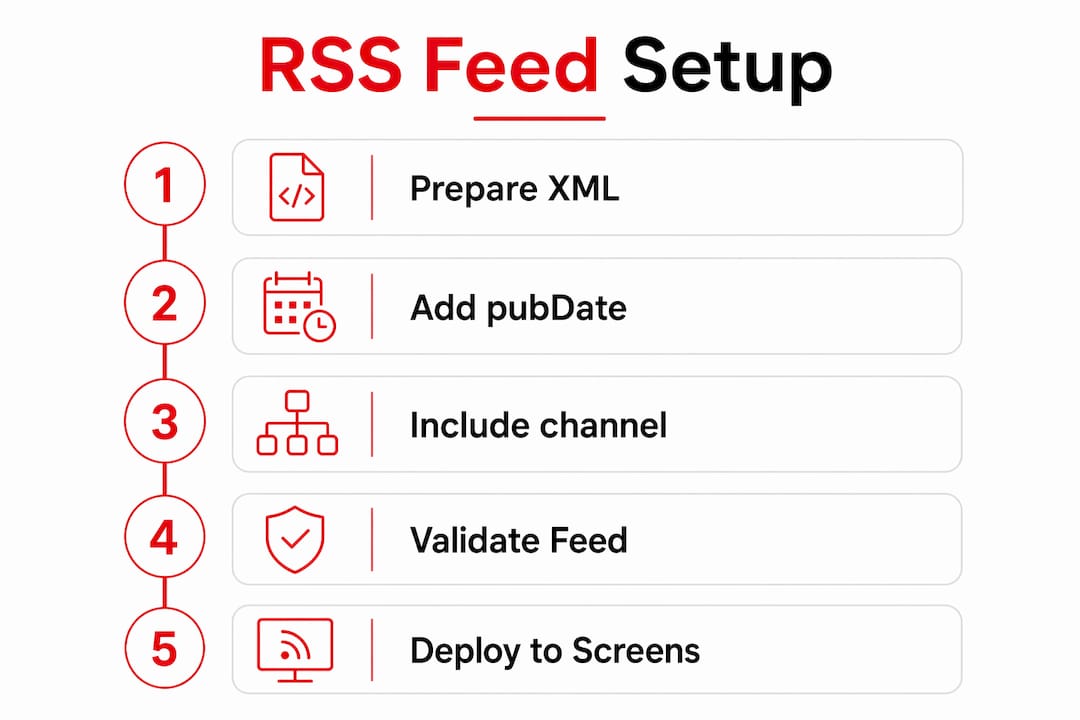
Save that as feed.xml, upload it to your server, then paste the public URL into the W3C Feed Validation Service. Green light means your signage widget can consume it immediately.
Table of Contents
- What RSS feed code actually requires
- A complete gym-focused RSS example, line by line
- How to generate a feed from your gym's existing systems
- How signage systems consume your feed
- How to validate and test before you go live
- Practical rules for gym feeds
- Quick fixes for the most common RSS problems
- Copy-paste code: Node.js, PHP, and vanilla JS renderer
- Key Takeaways
- What gym operators actually get wrong about RSS
- Kingdomsignage makes RSS-driven gym signage straightforward
- Useful sources and validators
What RSS feed code actually requires
Every valid RSS 2.0 feed follows the same skeleton. Get these wrong and signage clients either reject the feed silently or display nothing.
Channel-level tags (required):
<?xml version="1.0" encoding="UTF-8"?>— the XML declaration; UTF-8 prevents garbled characters on screens<rss version="2.0">— the root wrapper; omitting the version attribute breaks spec compliance<title>,<link>,<description>— the three mandatory channel fields
Item-level tags (minimum viable, recommended full set):
<title>and<link>— the only two truly required per spec<description>— always include it; screens need something to display<pubDate>— RFC 822 format (Mon, 16 Jun 2026 06:00:00 GMT); automation connectors use this to detect new items<guid>— a unique string per item; prevents duplicate rendering on refresh
Pro Tip: Add <atom:link rel="self" href="https://yourdomain.com/feed.xml" type="application/rss+xml"/> inside <channel>. Signage platforms use this for canonical feed discovery, and it prevents duplicate-subscription issues.
A complete gym-focused RSS example, line by line

Copy this, swap the content, and you have a production-ready feed.
<?xml version="1.0" encoding="UTF-8"?>
<rss version="2.0"
  xmlns:atom="http://www.w3.org/2005/Atom"
  xmlns:media="http://search.yahoo.com/mrss/">
  <channel>
    <title>Iron Peak Gym</title>
    <link>https://ironpeakgym.com</link>
    <description>Live class schedule and member announcements</description>
    <lastBuildDate>Mon, 16 Jun 2026 08:00:00 GMT</lastBuildDate>
    <atom:link rel="self"
      href="https://ironpeakgym.com/feed.xml"
      type="application/rss+xml"/>

    <item>
      <title>Spin Class — Tuesday 7 AM</title>
      <link>https://ironpeakgym.com/schedule/spin-tue</link>
      <description><![CDATA[<strong>Instructor:</strong> Coach Rivera. 45-minute ride. Shoes required.]]></description>
      <pubDate>Tue, 17 Jun 2026 07:00:00 GMT</pubDate>
      <guid isPermaLink="false">spin-tue-20260617</guid>
      <media:content url="https://ironpeakgym.com/img/spin.jpg"
        medium="image" width="1280" height="720"/>
    </item>

    <item>
      <title>Pool Closed Saturday for Maintenance</title>
      <link>https://ironpeakgym.com/announcements/pool-closure</link>
      <description><![CDATA[The lap pool will be closed all day Saturday, June 21. All other facilities remain open.]]></description>
      <pubDate>Mon, 16 Jun 2026 08:00:00 GMT</pubDate>
      <guid isPermaLink="false">pool-closure-20260621</guid>
    </item>

  </channel>
</rss>
What each piece does:
| Tag | Purpose |
|---|---|
xmlns:media namespace | Enables media:content for images on screens |
<lastBuildDate> | Tells signage clients whether the feed changed since last poll |
<![CDATA[...]]> | Wraps HTML safely so the XML parser ignores inner tags |
<guid isPermaLink="false"> | Unique ID that prevents re-rendering the same item |
<media:content> | Supplies a thumbnail or banner image directly to the display widget |
The enclosure tag is an alternative to media:content for images: <enclosure url="..." length="204800" type="image/jpeg"/>. Use media:content when you need width/height metadata for layout; use enclosure for simpler setups or audio files.
How to generate a feed from your gym's existing systems
Hand-coding XML is rarely the right call long-term. Here are four practical paths:
-
CMS auto-output. WordPress, Squarespace, and most booking platforms already publish a feed. Append
/feedor/rss.xmlto your site URL. Many modern CMSs generate feeds automatically with no configuration. -
Dedicated feed generators. When your scheduling software has no native RSS output, services like FetchRSS or RSS.app scrape your content and expose a clean feed URL. No code required.
-
Middleware automation. Tools like Make or IFTTT can watch a schedule database or Google Sheet and push new rows as RSS items. This is the right pattern when your source data lives outside a CMS.
-
Server-side script. A small Node.js or PHP endpoint (see Section 9) gives you full control over item structure, image URLs, and refresh timing. Worth the effort for multi-location gyms with custom scheduling software.
How signage systems consume your feed
Kingdomsignage and most signage platforms use a pull model: the platform polls your feed URL on a set interval, parses new items, and updates the playlist. You configure the URL once; the platform handles the rest.
Pro Tip: Set your signage polling interval to match your content cadence. For class schedules that change daily, a 15-minute refresh is plenty. For live announcements, drop to 5 minutes. Polling faster than your feed actually updates wastes bandwidth and can trigger rate limits.
A few rendering considerations worth knowing:
- CORS on browser-based widgets. If your signage player renders in a browser and fetches the feed client-side, the browser will block cross-origin requests. The fix is a small server-side proxy or a Cloudflare Worker that adds
Access-Control-Allow-Originheaders. - Image sizing. Supply images at the native resolution of your screens (typically 1280×720 or 1920×1080). Oversized images slow render time and cause flicker on loop transitions.
- Item ordering. Signage widgets sort by
pubDatedescending. If two items share the same timestamp, display order is undefined.
For a deeper look at managing external feeds on gym screens, the social media feeds on gym screens guide covers moderation and widget setup in detail.
How to validate and test before you go live
Skipping validation is how feeds silently break on 12 screens at once. Run through this before any deployment.
| Test | Tool / Method | Expected result |
|---|---|---|
| XML spec compliance | W3C Feed Validation Service | "This is a valid RSS feed" |
| Content-Type header | curl -I https://yourdomain.com/feed.xml | content-type: application/rss+xml |
| pubDate format | Manual review or validator | RFC 822, strictly increasing |
| GUID uniqueness | Text search in feed file | No duplicate <guid> values |
| Image URL reachability | Browser or curl | correct MIME type |
Deployment checklist:
- Validate feed URL at the W3C Feed Validation Service — fix every error before proceeding.
- Confirm
Content-Type: application/rss+xmlin the server response; serving as plain text/xml can prevent discovery. - Check
pubDatevalues are RFC 822 and strictly increasing — automation connectors skip items when timestamps are identical or out of order. - Test on one staging display for a full loop cycle before pushing to all screens.
- Set a
lastBuildDateon the channel so clients can skip parsing unchanged feeds.
The W3C validator is the de facto standard for confirming RSS 2.0 compliance and gives line-numbered errors you can fix immediately.
Practical rules for gym feeds
Keep feeds lean. Signage clients download the entire XML file on every poll, so a bloated feed slows refresh cycles.
Pro Tip: Cap your feed at 10–20 items. Older items never display on a signage loop anyway, and trimming them cuts file size and parse time.
- Update frequency. Publish class schedule items 24–48 hours ahead. Push announcements as they happen, but batch minor updates rather than triggering a new item for every small edit.
- Images. Use
media:contentorenclosurewith JPEG or WebP files under 500 KB for screen thumbnails. Always declarewidthandheightso the renderer can pre-allocate layout space. - Timezones. Always use a named timezone offset or
GMTinpubDate. Ambiguous local times cause ordering bugs when your signage server is in a different timezone than your CMS. - Security. Strip all
<script>tags and event attributes from descriptions before publishing. If your feed ingests user-submitted content, sanitize it server-side. Wrap HTML inCDATAbut never trust that a downstream client will handle malicious markup safely.
For guidance on keeping your brand assets consistent across feed-driven screens, the gym brand consistency guide is worth a read.
Quick fixes for the most common RSS problems
&in titles or descriptions — replace every raw&with&. The XML parser treats bare ampersands as the start of an entity reference and throws a parse error.- Unclosed tags — run the W3C validator; it gives the exact line number. A single missing
</item>breaks the entire feed. - Wrong Content-Type — add
AddType application/rss+xml .xmlto your.htaccess(Apache) or set the header explicitly in your server script. - pubDate not RFC 822 — use the format
Mon, 16 Jun 2026 10:00:00 GMTexactly. Connectors rely on pubDate ordering to decide whether an item is new; a malformed date means items get skipped. - Feed not updating on screens — check
lastBuildDate. If it hasn't changed, many clients skip re-parsing. Update it every time you add or modify an item. - CORS errors in browser widgets — route the fetch through a server-side proxy or Cloudflare Worker that adds
Access-Control-Allow-Origin: *.
Copy-paste code: Node.js, PHP, and vanilla JS renderer
1. Node.js Express endpoint
const express = require('express');
const app = express();

const schedule = [
  { title: 'Yoga — Wed 8 AM', link: 'https://gym.com/yoga-wed', date: 'Wed, 18 Jun 2026 08:00:00 GMT', guid: 'yoga-wed-20260618' },
  { title: 'Boxing — Thu 6 PM', link: 'https://gym.com/boxing-thu', date: 'Thu, 19 Jun 2026 18:00:00 GMT', guid: 'boxing-thu-20260619' }
];

app.get('/feed.xml', (req, res) => {
  res.setHeader('Content-Type', 'application/rss+xml; charset=UTF-8');
  const items = schedule.map(i => `
    <item>
      <title>${i.title}</title>
      <link>${i.link}</link>
      <pubDate>${i.date}</pubDate>
      <guid isPermaLink="false">${i.guid}</guid>
    </item>`).join('');
  res.send(`<?xml version="1.0" encoding="UTF-8"?>
<rss version="2.0">
  <channel>
    <title>Gym Schedule</title>
    <link>https://gym.com</link>
    <description>Live class feed</description>
    ${items}
  </channel>
</rss>`);
});

app.listen(3000);
2. PHP from a MySQL schedule table
<?php
header('Content-Type: application/rss+xml; charset=UTF-8');
$pdo = new PDO('mysql:host=localhost;dbname=gym', 'user', 'pass');
$rows = $pdo->query("SELECT title, url, start_time, id FROM classes ORDER BY start_time DESC LIMIT 20")->fetchAll();

echo '<?xml version="1.0" encoding="UTF-8"?>';
echo '<rss version="2.0"><channel>';
echo '<title>Gym Classes</title><link>https://gym.com</link><description>Schedule</description>';

foreach ($rows as $r) {
    $pubDate = date(DATE_RSS, strtotime($r['start_time']));
    echo "<item>";
    echo "<title>" . htmlspecialchars($r['title']) . "</title>";
    echo "<link>" . htmlspecialchars($r['url']) . "</link>";
    echo "<pubDate>{$pubDate}</pubDate>";
    echo "<guid isPermaLink=\"false\">class-{$r['id']}</guid>";
    echo "</item>";
}
echo '</channel></rss>';
3. Vanilla JS renderer (with proxy pattern)
async function renderFeed(proxyUrl) {
  const res = await fetch(proxyUrl); // proxy adds CORS headers
  const text = await res.text();
  const xml = new DOMParser().parseFromString(text, 'text/xml');
  const items = xml.querySelectorAll('item');
  let html = '';
  items.forEach(item => {
    const title = item.querySelector('title')?.textContent ?? '';
    const link  = item.querySelector('link')?.textContent ?? '#';
    const desc  = item.querySelector('description')?.textContent ?? '';
    html += `<div class="feed-card"><h3><a href="${link}">${title}</a></h3><p>${desc}</p></div>`;
  });
  document.getElementById('feed-container').innerHTML = html;
}
renderFeed('https://your-proxy.workers.dev/?url=https://gym.com/feed.xml');
The rss-feed-widget npm package offers a pre-built alternative if you'd rather skip the custom parser. For production signage, server-side rendering avoids CORS entirely and is the safer default.
| Approach | Best for | CORS risk |
|---|---|---|
| Node.js endpoint | Custom schedule DB | None (server-side) |
| PHP script | Shared hosting, MySQL | None (server-side) |
| Vanilla JS + proxy | Browser-based signage player | Eliminated via proxy |
| npm widget | Rapid prototyping | Depends on setup |
Pro Tip: In your PHP or Node script, always call htmlspecialchars() or equivalent on user-facing strings before writing them into XML. One unescaped < in a class title breaks the entire feed.
Key Takeaways
A valid RSS feed for gym signage needs correct XML structure, RFC 822 pubDate values, and a Content-Type: application/rss+xml header — validate with the W3C Feed Validation Service before any screen goes live.
| Point | Details |
|---|---|
| Mandatory XML structure | Include <?xml> declaration, <rss version="2.0">, and channel tags <title>, <link>, <description>. |
| pubDate format matters | Use RFC 822 exactly and keep timestamps strictly increasing so automation connectors detect new items. |
| Validate before deploying | Run the W3C Feed Validation Service on your feed URL and fix every error before pushing to screens. |
| Cap feed size | Limit feeds to 10–20 items to keep file size low and signage refresh cycles fast. |
| Kingdomsignage integration | Point a Kingdomsignage playlist widget at your validated feed URL and set a polling interval that matches your content cadence. |
What gym operators actually get wrong about RSS
RSS has a reputation as a blog technology, and that reputation causes gym operators to underestimate it. The real use case here is synchronization: one feed URL becomes the single source of truth for every screen in your facility. Get the pubDate ordering right and your automation connectors, signage widgets, and scheduling tools all stay in sync without any manual intervention.
The mistake most operators make isn't in the XML itself. It's skipping the lastBuildDate update when editing existing items, then wondering why screens show stale content for hours. Signage clients cache aggressively. If lastBuildDate hasn't changed, many clients don't re-parse at all. Update it every time you touch the feed.
Staged rollouts matter too. Test on one screen for a full loop cycle before pushing to every display. A single malformed & in a class title will break the feed silently, and you won't know until a member asks why the schedule board is blank.
Kingdomsignage makes RSS-driven gym signage straightforward
Running a validated RSS feed is only half the job. The other half is a signage platform that actually consumes it reliably, displays it cleanly, and lets you manage every screen from one place.

Kingdomsignage ingests your RSS feed URL directly into a playlist widget, lets you set a custom polling interval, and pushes updates to every TV in your facility the moment the feed changes. Class schedules, announcements, promotional offers, and images from media:content all render automatically. No manual uploads, no screen-by-screen edits. The unified dashboard also handles audio sync, workout timers, and multi-room management, so your RSS feed slots into a workflow that already controls everything else. For operators managing real-time class schedule displays, this means one validated feed drives the entire member-facing experience. Start a free trial or book a demo at kingdomsignage.com to see it running on your screens.
Useful sources and validators
- W3C Feed Validation Service — paste your feed URL for a full spec compliance check with line-numbered errors
- RSS 2.0 specification — the canonical spec for all tag definitions and required fields
- RFC 822 date format reference — authoritative source for pubDate formatting rules
- Paul Tibbetts — How to create an RSS feed — practical walkthrough covering Content-Type headers and encoding
- Feather.so — Modern guide to RSS feeds — covers pubDate formatting, CDATA usage, and hosting options
- RSS.com — How to create an RSS feed — overview of auto-generated feeds and validator usage
- DEV Community — Vanilla JS RSS widget — client-side rendering example with CORS proxy pattern
- rss-feed-widget on npm — pre-built widget package for rapid feed rendering
- Microsoft Learn — RSS connector — documents how automation connectors use pubDate for trigger logic
- GeeksforGeeks — RSS feed reader with HTML, CSS, JS — full fetch/DOMParser example for building a custom reader