
A fully installed commercial screen runs in a range of typical market prices in Year 1, once you add the display, media player, mounting, install labor, and the first year of software. After that, budget a moderate annual amount per screen for CMS, content, and upkeep. Start with one or two screens as a pilot, or request a site survey before committing to a full rollout.
TL;DR:
- Ongoing yearly expenses mostly involve recurring software fees, content updates, and electricity, which can significantly add to costs over five years.
- Commercial displays suited for 12/7 or 24/7 operation are more expensive upfront but reduce service calls and increase lifespan compared to consumer TVs.
- Installation costs depend on mounting complexity and location, with outdoor and multi-site setups incurring higher labor and structural expenses.
- Proper vendor comparison should focus on display class, warranty, software licensing fees, and support terms, avoiding vague quotes and multi-year lock-ins.
Table of Contents
- What Drives Digital Signage Pricing: Year 1 vs. Recurring
- How Much Do Digital Signage Displays Cost?
- What Do Media Players Cost, and Which One Do You Need?
- How Much Does Digital Signage Software Cost Per Month?
- What Does Digital Signage Installation Cost?
- What Ongoing Costs Do Digital Signage Budgets Miss?
- What Does a Real Digital Signage Budget Look Like?
- How Do You Compare Digital Signage Vendor Quotes Fairly?
- How Gym-Specific Signage Changes the Cost Math
- What Facility Managers Get Wrong About Signage Budgets
- Get Started With Kingdom Signage for Your Gym
- Where These Digital Signage Pricing Figures Come From
- Sources
What Drives Digital Signage Pricing: Year 1 vs. Recurring
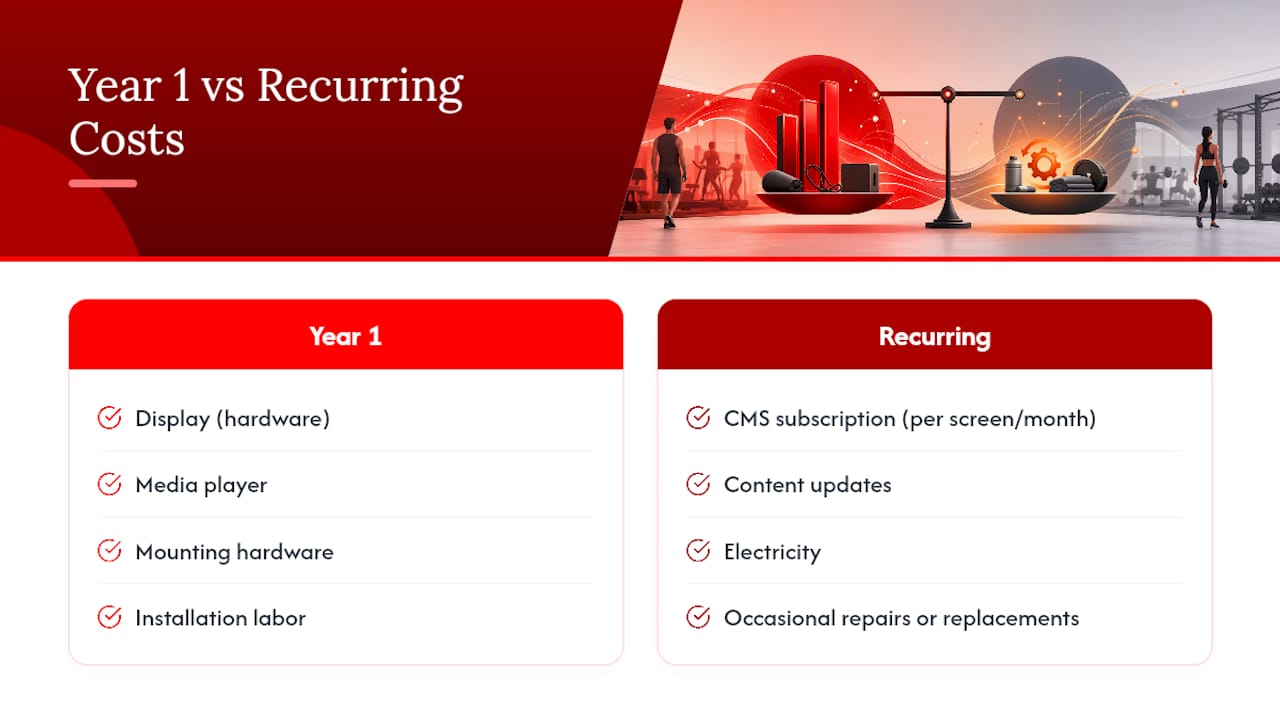
Digital signage pricing splits into two very different buckets, and confusing them is how budgets go sideways. Year 1 includes the display, the media player, mounting hardware, installation labor, and your first year of content management software (CMS). Every year after that, you're only paying for the recurring stuff: CMS subscription, content updates, electricity, and the occasional repair or replacement.
That second bucket is where most of the five-year cost actually lives. A cloud CMS charged per screen per month can add up to a substantial amount per screen over five years, while a one-time license may cost significantly less in total for the same period, according to DisplayDetails' pricing breakdown. That's the gap that determines whether your signage program is a smart long-term investment or a slow leak in your operating budget.
Consumer versus commercial hardware is the other fork in the road. Consumer TVs are cheaper up front but weren't built to run 12 to 16 hours a day, every day, for years. Commercial displays cost more initially and pay that back in warranty coverage, brightness, and fewer service calls.
How Much Do Digital Signage Displays Cost?
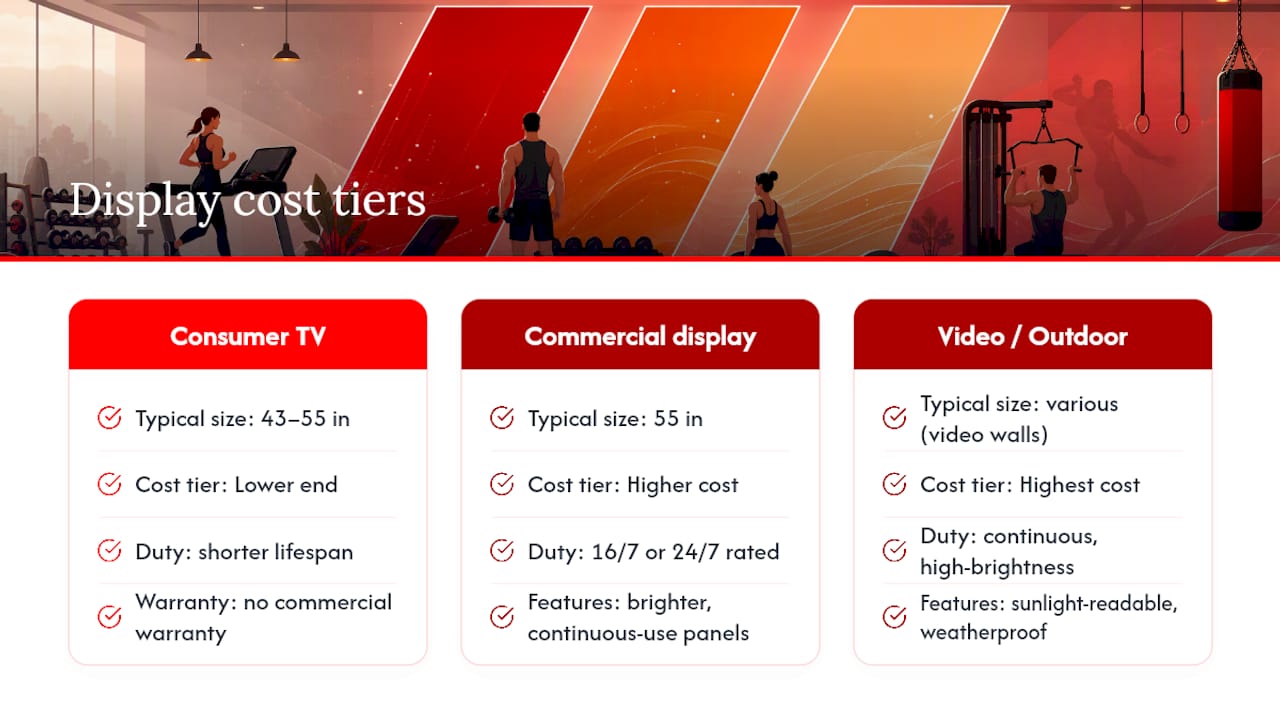
Display pricing spans a wide range depending on size, brightness, and duty rating, according to Pickcel's hardware pricing tables. A consumer 43 to 55 inch television typically costs on the lower end and works fine for low-traffic indoor spots like a back office or a break room, provided you accept a shorter lifespan and no commercial warranty.
Commercial-grade 55 inch displays rated for 16/7 or 24/7 operation generally cost more to reflect their enhanced features. You're paying for panels engineered for continuous use, brighter output, and warranty terms that actually cover a screen running all day, every day.
Video walls and outdoor or high-brightness displays are in a higher cost tier due to sunlight-readable brightness and weatherproofing requirements. Outdoor drive-thru menu boards fall into this category too, illustrating the significant role of food in hospitality where effective signage enhances the guest experience. Mounting hardware costs vary, with tilt or fixed wall mounts generally less expensive than articulating or recessed mounts.
What Do Media Players Cost, and Which One Do You Need?
Your playback device matters more than most buyers expect. Built-in smart TV operating systems and HDMI streaming sticks are lower-cost options that can work for simple, low-stakes content loops. Dedicated media players offer enhanced reliability and features for a higher cost than basic options.
A Raspberry Pi setup is suitable for technically inclined operators but may require more manual troubleshooting. If a screen is central to your operation, like a class schedule board or a front-desk promotional loop, a dedicated player earns its higher price through fewer freezes and fewer emergency truck rolls.
How Much Does Digital Signage Software Cost Per Month?
CMS pricing is where digital signage cost comparisons get confusing, because the platforms genuinely serve different needs. Freemium and entry-level tools often have low or no monthly fees per screen and can be suitable for pilots. Mid-market cloud platforms charge moderate monthly fees per screen, typically adding features like multi-zone layouts, playlist scheduling, and API integrations, according to Digital Signage Hub's cost breakdown.
Enterprise platforms tend to be on the higher end in monthly fees per screen with dedicated support and custom agreements. One-time license software is an alternative that may be less expensive over multiple years but lacks cloud conveniences. The right tier depends less on your budget and more on how many locations you need to manage from one dashboard.
What Does Digital Signage Installation Cost?
Installation costs vary widely because labor complexity differs. A simple wall mount in an accessible location typically incurs a moderate labor cost, according to DisplayDetails' installation scenario data. Recessed or ceiling mounts often involve additional labor complexity that increases costs.
Specialized installations such as video walls and outdoor setups often entail higher costs due to structural and weatherproofing requirements, plus labor variations depending on local regulations. For multi-site rollouts, installation complexity, not screen count, tends to drive the total. A single tech visiting five nearby locations in one week costs far less per site than five separate service calls scattered across a region.
What Ongoing Costs Do Digital Signage Budgets Miss?
Content creation is a frequently underestimated ongoing cost. Using template libraries can reduce this expense significantly compared to custom design work.
Network upgrades matter too. If a location needs a new access point or ethernet drop to support a screen, that's a one-time cost per site worth flagging early. Electricity costs are a minor but ongoing expense; a 55 inch screen drawing moderate power over typical hours incurs a monthly cost of a few dollars, based on U.S. Energy Information Administration rate data. Multiply that across a dozen screens and it becomes a real line on the utility bill. Be aware that many cloud CMS providers may apply annual price increases, which should be considered before committing to multi-year contracts.
What Does a Real Digital Signage Budget Look Like?
Numbers land differently depending on scale. Here's how the math shakes out across four common scenarios, combining display, player, mount, install, and first-year CMS into a Year 1 total.
- Single-screen pilot: Consumer 50" TV ($450) + HDMI stick ($60) + basic mount ($80) + self-install ($0) + entry CMS ($96/year) totals roughly $686 in Year 1. Some operators skip the commercial display entirely for a pilot, and Digital Signage Hub notes this DIY path can land under $500 all-in, though it sacrifices warranty coverage and won't scale cleanly.
- Small rollout, 3 to 5 screens: Commercial 55" displays (
$1,000 each) + dedicated media players ($250 each) + professional mounts and install ($350 each) + mid-tier CMS ($20/screen/month) puts Year 1 per screen around $1,800 to $2,200, consistent with CrownTV's integrator data on fully installed commercial screens. - Multi-site rollout, 25 locations: Batching hardware purchases and installation visits typically brings per-screen Year 1 cost down toward $1,500 to $2,800, since travel and mobilization get spread across more screens per visit.
- Enterprise deployment with video walls: A single video wall installation, including panels, structural mounting, and processing hardware, can run into the tens of thousands per wall, with recurring enterprise CMS costs of $30 to $100+ per screen monthly.
Across all scenarios, Year 2 and beyond typically involves moderate annual per-screen budgets for mid-tier commercial deployments, according to CrownTV's recurring cost figures. Volume discounts on hardware kick in noticeably past the 10 to 15 screen mark, and that's usually when it makes sense to negotiate a master service agreement instead of buying piecemeal.
How Do You Compare Digital Signage Vendor Quotes Fairly?
Two quotes for "the same" digital signage project can differ by thousands of dollars, and the gap almost always hides in what's excluded, not what's included. Build your comparison around this checklist:
- Confirm display class, brightness rating, and duty cycle (16/7 versus 24/7) for every screen in the quote.
- Ask what warranty length is included and whether it covers parts, labor, or both.
- Request the CMS's per-screen monthly rate, contract length, and any price escalation clause in writing.
- Clarify what support SLA applies: response time, remote diagnostics, and on-site visit terms.
- Ask who owns content creation, how many revisions are included, and what a template swap costs later.
Pro Tip: Ask every vendor to quote Year 1 and Year 2 totals separately. A supplier with a low sticker price but an aggressive CMS escalator often costs more by year three than a pricier competitor with flat recurring fees.
Red flags worth walking away from: vague "starting at" pricing with no per-screen breakdown, multi-year lock-in with no early-exit terms, and any quote that won't separate hardware cost from software subscription cost.
How Gym-Specific Signage Changes the Cost Math
Gyms and fitness studios have a cost problem most generic pricing guides never mention: they're often running separate systems for TV content, class schedules, and room audio, which means separate licenses, separate logins, and separate support headaches. Every duplicate tool is a duplicate monthly fee and another vendor to troubleshoot when something breaks mid-class.
Unified control over signage and audio removes that overlap. Instead of paying for a TV content platform, a class-scheduling app, and a separate audio zone controller, one dashboard handles all three, which cuts the recurring software line down to a single line. It also reduces the support burden on facility staff, since one interface for class transitions, promotional content, and music sync means fewer places for something to go wrong on a busy Monday evening.
What Facility Managers Get Wrong About Signage Budgets
Most facility managers overbuy hardware and underbudget content. The screens rarely fail first, stale playlists do. Scope for one strong content owner before you scope for a fifth screen, and pilot two locations before signing a multi-site contract. Buy commercial-grade reliability where uptime actually matters; save money on the screens that don't.
— Kingdom
Get Started With Kingdom Signage for Your Gym
Kingdom Signage is built for exactly the overlap problem gyms run into: separate systems for TVs, class schedules, and room-by-room audio that all need managing at once. Instead of stitching together a content platform, a scheduling tool, and an audio controller, you get one dashboard that syncs visuals and music across every room, handles class transitions automatically, and pushes promotional content without a second device or a second login.

That consolidation is where the real budget win sits for a fitness operator. You're not paying for three subscriptions and training staff on three interfaces. If you're planning a signage rollout across one location or twenty, a multi-location playbook can help you scope the project before you request quotes. Start a demo or trial on the KingdomSignage landing page and see what a unified dashboard would look like at your own gym.
Where These Digital Signage Pricing Figures Come From
- DisplayDetails' 2026 pricing guide: Year 1 scenario bands and installation cost tables.
- CrownTV's cost breakdown: integrator-verified per-screen Year 1 and recurring figures.
- Digital Signage Hub: CMS pricing tiers and DIY pilot cost examples.
- Pickcel's hardware tables: display price ranges by class and size.
- EIA electricity data: basis for per-screen electricity cost estimates.
Sources
- Digital Signage Cost 2026: Hardware, CMS & Install Guide – DisplayDetails
- Digital signage cost — CrownTV
- Digital Signage Pricing: Full Cost Breakdown (2026) - Digital Signage Hub
- Digital Signage Cost: The Complete 2026 Breakdown - Pickcel
- U.S. Energy Information Administration — Electricity data