
The eight features every gym operator needs from a digital signage and audio platform are: automated multi-screen scheduling with dayparting, multi-room audio/video sync, remote cloud management, booking-system integration (Mindbody, ABC Fitness, or equivalent), drag-and-drop content templates, engagement analytics, offline playback with auto-reboot, and commercial-grade hardware with one media player per display. Well-executed in-location signage produces a realistic 1–5% lift on total revenue, with targeted upsell categories like personal training seeing 15–25% gains. Booking-system integrations push instructor swaps and cancellations to screens quickly, typically within a minute, eliminating manual updates entirely. Kingdomsignage unifies all of these capabilities in a single dashboard built specifically for gym environments.
Table of Contents
- What are the cost-effective signage features must-haves for gyms?
- What hardware do gyms actually need to keep costs down?
- What content actually drives PT upsells and class fill?
- How much does gym digital signage cost, and when does it pay off?
- Key Takeaways
- What gym operators often get wrong about signage rollouts
- Kingdomsignage offers a low-risk pilot for gym operators
What are the cost-effective signage features must-haves for gyms?
Each feature below maps to a concrete gym outcome. Skip one and you leave money or retention on the table.
- Booking-system integration. Live capacity displays tied to Mindbody or ABC Fitness increase walk-in class fill because members see open spots in real time. Instructor swaps propagate in under a minute.
- Offline playback and auto-reboot. Gym Wi-Fi is frequently congested, and connectivity issues cause most signage failures. A purpose-built player with local caching keeps content running regardless of network status.
Pro Tip: Connect your booking system before you launch a single screen. Live class capacity is the highest-engagement content a gym can display, and it requires zero ongoing creative work once the integration is live.
What hardware do gyms actually need to keep costs down?
Hardware dominates year-one spend, so getting these choices right matters more than picking the cheapest CMS.
Zone sizing. Lobby and front-desk areas work well with 43"–55" displays at eye level. Cardio floors and weight areas benefit from 65"–86" screens mounted high enough to read from a distance. Studio doors call for portrait-orientation displays (32"–43") showing the live class schedule.
Commercial vs. consumer panels. Consumer TVs are fine for zones running under 12 hours a day in normal temperature and humidity. Locker rooms, humid stretching areas, and any 24-hour facility need commercial-grade panels rated for 16+ hours of continuous operation. The price gap is real, but so is the failure rate when you put a consumer TV in a locker room for two years.
Media players. The most common low-cost approach pairs a consumer 43"–55" TV with a purpose-built signage stick around $99. For floor and studio displays running all day, a higher-reliability Android or commercial media player reduces on-site service calls. One player per display is the rule — shared players create single points of failure that take down multiple screens at once.
Wiring and mounting. Use tamper-resistant mounts in high-traffic zones. Run power and data through conduit where possible; exposed cables in a gym get damaged fast.
| Setup | Display cost | Media player | Estimated hardware total |
|---|---|---|---|
| 1-screen lobby pilot | $600–$1,200 | $99 | $600–$1,200 |
| 6-screen full gym | — | $600–$1,200 | — |
What content actually drives PT upsells and class fill?
The highest-converting content is also the simplest to produce. A multizone placement strategy — matching content type to zone and time of day — consistently outperforms a single playlist running everywhere.
High-leverage content types:
- Live class capacity with a "2 spots left" indicator at studio doors
- PT intro offers with a clear price and a QR code at the lobby desk
- Timed limited offers (juice bar, retail) in locker rooms and near point-of-sale
- Member spotlights and transformation stories on the cardio floor
- Workout form tips and exercise demos between the weight racks
- Leaderboards and challenge trackers for retention and community
Sample daypart schedule:
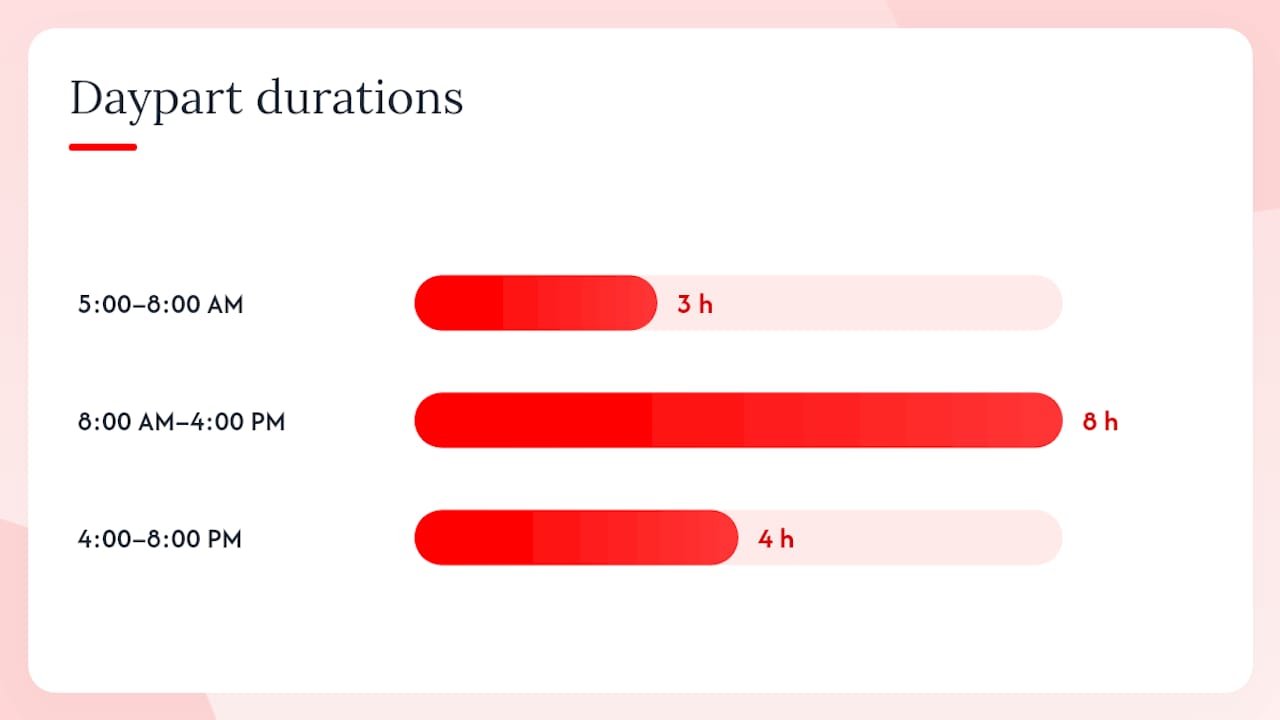
- 5:00–8:00 AM (morning rush): Motivational content, live class schedule, early-bird PT offer.
- 8:00 AM–4:00 PM (midday steady-state): Workout tips, retail promos, class schedule for afternoon sessions.
- 4:00–8:00 PM (evening peak): PT upsell offers, class fill alerts, member spotlights, limited-time evening offers.
Avoid long-form video in high-glance zones like the cardio floor — members glance for 2–3 seconds. Short loops of 8–12 seconds per frame with a single CTA outperform elaborate productions every time. Pair your visual promos with a matching music mood through your audio integration and conversions climb further, because the sensory environment reinforces the message.
How much does gym digital signage cost, and when does it pay off?
Hardware dominates first-year spend; software costs become the more important variable as screen count grows. A flat-rate SaaS subscription is almost always the right call if you plan to scale past 6–8 screens or manage multiple locations.
| Cost item | 1-screen pilot | 6-screen gym |
|---|---|---|
| Hardware (one-time) | $600–$1,200 | — |
PT upsells and class-fill improvements generate most of the early ROI. A gym running a targeted PT intro offer on lobby screens can see a significant lift on PT trial bookings within the first two months. A realistic total revenue lift from well-executed signage is 1–5%, while targeted upsells such as PT offers can see gains in the 15–25% range once content is optimized across zones. Many single-location gyms recover hardware costs within a few months when PT and class-fill content is prioritized from day one.
Budget checklist for sizing your pilot:
- One commercial or consumer display per target zone
- One media player per display (no sharing)
- Flat-rate CMS subscription (monthly, cancel-friendly for pilots)
- Booking-system integration enabled from day one
- Optional: professional mount and install labor ($75–$150 per screen)
Key Takeaways
Gym operators who start with booking-system integration, automated dayparting, and one media player per display recover hardware costs fastest and build a scalable foundation for multi-location rollout.
| Point | Details |
|---|---|
| Start with two zones | Lobby and studio entry cover PT upsells and class fill — the fastest ROI channels. |
| One player per display | Shared players create multi-screen failures; budget one dedicated player per screen from the start. |
| Choose flat-rate SaaS | Flat-rate pricing beats per-screen models once you pass 6–8 screens or manage multiple locations. |
| Connect your booking system first | Live class capacity is the highest-engagement content and requires zero ongoing creative work once integrated. |
| Kingdomsignage for unified control | Kingdomsignage combines signage, audio, booking sync, and multi-location management in one gym-focused dashboard. |
What gym operators often get wrong about signage rollouts
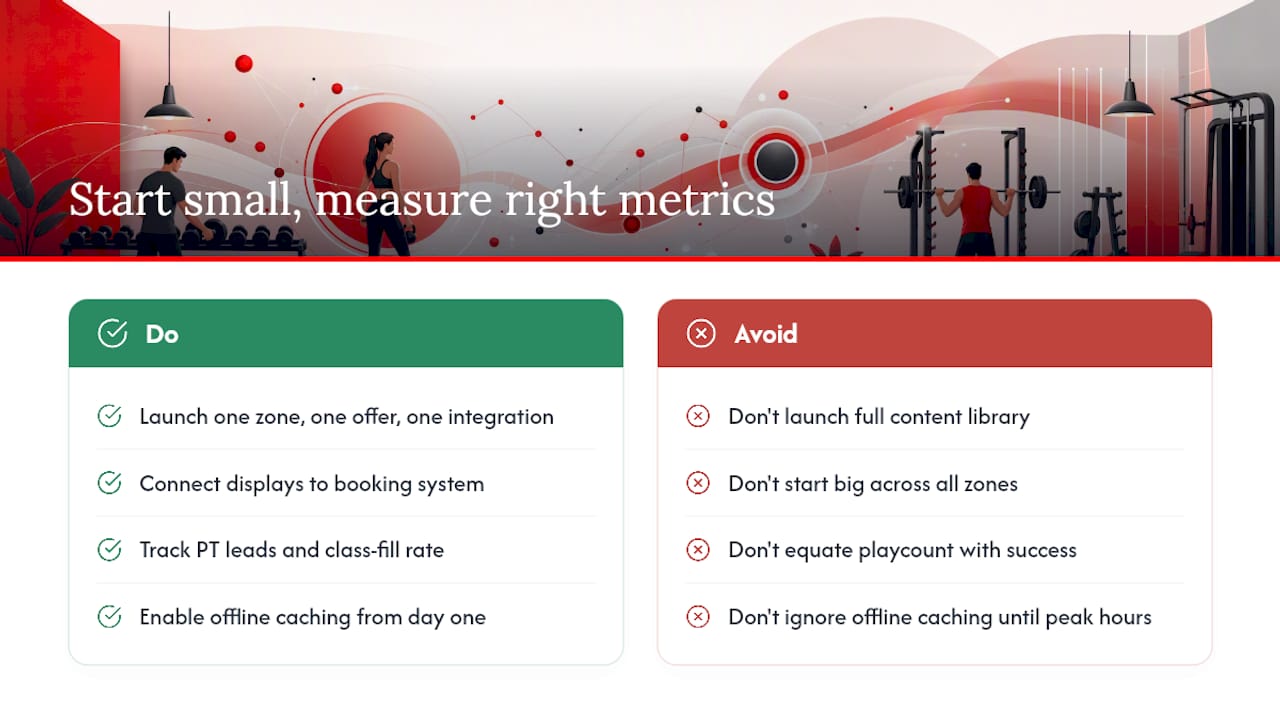
The conventional wisdom says start big, cover every zone, and build a full content library before launch. Every gym that follows that advice delays ROI by months and burns out the manager responsible for keeping content fresh.
The smarter path is the opposite: one zone, one offer, one integration. A live class schedule at the studio door and a PT intro offer in the lobby, both connected to your booking system, will tell you more about what your members respond to than six months of planning ever could. Move beyond impression counts quickly. Playcount data is easy to collect and easy to misread as success. The number that matters is PT leads per week and class-fill rate in promoted slots. If those aren't moving after 60 days, the problem is almost always content placement or offer clarity, not the technology.
The other mistake worth naming: ignoring offline caching until a screen goes blank during peak hours. Set it up on day one. A blank screen in a busy gym is worse than no screen at all.
Kingdomsignage offers a low-risk pilot for gym operators
Gym operators who want unified signage and audio without stitching together three separate tools have a direct path: Kingdomsignage. The platform ships with pre-built fitness templates, native booking-system integrations, and multi-room audio sync already configured for gym environments. Onboarding is remote, setup takes under an hour for most single-location pilots, and flat-rate pricing means your monthly cost stays predictable whether you manage one studio or forty.

The pilot structure is straightforward: pick your two highest-traffic zones, connect your booking system, activate dayparting, and measure PT leads and class fill over 30 days. Kingdomsignage's team provides template setup and manager training as part of onboarding, so your staff isn't learning a new tool on their own. Book a demo or start your pilot at Kingdomsignage and see what unified gym signage and audio management looks like in your facility.