
The bandwidth requirement for any AV system equals the sum of all simultaneous stream bitrates, plus protocol overhead, plus a headroom reserve. Per AVIXA's guidance on AVoIP bandwidth planning, the critical discipline is designing for peak and burst usage, not averages. Averages don't crash networks. Peaks do.
Quick reference numbers for planning:
- ~87 kbps audio: ~87 kbps per call with overhead (64 kbps payload + ~23 kbps header overhead at 20 ms ptime)
- ~31 kbps audio: ~31 kbps per call with overhead (8 kbps payload)
- Opus audio: 6 kbps to 510 kbps depending on configuration; plan 32–64 kbps for voice, 128–256 kbps for HD music
- 720p30 compressed (H.264): 1.5–4 Mbps
- 1080p30 compressed (H.264/HEVC): 4–8 Mbps
- 1080p60 compressed: 6–12 Mbps
- 4K30 compressed: 15–25 Mbps
- 4K60 compressed: 25–50 Mbps
- Uncompressed 4K (SDVoE/ST 2110): 6–12 Gbps
- Headroom rule: 20–30% for standard AVoIP; 25–40% for motion-heavy signage or interactive class streams
Peaks, not averages, drive AV network failures. A stream that averages 6 Mbps can spike to 12 Mbps during a fast-cut or motion-heavy sequence. Size your uplinks for the spike.
Key Takeaways
| Point | Details |
|---|---|
| Use the peak, not the average | Size uplinks for burst bitrates; a 1080p30 stream averaging 6 Mbps can spike to 12 Mbps during motion-heavy content. |
| Apply 20–30% headroom | Reserve 25–40% for motion-heavy signage or interactive class streams; never plan uplinks above 70% sustained utilization. |
| Uplinks are the bottleneck | Move to 10GbE uplinks when concurrent stream demand exceeds 700 Mbps; validate backplane capacity, not just port speed. |
| Configure multicast correctly | IGMP snooping plus one querier per AV VLAN is required; missing either causes network-wide flooding and CPU spikes. |
| Test before go-live | Use iPerf, Wireshark, and SNMP counters to validate real-world bandwidth under peak load before deployment sign-off. |
Table of Contents
- What are the bandwidth requirements for AV systems, step by step?
- How do audio codec choices affect your bandwidth budget?
- What bitrates should you plan for video codecs and resolutions?
- How do you size uplinks and switch capacity for AVoIP?
- Why does multicast configuration determine whether AVoIP actually works?
- How do you test and verify AV network bandwidth before going live?
- Worked examples: single room, multi-room office, and 20-room gym
- How a 20-room gym maps AV bandwidth to real hardware choices
- What integrators consistently get wrong about AV bandwidth planning
- Sources
What are the bandwidth requirements for AV systems, step by step?
The calculation has four steps. Work through them in order and you won't miss anything.
Step 1: Enumerate every simultaneous stream. List every camera, display feed, audio channel, and signaling stream that can be active at the same time. Don't count total devices; count concurrent active transmitters.
Step 2: Sum the stream bitrates. Add the maximum bitrate for each stream type. Use codec vendor specs or measured values, not marketing minimums.
Step 3: Add protocol overhead. Every RTP packet carries a 20-byte IP header, an 8-byte UDP header, and a 12-byte RTP header, totaling 40 bytes per packet. At a 20 ms packetization interval (ptime), a codec generates 50 packets per second (PPS). For a ~87 kbps call at 64 kbps payload, each packet carries 160 bytes of audio. Per SIPSymposium's VoIP math, the practical planning recommendation is to add 20–30% headroom on top of the raw codec rate and never plan at 100% utilization.
Step 4: Apply headroom. Multiply the overhead-adjusted total by 1.25 to 1.40 for motion-heavy or bursty content.
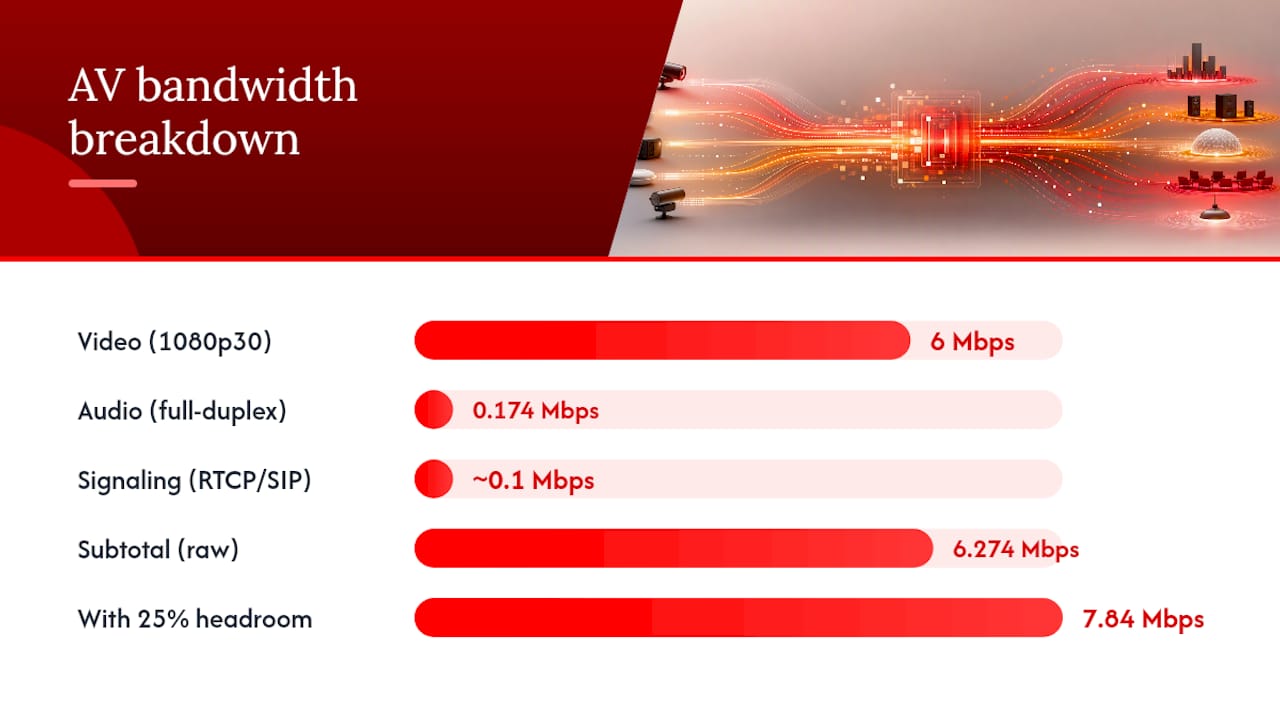
Worked numeric example — 1080p30 conferencing room:
- 1 × 1080p30 H.264 video stream: 6 Mbps
- 1 × ~87 kbps audio (full duplex, so ×2): 0.174 Mbps
- RTCP and SIP signaling allowance: ~0.1 Mbps
- Subtotal: 6.274 Mbps
- Add 25% headroom: 7.84 Mbps
For a full-duplex video call, multiply the video stream by 2 (one inbound, one outbound). A 10-party conference call multiplies audio streams by the number of simultaneous talkers your system mixes. The math scales linearly once you have the per-stream number locked.
How do audio codec choices affect your bandwidth budget?
Audio is easy to underestimate because individual streams look small. Multiply by 50 concurrent calls and the picture changes.
| Codec | Payload bitrate | With IP/UDP/RTP overhead (20 ms ptime) | Notes |
|---|---|---|---|
| ~87 kbps | 64 kbps | ~87 kbps | Uncompressed PCM; highest quality, highest bandwidth |
| ~31 kbps | 8 kbps | ~31 kbps | Compressed; common in legacy VoIP |
| Opus (voice) | 6–32 kbps | 32–64 kbps | Variable; adapts to network conditions |
| Opus (HD music) | 128–256 kbps | 128–256 kbps | Opus supports up to ~510 kbps for high-fidelity audio |
Packetization interval matters more than most planners expect. Doubling ptime from 20 ms to 40 ms halves PPS, which cuts header overhead contribution roughly in half. For 50 concurrent ~87 kbps calls, switching from 20 ms to 40 ms ptime saves roughly 575 kbps in header overhead alone. That's not transformative at small scale, but at 500 concurrent calls it's meaningful.
Don't plan around VAD savings for small call volumes. The savings are real only when you have enough concurrent calls that statistical multiplexing smooths the variance. For fewer than 20 concurrent calls, plan for full payload bandwidth on every channel.
Pro Tip: Compressed RTP (cRTP) reduces the 40-byte IP/UDP/RTP header to 2–4 bytes per packet. It's most effective on low-bitrate codecs where header overhead is a large fraction of total packet size. Don't bother on LAN segments with 1GbE or higher capacity; the gain is negligible compared to the added configuration complexity.
What bitrates should you plan for video codecs and resolutions?
Video is where bandwidth planning gets expensive fast. The gap between compressed and uncompressed is not incremental; it's orders of magnitude.
| Resolution / Frame rate | H.264 | Compressed HEVC | Uncompressed (SDVoE/ST 2110) |
|---|---|---|---|
| 720p30 | 1.5–4 Mbps | 1.5–4 Mbps | ~1.5 Gbps |
| 1080p30 | 4–8 Mbps | 2–5 Mbps | ~3 Gbps |
| 1080p60 | 6–12 Mbps | 4–8 Mbps | ~6 Gbps |
| 4K30 | 15–25 Mbps | 8–15 Mbps | ~6–12 Gbps |
| 4K60 | 25–50 Mbps | 15–30 Mbps | ~12–24 Gbps |
Uncompressed formats like SDVoE and SMPTE ST 2110 require 10GbE as a minimum, and 4K60 uncompressed pushes toward 25GbE territory. A single 4K60 compressed stream can approach 850 Mbps peak on some implementations, per TiGHT AV's network requirements documentation, which means a 1GbE port can be saturated by a single stream during a burst.
Chroma subsampling and bit depth push numbers higher than the resolution alone suggests. Motion-heavy content, fast cuts, and high-contrast scenes all drive encoders toward their peak bitrate ceiling. Plan for the ceiling, not the average.
Use this to validate that your network infrastructure can handle the absolute worst case before committing to an uncompressed workflow.
On codec trade-offs: H.264 offers broad hardware support and low decoder complexity, which keeps latency manageable. HEVC cuts bitrate roughly in half at equivalent quality but demands more processing. For interactive class streams where latency matters, H.264 at a slightly higher bitrate is often the better call than HEVC with its added encode delay.
How do you size uplinks and switch capacity for AVoIP?
Uplinks are where most AVoIP designs break. Per-port bandwidth looks fine; the uplink is quietly overloaded.
The calculation is directional. For each uplink, identify every endpoint that can transmit across it simultaneously, sum their maximum bitrates, and compare that sum to the uplink's rated capacity in one direction.
- List all transmitters that share the uplink. In a gym with 10 rooms, each running a 1080p30 class stream at 6 Mbps, the access switch uplink must carry all 10 streams if they're all active simultaneously.
- Sum worst-case transmit bandwidth. 10 × 6 Mbps = 60 Mbps transmit. Add 25% headroom: 75 Mbps. A 1GbE uplink handles this comfortably.
- Check the receive direction separately. If each room also receives a 1080p30 signage feed, add another 60 Mbps inbound. Total bidirectional demand: 120 Mbps plus headroom.
- Validate backplane capacity. A switch with a 1GbE uplink but a 5 Gbps backplane can handle 10 × 1GbE access ports at full speed. A switch with a 1.6 Gbps backplane cannot.
When concurrent stream counts push uplink demand above 700–800 Mbps on a 1GbE uplink, move to 10GbE. The oversubscription ratio matters: a 24-port 1GbE access switch with a single 1GbE uplink has a theoretical 24:1 oversubscription ratio. For AV traffic, keep oversubscription at 4:1 or lower.
Biamp's TesiraLUX documentation notes that AVB reserves up to 75% of a link for AV traffic by default. On a 1GbE uplink, that leaves ~0.75 Gbps for AVB streams and the remaining 0.25 Gbps for control, management, and non-AV data. Factor this into your uplink budget before you assume the full 1 Gbps is available for media.
For multi-switch designs, validate every inter-switch link the same way. A core switch aggregating four access switches, each carrying 500 Mbps of AV traffic, needs a 2 Gbps uplink minimum before headroom. In practice, that means 10GbE uplinks on the core.
Why does multicast configuration determine whether AVoIP actually works?
Multicast is the efficiency mechanism that makes large-scale AVoIP practical. One transmitter sends one stream; every subscribed receiver gets it without the source sending duplicate unicast copies. The catch: multicast only behaves this way when switches are configured correctly.
Without IGMP snooping, a switch treats multicast like broadcast and floods every multicast packet to every port on the VLAN. A 10-stream 1080p30 deployment becomes a 10-stream flood to every device on the network, regardless of whether those devices need the stream. Switch CPU spikes, access ports saturate, and the system looks like it has a bandwidth problem when it actually has a configuration problem. AVIXA's AV over IP guide is direct on this: IGMP snooping and an IGMP querier are non-negotiable for multicast AVoIP.
IGMP snooping alone isn't enough. The switch also needs an IGMP querier to send periodic membership queries so receivers can maintain their group subscriptions. Without a querier, group memberships time out and streams drop. Place exactly one querier per multicast VLAN, typically on the Layer 3 switch or router. Multiple queriers on the same VLAN create election instability and unpredictable behavior.
Media VLANs and DSCP markings work together. Separate AV traffic onto its own VLAN to prevent general data traffic from competing for the same buffer space. Then mark media packets with appropriate DSCP values: Expedited Forwarding (EF, DSCP 46) for interactive video and voice, Assured Forwarding (AF41, DSCP 34) for streaming video. TechTarget's guidance on video conferencing bandwidth reinforces treating bandwidth as a dynamic resource and using DSCP-based QoS to protect media from firmware updates and bulk data transfers that can burst without warning.
Disable Energy Efficient Ethernet on all AV-facing ports.
Pro Tip: Place the IGMP querier on your Layer 3 core switch, not on an access switch. If the access switch reboots or loses power, the querier disappears and every multicast subscription on that VLAN times out within 125 seconds. A core-placed querier survives access-layer failures.
How do you test and verify AV network bandwidth before going live?
Calculated bandwidth is a prediction. Measured bandwidth is the truth. Run both before a deployment goes live.
Pre-deployment checklist:
- Baseline switch port counters (input/output octets, error rates) before any AV traffic is introduced
- Confirm uplink capacity and backplane specs against vendor datasheets, not just port labels
- Validate IGMP snooping is enabled on all AV VLANs and confirm querier IP in switch multicast tables
- Verify DSCP markings are being applied and honored at each switch hop using a packet capture
- Confirm EEE is disabled on all AV-facing ports
Tools and how to use them:
- iPerf: Run bidirectional throughput tests between AV endpoints to confirm the physical path supports the calculated bandwidth. Use UDP mode with the target stream bitrate to simulate real traffic patterns and measure jitter and packet loss simultaneously.
- Wireshark: Capture live AV traffic to verify DSCP markings, RTP sequence numbers (gaps indicate loss), and actual packet sizes. Filter on the multicast group address to confirm only subscribed ports receive the stream.
- SNMP counters / switch CLI: Poll interface counters during peak load to catch utilization spikes that iPerf's synthetic traffic might not reproduce. Look at output queue drops, not just utilization percentage.
- Switch multicast tables: Confirm that IGMP group memberships match the expected receiver list. An unexpected port in the membership table means a misconfigured endpoint is receiving traffic it shouldn't.
Microsoft Teams network preparation guidance provides per-session bandwidth figures useful as conferencing baselines during verification testing.
For ongoing monitoring, deploy NetFlow or sFlow on core and distribution switches to capture traffic patterns during actual peak usage. The first two weeks of a new deployment almost always reveal traffic patterns the pre-deployment model missed.
Worked examples: single room, multi-room office, and 20-room gym
These three scenarios translate the formulas into hardware decisions.
Scenario 1: Single conference room One 1080p30 H.264 video call (full duplex) + ~87 kbps audio (full duplex) + signaling.
- Video: 2 × 6 Mbps = 12 Mbps
- Audio: 2 × 0.087 Mbps = 0.174 Mbps
- Signaling: 0.1 Mbps
- Subtotal: 12.274 Mbps
- Add 25% headroom: 15.3 Mbps
A standard 1GbE access port handles this with room to spare. No special uplink needed.
Scenario 2: 10-room office with mixed conferencing and signage 10 rooms, each with 1080p30 conferencing (full duplex) and one 1080p30 signage feed.
- Per room: 15.3 Mbps conferencing + 6 Mbps signage = 21.3 Mbps
- 10 rooms: 213 Mbps
- Add 25% headroom: 266 Mbps
1GbE uplinks are sufficient; validate backplane supports non-blocking throughput for all 10 ports simultaneously.
Scenario 3: 20-room gym with class streams, signage, and background music 20 rooms, each running a 1080p30 class stream (transmit only from room cameras), one 1080p30 signage feed inbound, and one Opus HD music stream at 192 kbps.
- Per room transmit: 6 Mbps (class stream) + 0.192 Mbps (music) = 6.192 Mbps
- Per room receive: 6 Mbps (signage) + 0.192 Mbps (music) = 6.192 Mbps
- 20 rooms transmit: 123.84 Mbps; receive: 123.84 Mbps
- Add 30% headroom (motion-heavy): transmit 161 Mbps, receive 161 Mbps
A 1GbE uplink from the access switch to the core handles this comfortably. If the gym adds 4K signage feeds at 25 Mbps each, the receive side jumps to 20 × 25 Mbps = 500 Mbps plus headroom, pushing toward 650 Mbps. At that point, a 10GbE uplink is the right call.
Decision rules: Move to 10GbE uplinks when concurrent stream demand exceeds 700 Mbps on any single uplink, or when a single stream's peak bitrate (uncompressed 4K, for example) approaches 1 Gbps.
How a 20-room gym maps AV bandwidth to real hardware choices
A 20-room fitness facility running Kingdomsignage for unified signage and audio control is a useful planning reference because it combines three distinct traffic types simultaneously.
Deployment assumptions:
- 20 rooms, each with one 1080p30 class stream camera (transmit) and one 1080p30 signage display (receive)
- Background music via Opus at 192 kbps per room (bidirectional for sync)
- Central management and announcement traffic: ~10 Mbps aggregate
Sample calculation:
- Transmit (class streams + music): 20 × (6 + 0.192) Mbps = 123.84 Mbps
- Receive (signage + music): 20 × (6 + 0.192) Mbps = 123.84 Mbps
- Management/control: 10 Mbps
- Total before headroom: 257.68 Mbps
- Add 30% headroom: 335 Mbps
A pair of 1GbE uplinks (active/active or active/standby) from the access layer to the core handles this with margin. If the operator adds 4K signage, recalculate the receive side at 25 Mbps per room and move to 10GbE uplinks.
Checklist for gym operators:
- Dedicate a separate VLAN for all AV traffic (signage, class streams, music)
- Enable IGMP snooping on the AV VLAN; place the IGMP querier on the core switch
- Mark class stream video with DSCP EF (46); signage video with DSCP AF41 (34)
- Reserve 25–30% headroom on every uplink; never plan above 70% sustained utilization
- Disable EEE on all AV-facing switch ports
- Validate audio sync by monitoring RTP timestamps in Wireshark during a live class session
- For concurrent audio stream management in multi-room gym environments, confirm the access switch backplane supports non-blocking throughput for all active ports
Kingdomsignage's dashboard gives operators real-time visibility into which rooms are streaming, which displays are active, and where audio sync issues appear, reducing the diagnostic time that would otherwise require a network engineer on-site. For deployment-specific guidance, the gym AV infrastructure design resource covers VLAN and uplink topology in detail.
What integrators consistently get wrong about AV bandwidth planning
The five mistakes that show up repeatedly in failed AVoIP deployments:
- Planning for average bitrates instead of peaks. A stream that averages 6 Mbps can spike to 12 Mbps during a fast cut. Networks sized for averages fail during the moments that matter most.
- Ignoring uplink capacity. Per-port bandwidth looks fine; the uplink is the bottleneck nobody checked. Model directional uplink sums, not just per-port occupancy.
- Skipping multicast configuration. IGMP snooping disabled means multicast floods. The network appears to have a bandwidth problem when it has a configuration problem.
- Not testing under realistic load. iPerf with synthetic traffic at 50% of peak doesn't reveal what happens when all 20 rooms go live simultaneously during a Monday morning rush.
- Over-speccing endpoints while under-speccing uplinks. Spending budget on high-end encoders connected to a 1GbE uplink that's already at 80% utilization is a common and expensive mistake.
On trade-offs: when budget forces a choice between more endpoint bandwidth and better uplink capacity, prioritize the uplink every time. QoS configuration costs nothing beyond engineering time and protects existing bandwidth more effectively than adding raw capacity at the edge.
Sources
These resources let you validate the numbers in this guide and drill into vendor-specific details:
- AVIXA — Planning video bandwidth for AV over IP
- TechTarget — Business video conferencing setup: Calculating bandwidth requirements
- Microsoft — Prepare your network for Microsoft Teams
- Biamp — Video network design (TesiraLUX)